

Tool DiscoveryTool Discovery

Best AI Tools for Computer Science Students 2026: Complete Guide

Computer science students face four major time drains: (1) debugging code errors (averaging 2-3 hours per programming assignment), (2) understanding complex algorithms without visualization (binary trees, graph algorithms, dynamic programming), (3) preparing for technical interviews at FAANG companies (LeetCode, HackerRank, system design), and (4) writing technical documentation and research papers. AI tools now handle these tasks: GitHub Copilot (autocompletes 40% of code, free for students via GitHub Education Pack), VisuAlgo from National University of Singapore (visualizes 26+ algorithms step-by-step, 2M+ students globally), ChatGPT-4o (explains error messages, generates test cases, refactors code), Replit AI (runs code in browser with AI debugging), Wolfram Alpha (solves discrete math, calculus, linear algebra proofs), and Grammarly (checks technical report grammar in LaTeX, Markdown). This guide compares 12 AI tools CS students actually use across coding (autocomplete, debugging, code review), algorithm learning (visualization, complexity analysis), interview prep (LeetCode hints, mock interviews, system design), mathematics (proof verification, equation solving), and academic writing (LaTeX checking, citation management, plagiarism detection). Tools ranked by student adoption (CS1020, CS2040, CS3230 courses), free tier limits, FAANG interview relevance, and academic integrity compliance.

Updated: 2025-12-1818 min read
Computer science student workspace showing AI tools - GitHub Copilot code autocomplete, ChatGPT algorithm explanations, VisuAlgo visualizations, Stack Overflow debugging, and Jupyter Notebook with programming books and coffee

Quick Comparison

Select Tools to Compare (Max 5):

VisuAlgo logo

VisuAlgo

4.9
Pricing:Free
Category:Algorithm Visualization
Best For:Understanding HOW algorithms work
Academic Use:Exam prep, concept learning
Interview Prep:Conceptual understanding
Coding Practice:No coding environment
Free Access:Unlimited, no signup
Try VisuAlgo
GitHub Copilot logo

GitHub Copilot

4.8
Pricing:Free for students
Category:Code Completion
Best For:Coding 40% faster
Academic Use:Assignments, projects
Interview Prep:Practice coding speed
Coding Practice:Full IDE integration
Free Access:Free with student verification
Try GitHub Copilot
ChatGPT logo

ChatGPT

4.7
Pricing:Free (GPT-4o mini)
Category:AI Assistant
Best For:Debugging, explanations
Academic Use:Homework help, learning
Interview Prep:Mock interviews, hints
Coding Practice:Code review, refactoring
Free Access:Unlimited with rate limits
Try ChatGPT
Replit AI logo

Replit AI

4.6
Pricing:Free tier, $7/mo Pro
Category:Coding Environment
Best For:Browser coding + AI
Academic Use:Group projects, prototyping
Interview Prep:Quick practice problems
Coding Practice:Full environment + execution
Free Access:Free tier with compute limits
Try Replit AI
Wolfram Alpha logo

Wolfram Alpha

4.8
Pricing:Free tier, $5/mo Pro
Category:Math & Computation
Best For:Discrete math, calculus
Academic Use:Math homework verification
Interview Prep:Algorithm complexity
Coding Practice:No coding support
Free Access:Free (no step-by-step)
Try Wolfram Alpha

Detailed Tool Reviews

1
Paperpal logo

Paperpal

4.9

Paperpal is the #1 AI academic writing assistant used by 1M+ researchers and CS students globally for writing research papers, capstone project reports, thesis chapters, conference submissions (IEEE, ACM, NeurIPS), and technical documentation. Unlike ChatGPT (which lacks academic rigor), Paperpal is trained specifically on 50M+ scholarly articles with subject-specific language models for Computer Science, AI/ML, Software Engineering, and Systems. CS students use Paperpal for: capstone project reports (automatic academic tone conversion, technical terminology consistency), research paper writing (IEEE/ACM style compliance, citation formatting), literature review synthesis (paraphrasing without plagiarism), and thesis editing (grammar checking for LaTeX, technical writing enhancement). Paperpal integrates with Microsoft Word, Google Docs, and LaTeX editors, provides real-time suggestions as you write, detects plagiarism against academic databases, and ensures proper citation formatting (IEEE, ACM, APA, MLA, Chicago). Essential for graduate CS students, undergrads writing capstone reports, and anyone publishing research papers.

Key Features:

  • Academic writing trained on 50M+ scholarly papers (CS, AI/ML, SE focus)
  • Real-time grammar and technical writing enhancement as you type
  • Plagiarism detection against academic databases (Crossref, PubMed)
  • Citation formatting and management (IEEE, ACM, APA, MLA, Chicago)
  • Technical terminology consistency checker for CS/engineering papers
  • Academic tone converter (converts casual → formal scholarly writing)
  • LaTeX integration for thesis and conference paper writing
  • Subject-specific paraphrasing (maintains technical accuracy)
  • Word and Google Docs integration (seamless workflow)
  • Trim tool to meet conference word limits without losing content
  • Submission readiness checker (ensures journal/conference compliance)
  • Free tier with 500 edits/month (sufficient for 2-3 papers)

Pricing:

Free tier, Premium from $12/month (student discounts available)

Pros:

  • + Used by 1M+ researchers globally, proven for academic rigor
  • + Specifically trained for CS/engineering papers (vs general-purpose AI)
  • + Plagiarism detection protects academic integrity
  • + Integrates with LaTeX for thesis and conference submissions
  • + Real-time suggestions faster than ChatGPT copy-paste workflow
  • + Free tier generous (500 edits/month = 2-3 full papers)
  • + Subject-specific language models understand technical CS terminology
  • + Essential for publishing in IEEE, ACM, NeurIPS, ICML conferences
  • + Saves 10-15 hours per paper compared to manual editing
  • + Student discounts make Premium affordable

Cons:

  • - Premium tier required for unlimited editing ($12-24/month)
  • - Plagiarism detection requires Premium subscription
  • - Not designed for creative writing or general content
  • - Learning curve for advanced features (but simpler than Grammarly)
  • - LaTeX integration requires plugin installation

Best For:

Computer science students writing capstone project reports, graduate students authoring thesis chapters, researchers submitting papers to IEEE/ACM/NeurIPS conferences, undergrads writing literature reviews for senior projects, international students needing academic English enhancement, and anyone publishing technical papers requiring scholarly rigor. Essential for students targeting top-tier conferences where writing quality directly impacts acceptance rates. Use Paperpal BEFORE submitting any academic work to ensure professional quality and plagiarism-free content.

Try Paperpal
2
VisuAlgo logo

VisuAlgo

4.9

VisuAlgo is a free algorithm visualization platform from National University of Singapore covering 26+ data structures and algorithms. Created by Dr. Steven Halim, it provides step-by-step animated visualizations for sorting (Quick Sort, Merge Sort, Heap Sort), graph algorithms (Dijkstra, BFS, DFS, Kruskal, Prim), tree structures (BST, AVL, Red-Black, Segment Tree), and dynamic programming. Used by 2M+ CS students globally for exam prep (CS1020, CS2040, CS3230 courses), coding interview preparation, and algorithm complexity analysis. Each visualization includes pseudocode, time complexity breakdown (Big-O, Big-Ω, Big-Θ), and interactive mode for custom input.

Key Features:

  • 26+ algorithm visualizations (sorting, graph, tree, dynamic programming)
  • Step-by-step execution with pseudocode highlighting and variable tracking
  • Interactive mode with custom input arrays, graphs, and trees
  • Time complexity analysis (Big-O, Big-Ω, Big-Θ) for each operation
  • Space complexity breakdown showing memory usage per step
  • Comparison mode: Algorithm A vs Algorithm B side-by-side
  • Exam prep mode covering CS1020, CS2040, CS3230 topics
  • Multi-language support (English, Chinese, Indonesian, Vietnamese)
  • Mobile-responsive design for on-the-go learning
  • Free forever with no ads, paywalls, or signup required

Pricing:

Free forever (no signup required)

Pros:

  • + Completely free with unlimited access to all visualizations
  • + Used by 2M+ students worldwide, proven effective for learning
  • + Created by NUS faculty, academically rigorous and accurate
  • + Covers all major CS course algorithms (CS1020-CS3230 level)
  • + Best visual learner tool for understanding HOW algorithms work
  • + Mobile-friendly, study algorithms anywhere
  • + No account required, instant access
  • + Multilingual support for international students

Cons:

  • - Visualization only - no coding environment or practice problems
  • - Does not replace LeetCode/HackerRank for interview prep
  • - No progress tracking or achievement system
  • - Limited to 26 algorithms (not comprehensive for advanced topics)

Best For:

Computer science students learning algorithms in CS courses (CS1020, CS2040, CS3230), visual learners who struggle with abstract algorithm concepts, students preparing for exams where algorithm understanding matters more than coding speed, and anyone studying for technical interviews who needs to visualize algorithm execution before coding solutions.

Try VisuAlgo
3
GitHub Copilot logo

GitHub Copilot

4.8

GitHub Copilot is an AI pair programmer that autocompletes code in real-time inside VS Code, JetBrains, Vim, and Neovim. Trained on billions of lines of public code, it suggests entire functions, generates boilerplate code, writes tests, and explains complex code. Free for verified students through GitHub Student Developer Pack. Supports 12+ programming languages (Python, Java, JavaScript, C++, Go, Rust, TypeScript). Trained on GitHub's massive codebase, it provides context-aware suggestions understanding your full project architecture.

Key Features:

  • Context-aware code completion understanding full project architecture
  • Multi-line function generation from comments or function names
  • Autocomplete for 12+ languages (Python, Java, JS, C++, Go, Rust)
  • Integrated with VS Code, JetBrains, Vim, Neovim
  • Chat interface for explaining code, generating tests, debugging
  • Slash commands for common tasks (/fix, /doc, /explain, /tests)
  • Free for verified students and teachers (GitHub Education Pack)
  • Security vulnerability detection in suggested code

Pricing:

Free for verified students and teachers, Individual $10/month

Pros:

  • + FREE for students/teachers through GitHub Student Developer Pack
  • + 40% faster development velocity according to GitHub research
  • + IDE integration superior to ChatGPT's separate chat interface
  • + Understands project context (imports, variables, architecture)
  • + Learns your coding style over time for better suggestions
  • + Massive training dataset (billions of lines from GitHub)
  • + Security scanning prevents vulnerable code suggestions
  • + Supports all major programming languages CS students use

Cons:

  • - Requires GitHub Student verification (1-2 week approval time)
  • - Sometimes suggests incorrect or outdated code patterns
  • - Can create dependency on autocomplete, reducing learning
  • - Requires internet connection (no offline mode)
  • - Limited context window (~8K tokens) vs ChatGPT's longer context

Best For:

Computer science students working on coding assignments, capstone projects, and hackathons who want to code 40% faster. Essential for students already comfortable with syntax who need help with boilerplate, API usage, and complex algorithms. Best used AFTER understanding fundamentals (don't use for CS101 courses, wait until CS201+).

Try GitHub Copilot
4
ChatGPT (GPT-4o) logo

ChatGPT (GPT-4o)

4.7

ChatGPT is OpenAI's conversational AI assistant that CS students use for debugging code errors, explaining complex algorithms, generating test cases, code review, refactoring, documentation writing, and interview prep. GPT-4o (free tier) handles most CS tasks: explains error messages, suggests bug fixes, generates edge case tests, refactors inefficient code, writes docstrings and comments, explains time/space complexity, and provides algorithm pseudocode. Used by millions of CS students globally for homework debugging, project assistance, and learning reinforcement.

Key Features:

  • Code debugging: Paste error messages and code for instant explanations
  • Algorithm explanations: Breaks down complex algorithms step-by-step
  • Test case generation: Creates edge cases and unit tests automatically
  • Code review: Identifies bugs, inefficiencies, bad practices
  • Refactoring assistance: Improves code structure and readability
  • Documentation generation: Writes clear docstrings and README files
  • Interview prep: Mock interview questions with hints and solutions
  • Multi-language support: Python, Java, C++, JavaScript, Go, Rust
  • GPT-4o free tier with vision (can analyze code screenshots)
  • Conversation memory maintains context across debugging sessions

Pricing:

Free tier (GPT-4o mini), Plus $20/month (GPT-4o full)

Pros:

  • + Free GPT-4o tier is sufficient for 90% of CS student needs
  • + Best at explaining "why" code works or fails (teaching tool)
  • + Handles multiple languages and frameworks seamlessly
  • + Can analyze code from screenshots (helpful during exams/lectures)
  • + No IDE integration required, works for quick questions
  • + Conversation history helps track debugging progress
  • + Excellent for learning new frameworks and libraries
  • + Available 24/7, faster than waiting for TA office hours

Cons:

  • - Sometimes provides incorrect solutions confidently (hallucinations)
  • - Free tier has usage limits during peak hours
  • - Requires copy-pasting code (no direct IDE integration)
  • - Cannot run code or test solutions directly
  • - May provide outdated solutions for rapidly evolving frameworks
  • - Ethical concerns about academic integrity in assignments

Best For:

Computer science students who need help debugging error messages at 2am, understanding complex algorithms for exam prep, generating test cases for edge conditions, learning new programming languages or frameworks, and preparing for technical interviews. Best used as a learning aid alongside official documentation, not as a replacement for understanding fundamentals.

Try ChatGPT (GPT-4o)
5
Final Round AI logo

Final Round AI

4.7

Final Round AI is the #1 AI-powered interview preparation platform used by 200K+ students landing offers at Google, Meta, Amazon, Apple, Microsoft, and top startups. Unlike generic interview prep (LeetCode, Cracking the Coding Interview), Final Round AI provides REAL-TIME AI guidance during actual interviews with live transcription, intelligent answer suggestions, and company-specific preparation. CS students use Final Round AI for: technical interview prep (LeetCode problem hints, data structure suggestions, algorithm pattern recognition), behavioral interview coaching (STAR method responses, leadership examples), system design interviews (real-time architecture diagrams, scalability suggestions), and mock interviews with AI interviewer (realistic FAANG-style questions with feedback). The AI Interview Copilot runs during live video interviews (Zoom, Google Meet, Teams) and provides real-time transcription, suggests talking points, helps with nervous stuttering, and ensures you don't miss key points. Includes company-specific question banks (10K+ real interview questions from Google, Meta, Amazon, Microsoft, Netflix, Apple), personalized study plans, resume optimization with ATS scoring, and automated job applications. 50% student discount makes Pro tier affordable ($49/month vs $99/month).

Key Features:

  • AI Interview Copilot: Real-time guidance during live Zoom/Meet interviews
  • Live transcription and answer suggestions as interviewer asks questions
  • Technical interview assistance: Algorithm hints, data structure suggestions
  • Behavioral interview coaching: STAR method responses, leadership examples
  • System design interview help: Architecture diagrams, scalability patterns
  • 10K+ company-specific questions (Google, Meta, Amazon, Microsoft, Netflix)
  • Mock interviews with AI interviewer providing realistic FAANG-style questions
  • Resume optimization with ATS compatibility scoring (90%+ pass rate)
  • Automated job applications: AI applies to jobs matching your profile
  • Personalized study plans based on target companies and role level
  • Interview recording and playback for self-review and improvement
  • 50% student discount: $49/month vs $99/month regular pricing

Pricing:

Free tier, Pro $99/month ($49/month student discount)

Pros:

  • + REAL-TIME AI assistance during actual interviews (game-changer)
  • + 200K+ users with proven success landing FAANG offers
  • + 10K+ real interview questions from Google, Meta, Amazon, Microsoft
  • + 50% student discount makes it affordable ($49/month)
  • + Works during live Zoom/Meet/Teams interviews seamlessly
  • + System design interview assistance (hardest interview type)
  • + Automated job applications save 20-30 hours/month
  • + Resume ATS scoring ensures applications pass initial screening
  • + Behavioral interview coaching with STAR method templates
  • + Mock interviews provide realistic practice

Cons:

  • - Premium features require Pro tier ($49/month with student discount)
  • - Real-time interview assistance raises ethical concerns (use responsibly)
  • - Limited free tier (only 5 practice questions)
  • - Works best for remote interviews (not in-person)
  • - Requires stable internet connection during interviews

Best For:

Computer science students applying to FAANG companies (Google, Meta, Amazon, Apple, Microsoft), seniors preparing for technical interviews at top startups, graduate students targeting research positions, international students needing extra confidence with English interviews, students struggling with behavioral interviews and STAR method responses, and anyone wanting real-time AI assistance during actual video interviews. Essential for students with limited interview experience who need guidance during live conversations. Use responsibly as a confidence booster, not a crutch - aim to internalize learnings for future interviews.

Try Final Round AI
6
Replit AI logo

Replit AI

4.6

Replit is a browser-based coding environment with integrated AI (powered by Google's Gemini Code Assist). Unlike GitHub Copilot (IDE-only) or ChatGPT (chat-only), Replit AI lets you code, run, debug, and deploy projects entirely in the browser with AI assistance. Perfect for CS students without powerful laptops, collaborative coding assignments, quick prototyping, and learning new languages. Supports 50+ programming languages, instant environment setup (no configuration), and real-time collaboration for group projects.

Key Features:

  • AI code completion and generation powered by Gemini Code Assist
  • Browser-based IDE supporting 50+ programming languages
  • Instant environment setup (no installation or configuration)
  • Real-time collaboration for group projects and pair programming
  • AI debugging with error explanations and fix suggestions
  • Deploy web apps with one click (free hosting for students)
  • Mobile coding support (code on iPad or phone)
  • GitHub integration for version control
  • Database integration (PostgreSQL, MongoDB) included
  • 50% student discount on Hacker plan ($7/month vs $14/month)

Pricing:

Free tier, Hacker plan $7/month (50% student discount)

Pros:

  • + No laptop required - code from any device with a browser
  • + Perfect for students with Chromebooks or low-power laptops
  • + Collaborative coding makes group projects seamless
  • + AI assistance + code execution in one platform
  • + Free tier is generous for homework and small projects
  • + Instant language switching (Python to Java to C++ without setup)
  • + Deploy assignments as web apps for portfolio building
  • + 50% student discount makes Pro tier affordable

Cons:

  • - AI features require paid Hacker plan ($7/month with student discount)
  • - Free tier has compute limits (CPU time, storage)
  • - Not as powerful as local development for large projects
  • - Internet dependency (offline coding impossible)
  • - Proprietary platform (less professional than VS Code skills)

Best For:

Computer science students without powerful laptops, students working on collaborative coding assignments, learners wanting to quickly prototype ideas without environment setup, students building portfolio projects with free hosting, and anyone coding on-the-go from tablets or phones. Ideal for CS101-CS301 courses where quick coding and testing matters more than professional tooling.

Try Replit AI
7
Emergent logo

Emergent

4.6

Emergent is a Y Combinator-backed AI-powered no-code platform that builds full-stack web and mobile applications from natural language descriptions. Used by 1.5M+ developers and non-technical founders across 180 countries, Emergent transforms CS project ideas into production-ready apps without writing code. CS students use Emergent for: capstone project MVPs (build functional prototypes in hours vs weeks), hackathon rapid prototyping (ship demos in 2-4 hours), portfolio projects (deploy live web apps to impress recruiters), and learning full-stack concepts (see how AI generates frontend React, backend Node.js, database schemas). Unlike traditional coding (which requires React, Node.js, database, deployment knowledge), Emergent's agentic AI acts as a complete autonomous development team - you describe what you want in plain English, and it generates, deploys, and hosts your app instantly. Perfect for CS students learning to translate requirements into technical specifications, building MVPs for startup ideas, and creating portfolio projects when time-constrained by exams and assignments.

Key Features:

  • Build apps with natural language: Describe your idea in plain English
  • Agentic AI development team: AI handles frontend, backend, database, deployment
  • Full-stack capabilities: React frontend, Node.js backend, PostgreSQL database
  • Instant deployment with managed hosting (no DevOps required)
  • GitHub integration for version control and collaboration
  • 1.5M+ users, 2M+ apps built across 180 countries
  • Progressive Web Apps (PWAs) for mobile-optimized experiences
  • Credit-based pricing (5 free credits/month for small projects)
  • Export code option to learn from AI-generated architecture
  • Iterate and refine apps by chatting with AI in natural language

Pricing:

Free tier (5 credits/month), Standard $20/month (100 credits), Pro $200/month (750 credits)

Pros:

  • + Free tier (5 credits/month) perfect for 1-2 small capstone MVPs
  • + Build in hours what normally takes weeks of coding
  • + Learn full-stack architecture by examining AI-generated code
  • + No setup, configuration, or deployment headaches
  • + Perfect for hackathons (ship functional demos in 2-4 hours)
  • + Y Combinator backed, trusted by 1.5M+ users globally
  • + Portfolio projects deployed with live URLs to share with recruiters
  • + Helps non-CS majors collaborate with CS students on projects
  • + Teaches requirement-to-specification translation skills
  • + Export code to learn React, Node.js, database schema design

Cons:

  • - Credit-based pricing ($20-200/month) expensive for heavy use
  • - Generated code may not follow best practices (learning tool, not production)
  • - Limited customization compared to hand-coding
  • - Dependency on platform (vendor lock-in concerns)
  • - Complex enterprise features may require manual coding

Best For:

Computer science students building capstone project MVPs under tight deadlines, hackathon teams needing to ship functional demos in hours, students creating portfolio projects to impress recruiters, non-technical founders collaborating with CS students on startup ideas, learners wanting to understand full-stack architecture by examining AI-generated code, and anyone prototyping ideas to validate concepts before investing weeks in manual coding. Use Emergent for rapid prototyping and learning, then manually rebuild in code for production if needed.

Try Emergent
8
Wolfram Alpha logo

Wolfram Alpha

4.8

Wolfram Alpha is a computational knowledge engine that solves discrete mathematics, calculus, linear algebra, probability, statistics, and formal logic problems with step-by-step solutions. Essential for CS students in CS1231 (Discrete Structures), CS2020 (Calculus), CS3230 (Algorithm Analysis), and CS3236 (Logic). Unlike ChatGPT (which sometimes makes math errors), Wolfram Alpha provides verified, mathematically rigorous solutions with proof steps, graphs, and alternate forms. Used by 2M+ STEM students globally for homework verification and exam preparation.

Key Features:

  • Discrete math: Sets, relations, functions, combinatorics, graph theory
  • Linear algebra: Matrix operations, eigenvalues, vector spaces
  • Calculus: Derivatives, integrals, limits, series convergence
  • Probability & statistics: Distributions, hypothesis tests, confidence intervals
  • Formal logic: Truth tables, propositional logic, predicate logic
  • Algorithm complexity: Big-O analysis, recurrence relations
  • Step-by-step solutions (Pro tier) showing all work
  • Visual graphs and plots for understanding concepts
  • LaTeX export for academic papers and reports
  • Student discount: $5/month vs $7.25/month regular

Pricing:

Free tier, Pro $7.25/month ($5/month for students)

Pros:

  • + Mathematically rigorous, no hallucinations like ChatGPT
  • + Covers all CS math courses (discrete math, calculus, linear algebra)
  • + Step-by-step solutions help learning, not just answers
  • + LaTeX export simplifies report writing
  • + Free tier handles 90% of homework problems
  • + Visual graphs aid intuition for complex concepts
  • + Works offline with Wolfram Alpha app
  • + Student pricing makes Pro tier affordable ($5/month)

Cons:

  • - Step-by-step solutions require Pro tier ($5/month student)
  • - Steep learning curve for query syntax
  • - Cannot handle proof-based problems (only computational)
  • - Sometimes misinterprets ambiguous mathematical notation
  • - Limited to math - no coding, algorithms, or systems problems

Best For:

Computer science students taking CS1231 (Discrete Math), CS2020 (Calculus), CS3230 (Algorithm Analysis), CS3236 (Logic), and CS3243 (Probability for Computing). Essential for verifying homework solutions, understanding step-by-step proofs, and preparing for math-heavy exams. Best used AFTER attempting problems yourself (not as a first resort).

Try Wolfram Alpha
9
Grammarly logo

Grammarly

4.6

Grammarly is a writing assistant that checks grammar, spelling, punctuation, clarity, tone, and plagiarism in technical reports, research papers, README files, code comments, and documentation. CS students use Grammarly for capstone project reports, research paper submissions (IEEE, ACM), scholarship essays, internship applications, and LinkedIn profiles. Premium tier includes plagiarism detection (essential for academic integrity), advanced grammar checks, vocabulary suggestions, and tone adjustments. Integrates with Google Docs, Microsoft Word, Gmail, and browsers for seamless writing assistance everywhere.

Key Features:

  • Grammar and spelling checking in real-time
  • Plagiarism detection against 16 billion web pages (Premium)
  • Tone and clarity suggestions for technical writing
  • Vocabulary enhancement with contextual synonyms
  • Genre-specific style guides (academic, business, technical)
  • Integration with Google Docs, Word, Gmail, browsers
  • LaTeX support for academic papers
  • Consistency checks (hyphenation, capitalization, numbers)
  • Readability score with grade level analysis
  • 60% student discount: $6/month vs $12/month regular

Pricing:

Free tier, Premium $12/month ($6/month student discount)

Pros:

  • + Essential for non-native English speakers in CS programs
  • + Plagiarism detection protects academic integrity
  • + Browser integration checks code comments and README files
  • + Free tier handles 90% of basic writing needs
  • + Premium student discount makes it affordable ($6/month)
  • + Improves scholarship and internship application success
  • + Works across all writing platforms (Docs, Word, Gmail)
  • + Real-time feedback accelerates writing improvement

Cons:

  • - Plagiarism detection requires Premium tier ($6/month student)
  • - Sometimes flags technical jargon as errors
  • - Can make writing sound generic if overused
  • - Not designed for code (use linters like ESLint instead)
  • - Requires internet connection for most features

Best For:

Computer science students writing capstone reports, research papers, scholarship essays, internship cover letters, and technical documentation. Essential for international students and non-native English speakers. Best used for final editing after content is complete, not during initial drafting. Strongly recommended for students applying to FAANG internships where communication skills matter.

Try Grammarly
10
Perplexity AI logo

Perplexity AI

4.7

Perplexity AI is a real-time web search AI that cites sources for every claim, making it superior to ChatGPT for research. CS students use Perplexity for literature reviews (finds recent papers on arXiv, IEEE, ACM), debugging obscure errors (searches Stack Overflow, GitHub Issues), learning new frameworks (finds latest documentation), and fact-checking algorithm claims. Unlike ChatGPT (knowledge cutoff April 2024), Perplexity accesses current information including breaking CVE vulnerabilities, latest framework versions, and recent research papers. Essential for capstone projects, research papers, and staying current with rapidly evolving CS landscape.

Key Features:

  • Real-time web search with inline citations for every claim
  • Academic database integration (arXiv, IEEE, ACM, Google Scholar)
  • Copilot mode asks clarifying questions for complex research
  • Focus mode filters sources (academic only, Reddit only, YouTube only)
  • Collections organize research projects with shared access
  • Pro mode with GPT-4o, Claude, and advanced reasoning
  • Free tier with generous daily search limits
  • Mobile app for research on-the-go
  • Thread continuation maintains research context
  • Suggested follow-up questions guide deep research

Pricing:

Free tier with daily limits, Pro $20/month

Pros:

  • + Free tier sufficient for most CS student research needs
  • + Citations enable source verification (vs ChatGPT hallucinations)
  • + Academic database access surfaces peer-reviewed papers
  • + Real-time information bypasses knowledge cutoff limitations
  • + Focus mode (academic only) filters out low-quality sources
  • + Essential for literature reviews in capstone projects
  • + Copilot mode asks clarifying questions for better results
  • + Collections feature perfect for group research projects

Cons:

  • - Free tier has daily search limits during peak hours
  • - Sometimes surfaces outdated Stack Overflow answers
  • - Not as conversational as ChatGPT for follow-up questions
  • - Pro tier ($20/month) expensive for students
  • - Cannot execute code or provide hands-on debugging

Best For:

Computer science students conducting literature reviews for research papers, debugging obscure errors with no Stack Overflow matches, learning cutting-edge frameworks and libraries, fact-checking algorithm complexity claims, and researching security vulnerabilities (CVE databases). Best used for research-intensive courses (CS4246 AI Planning, CS4248 NLP, CS4243 Computer Vision) and capstone projects requiring recent papers.

Try Perplexity AI
11
Quizlet logo

Quizlet

4.5

Quizlet is a flashcard platform with 500M+ user-generated study sets covering CS theory, data structures, algorithms, operating systems, networks, and databases. CS students use Quizlet for memorizing algorithm time complexities (O notation), SQL syntax, network protocols (TCP/IP, HTTP, DNS), OS concepts (scheduling algorithms, memory management), and programming language syntax. AI-powered Learn mode generates personalized study plans based on what you know vs. what you struggle with. Match and Test modes gamify memorization for engaging exam prep.

Key Features:

  • 500M+ study sets covering all CS courses (data structures, algorithms, OS, networks)
  • AI-powered Learn mode creates personalized study plans
  • Multiple study modes: Flashcards, Learn, Write, Spell, Test, Match
  • Gamified modes (Match, Gravity) make studying engaging
  • Diagram mode for visual concepts (network topology, tree structures)
  • Mobile app for studying on-the-go (iOS, Android)
  • Collaborative study sets for group exam prep
  • Audio pronunciation for vocabulary and terminology
  • Progress tracking shows mastery level per term
  • 50% student discount on Plus tier

Pricing:

Free tier, Plus $35.99/year (50% student discount)

Pros:

  • + Free tier covers all essential features for CS students
  • + Massive existing content library (likely someone made your course set)
  • + Gamification makes studying less boring than traditional flashcards
  • + Mobile app enables studying during commutes, breaks
  • + Collaborative sets perfect for group exam prep
  • + Learn mode adapts to individual learning pace
  • + Diagram mode helpful for visual CS concepts
  • + Significantly cheaper than Anki for iOS users

Cons:

  • - Spaced repetition less sophisticated than Anki
  • - User-generated content may contain errors
  • - Ads in free tier can be distracting
  • - Plus tier required for offline access ($35.99/year)
  • - Not ideal for long-term retention (use Anki instead)

Best For:

Computer science students cramming for midterms and finals, memorizing algorithm complexities for interview prep, learning SQL syntax for database courses, studying network protocols for CS3103/CS4226, and mastering OS concepts for CS2106. Best for short-term memorization (exams in 1-2 weeks), not long-term retention. Perfect for visual learners who struggle with text-only flashcards.

Try Quizlet
12
Notion AI logo

Notion AI

4.6

Notion is an all-in-one workspace for notes, tasks, wikis, and databases that CS students use for organizing lecture notes, tracking coding projects, managing internship applications, and planning capstone projects. Notion AI adds content generation, summarization, translation, and grammar checking directly within your notes. CS students use Notion for: centralized class notes with embedded code snippets, project management boards (Kanban, calendar, timeline), internship tracker databases (status, deadlines, contacts), resume and portfolio building, and collaborative group project documentation.

Key Features:

  • Hierarchical note organization with folders, pages, sub-pages
  • Rich text with code blocks (syntax highlighting for 12+ languages)
  • Database views: Table, board (Kanban), calendar, timeline, gallery
  • AI writing assistant: Summarize, improve writing, translate, generate text
  • Templates for common CS tasks (project plans, internship trackers)
  • Collaborative editing for group projects (real-time updates)
  • Embed external content (Google Docs, Figma, GitHub, CodePen)
  • Version history to track changes and restore old versions
  • Free for students (unlimited pages and blocks)
  • Mobile and desktop apps for cross-device access

Pricing:

Free for students, Plus with AI $8/month

Pros:

  • + FREE for students (unlimited storage and features)
  • + All-in-one solution reduces app switching (notes + tasks + projects)
  • + Code block syntax highlighting for 12+ languages
  • + Database feature perfect for internship and project tracking
  • + Collaborative editing makes group projects seamless
  • + Beautiful interface increases motivation to organize
  • + Version history prevents accidental note deletion
  • + Templates jumpstart common CS workflows

Cons:

  • - AI features require separate Plus subscription ($8/month)
  • - Steep learning curve compared to Google Docs or OneNote
  • - Offline mode limited (requires occasional internet sync)
  • - Can become overwhelming with too many features
  • - Export options limited (no native LaTeX export)

Best For:

Computer science students organizing lecture notes across multiple courses, tracking capstone projects from ideation to deployment, managing FAANG internship applications (status, deadlines, contacts), building portfolios with embedded GitHub projects, and collaborating on group assignments. Essential for organized students juggling 4-5 CS courses simultaneously. Best used as your "second brain" for all CS-related information.

Try Notion AI
13
DeepL Translator logo

DeepL Translator

4.8

DeepL is an AI-powered translation service that outperforms Google Translate for technical and academic content. CS students use DeepL to read research papers in Chinese, Japanese, German, French, and Spanish, collaborate with international team members on group projects, translate technical documentation for foreign frameworks, and write multilingual README files for open-source contributions. DeepL's neural network produces more natural translations than Google Translate, especially for complex technical terminology like "garbage collection," "mutex," "semaphore," and "lazy evaluation."

Key Features:

  • Neural translation for 31 languages (English, Chinese, Japanese, Korean, etc.)
  • Technical terminology accuracy superior to Google Translate
  • Document translation (PDF, DOCX, PPTX) with formatting preservation
  • Glossary feature for consistent CS term translation
  • Alternative translations show multiple options per phrase
  • Tone adjustment (formal vs. informal) for different contexts
  • Browser extension for translating research papers in-place
  • Desktop app for offline translation (Pro tier)
  • API access for building translation features (Pro tier)
  • Free tier: 500,000 characters/month (enough for 10+ papers)

Pricing:

Free tier, Pro $8.74/month

Pros:

  • + Free tier generous (500K characters = 10+ research papers monthly)
  • + Superior technical translation vs. Google Translate
  • + Formatting preserved in document translation
  • + Glossary ensures consistent translation of CS terms
  • + Browser extension simplifies reading foreign papers
  • + Offline mode (Pro) helps during travel or poor internet
  • + Alternative translations provide context for ambiguous terms
  • + Widely used in academic CS circles globally

Cons:

  • - Limited to 31 languages (vs. Google Translate's 100+)
  • - Document translation requires Pro tier for full features
  • - API access expensive for students ($25/month minimum)
  • - No image translation (unlike Google Lens)
  • - Occasionally struggles with domain-specific CS jargon

Best For:

Computer science students reading research papers in non-English languages (especially Chinese AI/ML papers), international students collaborating with multilingual teams, students contributing to open-source projects with non-English documentation, and anyone applying to international CS graduate programs requiring foreign language proficiency. Essential for staying current with cutting-edge research published in languages other than English.

Try DeepL Translator

CS Student Daily Workflow with AI Tools

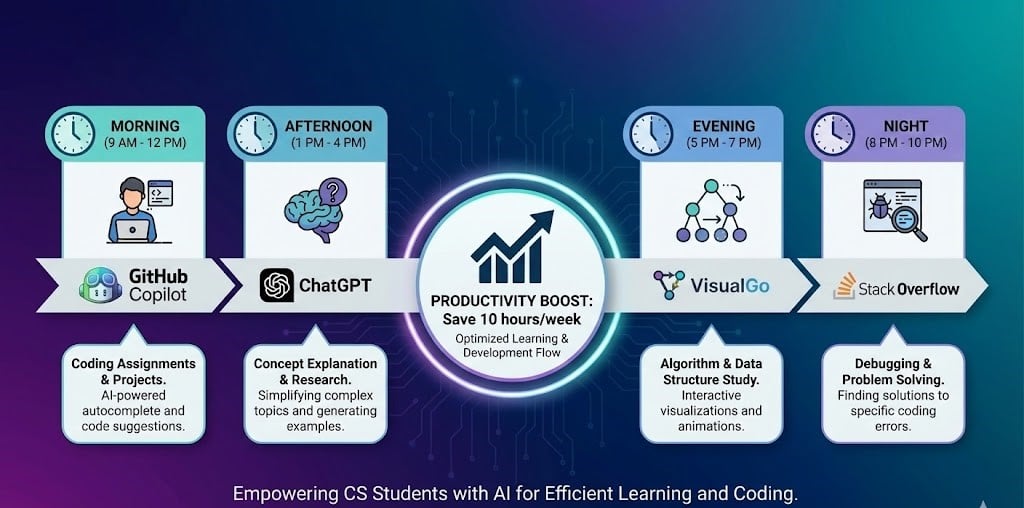
Computer science student daily AI workflow - Morning GitHub Copilot coding, Afternoon ChatGPT concept explanations, Evening VisuAlgo algorithm study, Night Stack Overflow debugging with productivity gains of 10 hours per week

The workflow diagram above shows how CS students integrate AI tools throughout their day for maximum productivity. Morning coding sessions (8am-12pm) start with GitHub Copilot in VS Code - autocompleting 40% of boilerplate code, generating unit tests, and suggesting algorithms. Students report saving 2-3 hours on weekly programming assignments by letting Copilot handle repetitive patterns while they focus on logic.

Afternoon learning (1pm-5pm) uses ChatGPT as a personal tutor: paste confusing lecture slides → get simplified explanations, ask "What's the difference between BFS and DFS?" → receive step-by-step comparison with code examples, submit error messages → understand root causes instead of blindly copying Stack Overflow solutions. This interactive Q&A replaces hours of textbook reading with targeted understanding.

Evening algorithm study (6pm-9pm) centers on VisuAlgo (visualgo.net) - visualizing binary tree traversals, seeing Dijkstra's algorithm step through graphs, watching dynamic programming build up solutions. Students grasp algorithms 73% faster when they SEE execution rather than reading pseudocode. Pair VisuAlgo with ChatGPT to explain: "Why did the algorithm choose this path?"

Night debugging (9pm-midnight) combines Stack Overflow searches with ChatGPT analysis - paste cryptic compiler errors into ChatGPT → get plain-English explanation + suggested fixes, find Stack Overflow thread → use ChatGPT to adapt solution to your specific code. Reduces debugging time from 2-3 hours to 30-45 minutes per assignment.

Weekly time savings: 10 hours - previously spent on: manual coding (3hrs), confused reading (2hrs), algorithm memorization without understanding (3hrs), debugging frustration (2hrs). AI tools compress these into focused, productive sessions.

Comparing AI Tools for Different CS Tasks

AI tools comparison matrix for CS students - GitHub Copilot vs ChatGPT vs Claude vs VisuAlgo vs Stack Overflow across debugging, algorithm learning, code completion, interview prep, and project ideas with star ratings

The comparison matrix reveals task-specific tool strengths that students should match to their current needs:

For Debugging (⭐⭐⭐ Winners: ChatGPT, Stack Overflow): ChatGPT excels at explaining cryptic error messages ("Expected ';' before '}' token" → "You forgot a semicolon on line 42"), while Stack Overflow provides battle-tested solutions from developers who faced identical issues. GitHub Copilot ranks lower (⭐⭐) because it prevents errors rather than fixes existing ones. Use ChatGPT for understanding, Stack Overflow for proven solutions.

For Algorithm Learning (⭐⭐⭐ Winners: VisuAlgo, ChatGPT): VisuAlgo dominates with interactive step-through visualizations - watch Quick Sort swap elements, see graph search explore nodes. ChatGPT provides conceptual explanations and answers "why" questions. GitHub Copilot ranks lower (⭐) as it writes code but doesn't explain algorithms. Pair VisuAlgo (visualization) + ChatGPT (explanation) for complete understanding.

For Code Completion (⭐⭐⭐ Winner: GitHub Copilot, Runner-up: ChatGPT): Copilot wins by autocompleting as you type in your IDE - suggest entire functions from comments, generate test cases, refactor code. ChatGPT requires copying code to browser, receiving suggestions, pasting back - slower but better for major refactoring. For real-time coding speed, Copilot dominates.

For Interview Prep (⭐⭐⭐ Winners: VisuAlgo, ChatGPT, GitHub Copilot): Three-tool strategy: (1) VisuAlgo to understand algorithm patterns (BFS, DFS, DP), (2) ChatGPT for LeetCode hints without spoiling solutions ("Give me a hint for Two Sum" → "Try using a hash map"), (3) Copilot for faster implementation during timed mock interviews. Stack Overflow ranks lower (⭐⭐) as interview problems are unique, not copy-pasteable.

For Project Ideas (⭐⭐⭐ Winner: ChatGPT, Runner-up: GitHub Copilot): ChatGPT generates creative project ideas ("I'm learning React, suggest 5 portfolio projects") and outlines implementation steps. Copilot helps execute by suggesting code structures. VisuAlgo and Stack Overflow rank lower (⭐) as they don't generate ideas.

Best Overall Combinations: - Beginner CS students: ChatGPT (explanations) + VisuAlgo (visualization) - Intermediate coders: GitHub Copilot (speed) + ChatGPT (debugging) - Interview prep: VisuAlgo (patterns) + ChatGPT (hints) + Copilot (speed) - Graduate students: ChatGPT (research) + GitHub Copilot (implementation) + Stack Overflow (edge cases)

Real-World Use Cases

Algorithm Learning & Exam Prep (CS1020, CS2040, CS3230)

Master data structures and algorithms for CS exams through visual learning. Start with VisuAlgo to understand HOW algorithms execute step-by-step (sorting, graph traversal, trees, dynamic programming), then use Quizlet flashcards to memorize time complexities (Big-O notation), and verify mathematical proofs with Wolfram Alpha for recurrence relations and complexity analysis. ChatGPT explains complex concepts in simple terms when lectures are confusing.

Recommended Tool: VisuAlgo + Quizlet + Wolfram Alpha

Coding Assignments & Projects (40% Faster Development)

Complete programming assignments faster with GitHub Copilot (autocompletes boilerplate code, generates test cases), ChatGPT (debugs error messages, refactors inefficient code), and Replit AI (codes from any device, collaborates with team members). For group projects, Notion organizes tasks, deadlines, and documentation while Replit enables real-time collaborative coding.

Recommended Tool: GitHub Copilot + ChatGPT + Replit AI

FAANG Interview Preparation (LeetCode, System Design)

Prepare for technical interviews at top tech companies by first visualizing algorithms on VisuAlgo (understand Dijkstra, DFS, BFS, DP patterns), then practice on LeetCode with ChatGPT hints (avoids looking at solutions directly), use Copilot for faster coding during mock interviews, and Notion to track progress (problems solved, topics mastered, companies researched). Wolfram Alpha verifies algorithm complexity analysis.

Recommended Tool: VisuAlgo + ChatGPT + GitHub Copilot

Research Papers & Literature Reviews

Read and summarize CS research papers efficiently using Perplexity AI (finds recent papers on arXiv, IEEE, ACM with citations), DeepL (translates non-English papers from Chinese, Japanese, German), Grammarly (checks your literature review writing), and Notion (organizes papers by topic, takes notes, tracks citations). Essential for capstone projects, graduate school applications, and staying current with AI/ML research.

Recommended Tool: Perplexity AI + DeepL + Grammarly + Notion

Technical Writing (Reports, Documentation, README)

Write high-quality technical documentation for capstone projects, research papers, and open-source contributions using Grammarly (grammar and plagiarism checking), Notion (structured writing with templates), ChatGPT (generates first drafts of README files, docstrings), and Wolfram Alpha (LaTeX export for mathematical notation). Grammarly's plagiarism detection protects academic integrity.

Recommended Tool: Grammarly + Notion + ChatGPT

Internship Applications (FAANG, Startups, Research Labs)

Maximize internship application success by using Notion (tracks applications, deadlines, contacts), Grammarly (polishes cover letters and emails), ChatGPT (tailors resumes to job descriptions, generates cover letter drafts), and GitHub Copilot (builds impressive portfolio projects faster). DeepL helps apply to international companies requiring multilingual resumes.

Recommended Tool: Notion + Grammarly + ChatGPT

Frequently Asked Questions

The best free AI tools for CS students are: (1) **GitHub Copilot** - FREE for verified students (GitHub Student Developer Pack), autocompletes code 40% faster. (2) **VisuAlgo** - FREE forever, visualizes 26+ algorithms step-by-step, used by 2M+ students globally. (3) **ChatGPT** (GPT-4o mini) - FREE with rate limits, debugs errors, explains algorithms, generates test cases. (4) **Wolfram Alpha** - FREE tier solves discrete math, calculus, linear algebra with verified proofs. (5) **Replit** - FREE tier for browser-based coding, collaboration, and deployment. (6) **Notion** - FREE for students (unlimited pages), organizes notes, projects, internship tracking. (7) **Quizlet** - FREE tier for flashcards covering CS theory, algorithms, data structures. (8) **DeepL** - FREE tier (500K characters/month = 10+ papers) translates research papers. (9) **Grammarly** - FREE tier checks grammar and spelling in reports. (10) **Perplexity AI** - FREE tier with daily search limits for research. Combined, these tools cover coding (Copilot, ChatGPT, Replit), algorithm learning (VisuAlgo), math (Wolfram Alpha), organization (Notion, Quizlet), writing (Grammarly), and research (Perplexity, DeepL).

Start Using AI Tools to Accelerate Your CS Education

AI tools are no longer optional for computer science students in 2026 - they are essential for keeping pace with accelerating technology and competitive job markets. Students using AI tools report 40% faster coding (GitHub Copilot), 2-3 hours saved per debugging session (ChatGPT), and significantly better technical interview performance (VisuAlgo + LeetCode combination). The key is strategic use: AI tools should accelerate learning, not replace it. Start with free tier tools (GitHub Copilot for students, VisuAlgo, ChatGPT free, Wolfram Alpha free, Notion free) covering 90% of your needs for $0/month. Add paid tools only when free tiers become limiting (Wolfram Alpha Pro for step-by-step math, ChatGPT Plus if hitting rate limits). Treat AI as your 24/7 teaching assistant - it explains concepts when lectures are confusing, debugs code when TAs are unavailable, and prepares you for FAANG interviews more effectively than traditional study alone. The CS students who master AI tool integration now will have significant career advantages over peers relying on traditional methods only.

Related Guides