
Tool DiscoveryTool Discovery

ComfyUI Reddit: What the Stable Diffusion Community Really Thinks in 2026

ComfyUI is the most powerful and most discussed Stable Diffusion interface in the AI art community, with r/StableDiffusion (750,000+ members) and the dedicated r/comfyui community treating it as the standard tool for anyone serious about AI image generation. Unlike the simpler web interface of AUTOMATIC1111, ComfyUI uses a node-based workflow system where every part of the generation pipeline is visible and editable. The community calls it the tool that "shows you exactly what is happening" inside Stable Diffusion. This guide draws from r/StableDiffusion, r/comfyui, and AI art forums to explain what ComfyUI actually does, how it compares to AUTOMATIC1111 and Forge, how long it takes to learn, and when it is worth the investment over simpler alternatives.

Updated: 2026-02-249 min read

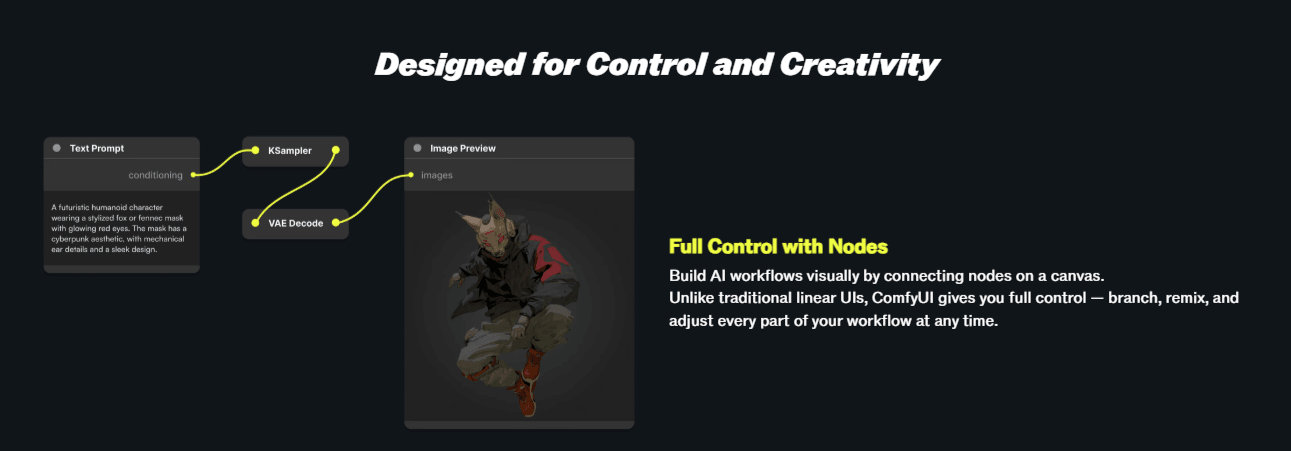
ComfyUI's node interface lets you see and control every step of the image generation pipeline

ComfyUI node-based workflow interface showing connected generation pipeline nodes

Detailed Tool Reviews

1

ComfyUI

4.5

Node-based Stable Diffusion interface that breaks image generation into visible, rearrangeable workflow nodes. The r/StableDiffusion community (750,000+ members) treats ComfyUI as the standard for advanced AI art work, praising its flexibility and performance while noting the steep learning curve for beginners.

Key Features:

  • Node-based workflow editor: every generation step is visible and editable
  • Supports all major model types: SDXL, FLUX, SD 1.5, ControlNet, AnimateDiff
  • ComfyUI Manager for one-click custom node installation
  • JSON workflow export and import for sharing exact setups
  • Faster than AUTOMATIC1111 for the same tasks per community benchmarks

Pricing:

Free (open source)

Pros:

  • + Complete control over every generation parameter per r/StableDiffusion
  • + Faster performance than AUTOMATIC1111 on the same hardware
  • + JSON workflows are shareable and reproducible across setups
  • + FLUX model support is better than AUTOMATIC1111 per community reports

Cons:

  • - Steeper learning curve than AUTOMATIC1111 or Forge for beginners
  • - Node interface overwhelming without prior workflow familiarity
  • - Error messages less beginner-friendly than alternative interfaces

Best For:

AI artists who want precise control over every aspect of image generation and are willing to invest time learning the node-based workflow system.

Try ComfyUI

ComfyUI vs AUTOMATIC1111: what the community actually recommends

The r/StableDiffusion community has a clear position on ComfyUI vs AUTOMATIC1111 (A1111) that is worth understanding before you invest time in either. The community does not say one is better than the other in absolute terms. It says they are for different users with different goals.

DimensionComfyUIAUTOMATIC1111 / ForgeReddit Recommendation
Learning curveSteep (node-based)Moderate (web UI)A1111 for beginners
PerformanceFasterSlowerComfyUI for speed
FlexibilityMaximumHighComfyUI for control
FLUX supportExcellentModerateComfyUI for FLUX
Video generationAnimateDiff nativePlugin-basedComfyUI
Community resourcesGrowingLarger, olderA1111 for beginner help
Workflow sharingJSON exportSettings exportComfyUI

AUTOMATIC1111 has the larger tutorial library and the more beginner-friendly starting experience. You install it, load a model, and start generating images within 30 minutes. ComfyUI requires you to understand what nodes are, how to connect them, and what each part of the pipeline does before you can generate your first image.

The payoff for that learning investment is real. r/StableDiffusion users who switched from A1111 to ComfyUI consistently describe faster generation times on the same hardware, greater flexibility for complex workflows, and better support for newer model types like FLUX.

The community verdict on when to choose each:

  • New to Stable Diffusion: start with AUTOMATIC1111 or Forge, understand the basics, then move to ComfyUI
  • Already using A1111 and hitting limits: switch to ComfyUI
  • Want video generation (AnimateDiff): ComfyUI is the better supported platform
  • Team or production workflow: ComfyUI with JSON workflow sharing

"Download other workflows to learn the process but then the way to really understand is to build the workflow from scratch." From r/StableDiffusion thread on must-have ComfyUI workflows, 2025.

Essential ComfyUI custom nodes: what r/StableDiffusion recommends

ComfyUI is intentionally minimal in its default installation. The power comes from custom nodes, and the community has identified a core set that most serious ComfyUI users install. ComfyUI Manager is the foundation: it is the package manager for custom nodes that makes installing, updating, and managing everything else significantly easier.

Installing ComfyUI Manager is the first thing r/StableDiffusion recommends for every new ComfyUI user. Without it, installing custom nodes requires manual git cloning and dependency management. With it, most nodes install in two clicks.

Essential nodes per community discussion:

  • ComfyUI Manager: installs and manages all other custom nodes (required)
  • rgthree nodes: provides group bypass (Ctrl+B) and group muter (Ctrl+M) for toggling workflow sections without errors
  • Impact Pack: advanced detection and segmentation tools used in face fixing, inpainting, and regional control
  • ControlNet auxiliary preprocessors: pre-processes images for ControlNet workflows (depth, pose, canny edge)
  • WAS Node Suite: large utility collection for image processing, file management, and workflow utilities
  • efficiency nodes: optimized node packs that reduce the total node count needed for common workflows

r/StableDiffusion user advice on rgthree nodes specifically:

"My best tip for you is to get the rgthree nodes that has a group bypass and group muter. Then slowly build out a workflow that has a group for LoRA and a group for ControlNet. Then you can just turn those groups on or off when you need them." From r/StableDiffusion thread on must-have ComfyUI workflows (2025, high engagement).

The group workflow architecture described above is the community standard for building flexible ComfyUI setups. You build groups for each optional component (LoRA, ControlNet, img2img, inpainting) and toggle them on or off using Ctrl+B or Ctrl+M without disconnecting nodes or breaking the workflow structure.

For FLUX model workflows specifically, the r/StableDiffusion community notes that FLUX requires a different node structure than SDXL. The main difference is the dual CLIP text encoder that FLUX uses. Community members have shared FLUX workflow JSON files extensively, and downloading an established FLUX workflow from Civitai or r/comfyui is the recommended starting point rather than building one from scratch.

ComfyUI learning curve: how long it actually takes per community reports

The ComfyUI learning curve is the most debated topic in r/comfyui and r/StableDiffusion. The frustration is real for beginners, and the community has developed honest timelines based on collective experience.

The realistic timeline from community reports:

  • Week 1: Basic text-to-image workflow running, understanding what checkpoints and samplers do
  • Week 2-3: Adding LoRAs, understanding ControlNet, building modular workflow groups
  • Month 1: Comfortable with img2img, inpainting, basic AnimateDiff video generation
  • Month 2+: Building custom workflows from scratch, understanding node connections intuitively

For context: AUTOMATIC1111 takes most beginners 1-3 days to feel comfortable. ComfyUI takes 2-4 weeks. The community says that gap is worth it if you plan to do serious AI art work long-term, but is a real barrier for casual users.

Experience LevelRecommended StartLearning Time
Complete beginnerAUTOMATIC1111 / Forge firstSkip ComfyUI until basics mastered
Basic A1111 userSwitch to ComfyUI2-4 weeks to proficiency
Technical backgroundComfyUI directly1-2 weeks
Professional workflowComfyUI + custom nodesOngoing, weeks to months

The community resource stack from r/StableDiffusion and r/comfyui:

  • Civitai model pages: download established workflows and study how they are structured
  • YouTube tutorials: several channels specifically covering ComfyUI workflows
  • r/comfyui: post workflows for feedback, ask specific node connection questions
  • ComfyUI GitHub: official documentation and issue tracker

The beginner trap the community identifies most: trying to build a complex workflow from scratch before understanding the basics. The recommendation is to download a working text-to-image workflow from Civitai, run it successfully, then start modifying individual nodes to see what each one does. This builds understanding organically without the frustration of debugging connections from nothing.

"My best advice: start with a working workflow someone else built, then rebuild it from scratch once. That's how you learn what every node actually does." From r/StableDiffusion ComfyUI beginners thread (aggregated community advice pattern, 2025).

ComfyUI for FLUX models and video generation: what Reddit says

Two capabilities drive significant community discussion about ComfyUI specifically: FLUX model support and video generation with AnimateDiff. Both are areas where ComfyUI has a meaningful advantage over AUTOMATIC1111.

FLUX models represent the current generation of open-source image generation quality. They produce more photorealistic outputs and handle complex prompts better than SDXL in many comparisons. The r/StableDiffusion community notes that FLUX model workflows in ComfyUI are better supported than in AUTOMATIC1111 for two reasons:

  • ComfyUI handles FLUX's dual CLIP text encoder natively through node connections
  • The community has built and shared extensive FLUX workflow JSON files that work out of the box
  • FLUX LoRA support in ComfyUI is more stable than plugin-based AUTOMATIC1111 implementations

The SDXL vs FLUX choice from r/StableDiffusion for ComfyUI users:

  • SDXL workflows: larger LoRA library, faster on lower-end GPUs, more community fine-tunes available
  • FLUX workflows: better base quality, stronger at photorealism, growing LoRA library, higher VRAM requirement

For video generation, AnimateDiff is the primary framework the community uses in ComfyUI. AnimateDiff adds temporal consistency to generations, producing short videos (typically 2-8 seconds) from text prompts or existing images. The r/comfyui community shares AnimateDiff workflows regularly and discusses prompt techniques for smooth motion.

Hardware minimum requirements from community posts:

  • 8GB VRAM: SDXL workflows run well, FLUX runs at reduced resolution
  • 12GB VRAM: FLUX full resolution, basic AnimateDiff video
  • 16GB+ VRAM: Complex FLUX workflows, longer AnimateDiff sequences, ControlNet + video simultaneously
  • 24GB VRAM: Professional video generation workflows without compromise

Cloud options are discussed in r/comfyui for users without sufficient local GPU hardware. RunPod and Vast.ai are the most mentioned cloud platforms that the community uses for GPU rental, allowing access to ComfyUI on high-end GPUs without hardware investment.

Common ComfyUI frustrations and how the community solves them

r/comfyui and r/StableDiffusion are honest communities that document real frustrations alongside successes. The recurring problems have established solutions that save new users significant debugging time.

The most common frustrations per community posts:

  • Out of memory (OOM) errors when loading models or running workflows
  • Missing node errors when loading workflows created with custom nodes you do not have installed
  • Slow generation speeds before learning optimization settings
  • Confusing error messages that do not clearly indicate what is wrong
  • Workflows breaking after ComfyUI or custom node updates

Community solutions for each:

For OOM errors: use the --lowvram or --medvram startup flag. Enable model offloading in ComfyUI settings. Use FP8 or FP16 model quantization to reduce memory requirements. The community also recommends the Sage Attention node pack for memory efficiency improvements.

For missing node errors: install ComfyUI Manager and use the "Install Missing Custom Nodes" button on the workflow load error screen. This automatically identifies and installs all missing nodes from a shared workflow.

For slow generation: the community recommendation is to ensure you are using xformers (install with pip install xformers) and that you have the correct PyTorch version for your GPU architecture. NVIDIA 30xx and 40xx series GPUs have specific optimization paths.

"Ctrl-B (bypass) skips that node but passes data through by type. Ctrl-M (mute) stops execution completely. Learning the difference saves hours of debugging disconnected workflows." From r/StableDiffusion ComfyUI tips thread (rgthree node documentation referenced by community).

The version compatibility issue is a real operational concern. ComfyUI updates frequently, and custom nodes sometimes break after updates. The r/comfyui community recommendation: pin your ComfyUI version when you have a stable working setup, update only when you need a specific new feature, and check the r/comfyui posts after updates for reports of breaking changes before updating production setups.

Frequently Asked Questions

ComfyUI is a node-based workflow editor for Stable Diffusion and FLUX AI image generation. Instead of a simple web interface like AUTOMATIC1111, ComfyUI shows every step of the generation pipeline as connected nodes you can rearrange and customize. The r/StableDiffusion community uses it for advanced text-to-image, img2img, ControlNet, video generation with AnimateDiff, and complex multi-step workflows.

The community verdict on ComfyUI in 2026

ComfyUI is the standard tool for serious AI image generation work, and the r/StableDiffusion community recommends it for anyone willing to invest 2-4 weeks learning the node workflow system. The performance advantage over AUTOMATIC1111, the superior FLUX support, and the JSON workflow sharing capability make it worth that investment for regular AI art work. For complete beginners, AUTOMATIC1111 or Forge is the right starting point, with ComfyUI as the natural next step once the basics of Stable Diffusion are understood. The free GitHub installation is the starting point, and ComfyUI Manager handles all custom node installation from there.

About the Author

Amara - AI Tools Expert

Amara

Amara is an AI tools expert who has tested over 1,800 AI tools since 2022. She specializes in helping businesses and individuals discover the right AI solutions for text generation, image creation, video production, and automation. Her reviews are based on hands-on testing and real-world use cases, ensuring honest and practical recommendations.

View full author bio

Related Guides