
Tool DiscoveryTool Discovery

How to Use Suno AI: Complete Guide to AI Music Creation (2026)

Updated: 2026-05-1410 min read

Suno AI generates complete songs from text descriptions. Type what you want, genre, mood, energy level, vocal type, and it builds a full track with instruments and production in under 60 seconds. No instruments needed. No production experience required. The free plan gives you 50 credits daily, enough for roughly 10 full songs, with no credit card needed. The prompting techniques here come from the r/SunoAI community's highest-upvoted threads. If you want a head start before burning through credits, we put together a Suno Prompts Pack, a curated collection of tested prompts organized by genre, mood, and use case, so you have a solid starting library on day one. For honest takes on pricing and how Suno compares to Udio from real users, the Suno AI Reddit guide covers what the community actually says.

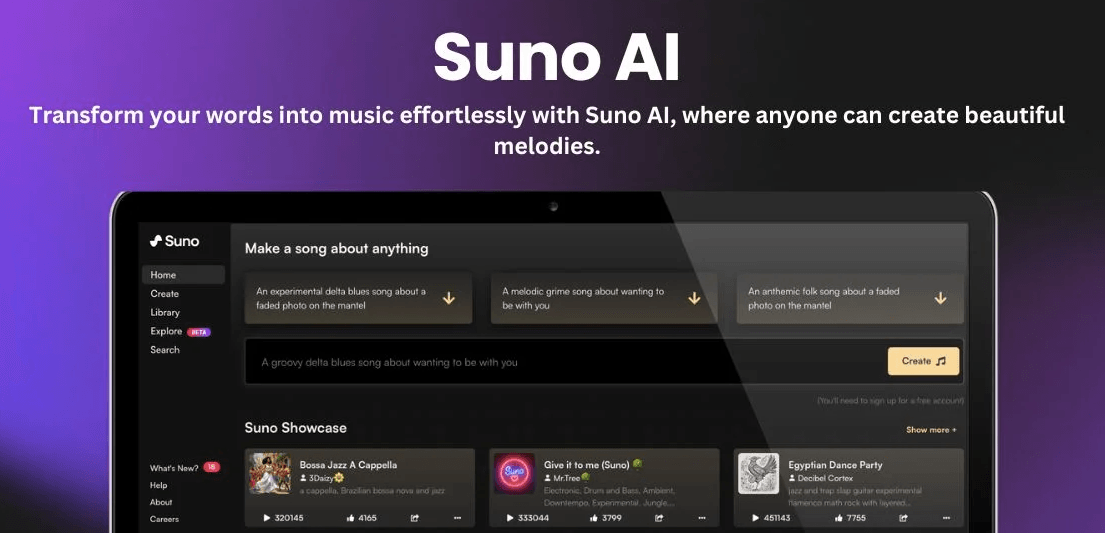
Suno AI: type a description and create a complete song with vocals, instruments, and production in under 60 seconds.

Suno AI interface showing the music creation dashboard with song prompts and library 2026

Detailed Tool Reviews

1

Suno AI

4.5

Suno AI generates complete songs from text prompts including vocals, instruments, and lyrics. The V4.5 model (launched May 2025) supports tracks up to 8 minutes and over 1,200 musical genres. Browser-based with no installation required - you describe what you want in plain language and Suno builds the song.

Key Features:

  • Simple Mode: one-line description generates a complete song with vocals and instruments
  • Custom Mode: write your own lyrics with [Verse] [Chorus] structure tags, set BPM and key
  • V4.5 model: up to 8-minute songs, 1,200+ genre support, improved vocal expressiveness
  • Song Editor (Pro): split songs into up to 12 stems for further editing
  • Suno Studio (Premier): DAW-style timeline editing with MIDI export
  • Covers and Mashups: recreate songs in different styles or blend genres

Pricing:

Free: 50 credits/day (~10 songs), no commercial use. Pro: $10/month for 2,500 credits, commercial rights, V4 access, Song Editor. Premier: $30/month for 10,000 credits, MIDI export, Suno Studio.

Pros:

  • + Free tier generates 10 full songs daily with no credit card required
  • + Songs generate in 30 to 60 seconds in most cases
  • + No music production skills needed - works from plain text descriptions
  • + Structure tags give precise song arrangement control in Custom Mode
  • + r/SunoAI community (100k+ members) provides prompting guides and tips

Cons:

  • - Free songs cannot be used commercially
  • - Credits do not roll over month to month - unused credits expire
  • - No stem export on free plan (requires Pro or Premier)
  • - Struggles with unusual time signatures like 7/8 or 5/4
  • - AI-generated songs cannot currently be copyrighted under US law

Best For:

Content creators, podcasters, musicians prototyping ideas, and anyone who wants original background music without recording or production skills.
Try Suno AI

What Is Suno AI and How It Works

Suno AI is a text-to-music generator. Write a description of what you want, genre, mood, instruments, style, and Suno builds a full song with vocals, melody, and production within about 60 seconds. No instruments required. No audio production experience needed.

The model was trained on a broad range of music. When you type "acoustic folk song about leaving home, fingerpicking guitar, melancholy female vocals," it maps each element to the corresponding sonic territory and generates from there. The V4.5 model, released May 2025, handles tracks up to 8 minutes and recognizes over 1,200 genres.

Everything runs in your browser at suno.com. Sign in with Google or Discord, and the Create section is where generation happens. Free plan: 50 credits per day, 5 credits per song, so roughly 10 songs daily at no cost.

From r/SunoAI (800+ upvotes): "I was really blown away by the very first result. I find this tech absolutely fascinating and genius."

That reaction is common for first-time users. The first result tends to be better than expected, especially for people who have never produced music before.

Getting Started: Sign Up and Navigation

Visit suno.com and click Sign In. Authenticate with Google or Discord. No separate email registration required. Once logged in, you land on the main feed showing public song creations.

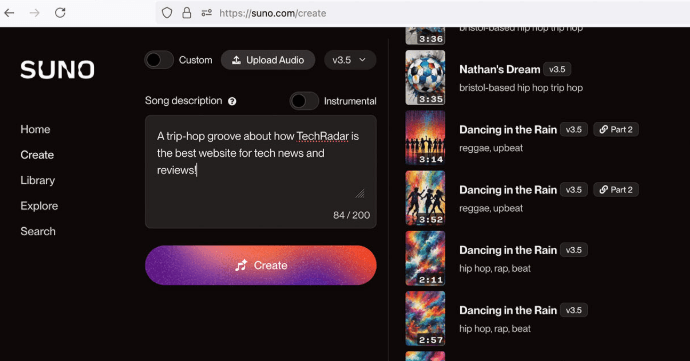
The Create button in the left sidebar opens the song creation panel. It has two inputs: a description field and a toggle between Simple Mode and Custom Mode.

Your song library lives under Library in the left sidebar. Songs you generate are stored there and accessible from any device. Free songs are public by default. Pro and Premier plans allow private creation.

The Explore section shows trending songs and popular styles. Browsing it helps you see what Suno handles well and surfaces prompting ideas. The r/SunoAI community (100,000+ members) regularly posts outputs alongside the prompts that generated them. That is one of the fastest ways to learn what actually works before spending your own credits.

Creating Your First Song in Simple Mode

Simple Mode is the fastest path to a finished song. Type one description, press Create, and Suno generates two versions simultaneously. Each version runs the same prompt through a different creative path, so you get two distinct takes to compare.

The description field accepts plain language. A working first attempt: "upbeat indie pop song about a summer road trip, male vocals, acoustic guitar, energetic." Every detail you include shapes the output.

Five things to include in a Simple Mode description:

  • Genre or style: "folk," "hip-hop," "lo-fi jazz," "80s synthwave," "bedroom pop"
  • Mood or energy: "melancholy," "euphoric," "contemplative," "high energy," "relaxed"
  • Vocal type: "female vocals," "male vocals," "vocal harmonies," or "no vocals" for instrumental
  • Key instruments: "piano," "fingerpicking guitar," "trap drums," "strings," "electric bass"
  • Tempo feel: "slow," "mid-tempo," "driving," "fast," "danceable"
Suno AI create interface showing the song description input field with Simple Mode active

Songs generate in 30 to 60 seconds. Both versions play back directly in the interface. If neither version works, regenerate from the same prompt (5 credits) or adjust the description and try again.

From r/SunoAI (400+ upvotes): "Be specific about tempo and energy, not just genre. 'Fast punk' and 'mid-tempo punk' produce completely different results even with the same genre tag."

Custom Mode: Full Control Over Your Song

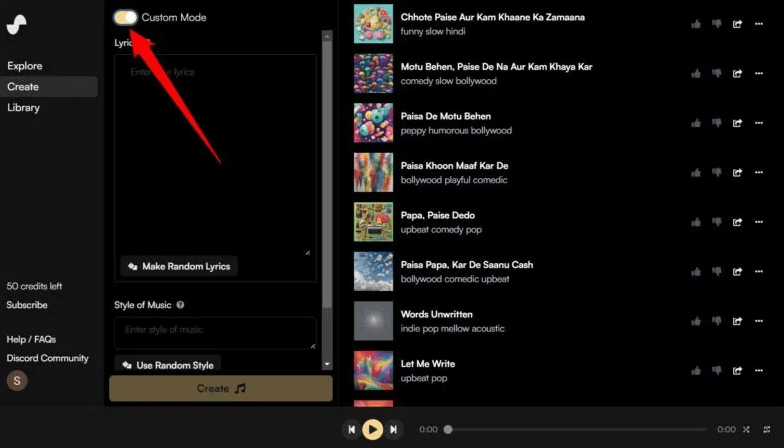
Custom Mode unlocks song structure, lyrics, and technical musical parameters. Switch to it using the toggle at the top of the Create panel.

Custom Mode adds four fields that Simple Mode does not have:

FieldWhat It ControlsExample
LyricsYour written lyrics + structure tags[Verse] text here / [Chorus] text here
Style of MusicGenre, instruments, production, vocal type"indie folk, fingerpicking, warm vocals, 90s production"
BPMTempo in beats per minute80 (ballad), 120 (pop), 140 (dance)
KeyMusical key for mixing with other instrumentsC major, A minor, F# minor

Structure tags matter more than most users expect. Add [Verse], [Pre-Chorus], [Chorus], [Bridge], or [Outro] on their own lines within your lyrics. Suno assigns different musical energy to each section. Verses stay quieter and conversational. Choruses get the full production push. Without those tags, Suno may treat your entire lyric block as one flat section.

Suno AI custom mode interface showing lyrics field, style field, BPM and key controls

Write your verse and chorus lyrics first, add structure tags, then fill in the Style field with specific sonic details. That sequence gives the most consistent output.

From r/SunoAI (500+ upvotes): "Custom Mode is where Suno goes from a toy to a real tool. The structure tags make an enormous difference in output quality."

Suno AI Prompting Tips That Work

Specificity beats length every time. "Folk rock, acoustic guitar, warm female vocals, verses that build to a big chorus, 90s production" outperforms a paragraph of vague description. One well-chosen detail is worth five generic adjectives.

Describe what you do not want. Suno responds to exclusion prompts in the Style field. Adding "no rap, no electronic drums, no distorted guitar" steers generation away from those elements. It is one of the most underused features in Custom Mode.

Use production language in the Style field. Terms like "stereo width," "room reverb," "dry mix," "punchy kick," and "warm low end" influence the production character of the output. Suno recognizes these concepts and responds to them consistently.

Genre mashups work well. "Celtic folk meets hip-hop" or "jazz with trap drums" are legitimate style descriptors. The V4.5 model handles over 1,200 genres, so niche combinations hold together more often than you might expect.

Iterate in batches before deciding something does not work. Suno produces two versions per creation, so two generations give you four interpretations of the same prompt. Swapping one adjective or changing the tempo descriptor can significantly shift the output.

When a version is close but not quite right, use the Remaster option on saved songs. Remaster preserves the overall structure while regenerating specific elements. If you want a ready set of prompts to test these techniques without starting from zero, the Suno Prompts Pack covers over 100 tested combinations organized by genre and use case.

Free vs Pro vs Premier: Which Plan Do You Need

Suno has three tiers. Commercial use rights and monthly song volume are the two variables that determine which one makes sense.

Free plan gives 50 credits daily, resetting every 24 hours. At 5 credits per song, you get 10 songs per day, roughly 300 per month. Free songs carry metadata marking them as Suno-generated, and you cannot use them in monetized content. The free plan also does not include the highest-quality V4 settings. For personal projects, experimentation, and learning how Suno interprets prompts, the free tier is substantial.

Pro at $10 per month provides 2,500 credits monthly - approximately 500 songs. Commercial rights are included, so you can monetize songs on YouTube, use them in paid client projects, or sell them as stock music. Pro also unlocks the Song Editor, which lets you split songs into up to 12 stems, rearrange sections, and make structural edits. Priority queue reduces wait times during peak usage hours.

Premier at $30 per month offers 10,000 credits monthly (roughly 2,000 songs). The main additions over Pro are Suno Studio - DAW-style timeline editing - and MIDI export for taking Suno output into other music production software.

Credits do not roll over. Unused credits expire at the end of each monthly billing cycle.

PlanPriceCreditsSongs/MonthCommercial RightsStems
Free$050/day~300NoNo
Pro$10/mo2,500/mo~500Yes12 stems
Premier$30/mo10,000/mo~2,000YesFull MIDI

From r/SunoAI pricing discussions: "Free is enough to know if you like it. Pro is worth it if you actually use it for anything that needs commercial rights. The credit math only points to Premier once you are consistently burning through Pro credits before the month ends."

Common Mistakes and How to Fix Them

Five mistakes come up in r/SunoAI help threads more than anything else. The Suno AI Reddit community guide covers what experienced users say works and what does not.

Vague prompts produce generic results. "A nice song" gives Suno nothing specific to work with. Add at least five details: genre, tempo feel, instrument, vocal type, and emotional quality.

Missing structure tags in Custom Mode. When you write your own lyrics without [Verse], [Chorus], and [Bridge] markers, Suno may treat the entire lyric block as one flat section with no dynamic shift. Adding structure tags is the single most impactful change for anyone writing their own lyrics.

Giving up after one or two generations. Suno produces different results every time, even from the same prompt. At 5 credits per generation, running five variations costs 25 cents on the free plan and typically surfaces at least one strong version.

Trying to reproduce a specific copyrighted song. Describe the style characteristics instead. "Folk-pop, conversational storytelling lyrics, acoustic guitar, emotional female vocals" works far better than naming the artist directly.

Expecting stems on the free plan. Stem export requires Pro (12 stems via Song Editor) or Premier (full MIDI). Many users find this out only after generating a song they want to take into a DAW.

Frequently Asked Questions

Yes. Suno AI's free plan gives you 50 credits daily, enough to generate approximately 10 full songs every day with no credit card required. Free songs cannot be used commercially and do not include the highest V4 quality settings, but the free tier is substantial for personal use and learning.

Start Creating AI Music with Suno Today

The free plan at 10 songs per day is enough to get real results quickly. Custom Mode with structure tags gives you enough control to produce targeted, specific outputs once you have a feel for how prompts translate into sound. The r/SunoAI community, now over 100,000 members, has accumulated years of shared experiments and honest reviews. That community knowledge shortens the learning curve considerably. If you want a prompt library ready on day one, the Suno Prompts Pack has tested prompts organized by genre and use case so you can skip the trial-and-error phase.

Start Creating with Suno Free

About the Author

Amara - AI Tools Expert

Amara

Amara is an AI tools expert who has tested over 1,800 AI tools since 2022. She specializes in helping businesses and individuals discover the right AI solutions for text generation, image creation, video production, and automation. Her reviews are based on hands-on testing and real-world use cases, ensuring honest and practical recommendations.

View full author bio

Related Guides