
Tool DiscoveryTool Discovery

OpenClaw Alternatives: 8 Tools Developers Switch To and Why

Developers search for OpenClaw alternatives for four distinct reasons: security vulnerabilities documented in a 430,000-line codebase that exposes host-level shell access and stores API keys in plaintext, setup friction requiring Node.js 22+, a VPS, and 30-60 minutes of terminal configuration, cost structures that reach $50-200+/month once VPS and AI API fees stack up, and use case mismatch where developers needing business workflow automation or IDE-integrated coding assistance find OpenClaw optimized for personal conversational automation rather than their specific workflow. This guide maps the eight most discussed alternatives across four categories: lightweight open-source agents (Nanobot, NanoClaw), managed hosted deployments (Emergent), workflow automation platforms (n8n, Make.com, Zapier), AI coding agents (Devin AI, Claude Code), and multi-agent frameworks (LangChain, CrewAI, AutoGPT). Each alternative is covered with its specific advantages over OpenClaw, the developer profile it fits, and the cases where OpenClaw remains the better choice.

Updated: 2026-02-1412 min read

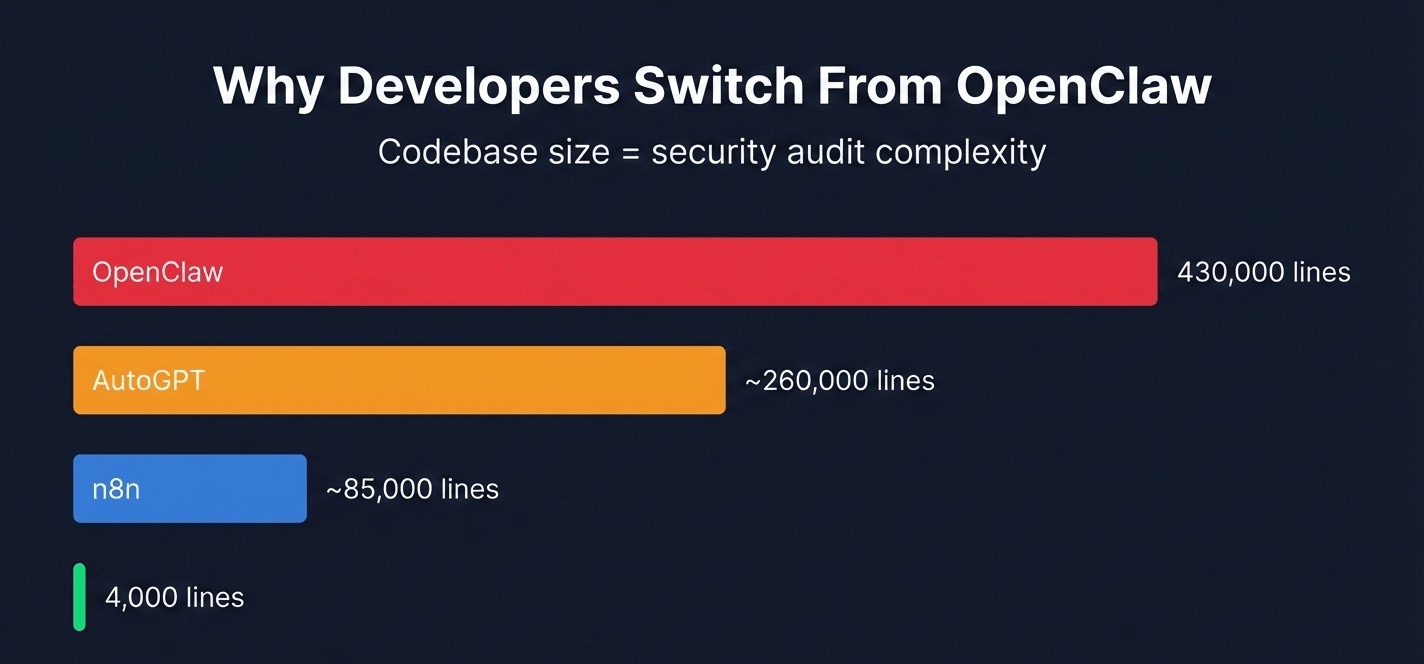
Codebase size determines security audit complexity. Nanobot achieves the same core functionality in 4,000 lines versus OpenClaw's 430,000.

Bar chart comparing codebase size of OpenClaw alternatives: OpenClaw 430,000 lines vs Nanobot 4,000 lines, showing why developers switch for auditability

Quick Comparison

Select Tools to Compare (Max 5):

Nanobot

Pricing:
Primary Function:Lightweight personal AI agent
Codebase Size:~4,000 lines Python
Setup Time:15-20 min (local or Pi)
VPS / Hosting Required:Optional (local or Pi)
Messaging Interface:Telegram, WhatsApp
Scheduled Automation:Yes (background agents)
Privacy Model:Self-hosted: your machine
Pricing Range:Free + API costs
Best Replaces OpenClaw For:Codebase auditability, resource-constrained hardware
No website available

Emergent

Pricing:
Primary Function:Managed OpenClaw deployment
Codebase Size:Managed (SaaS)
Setup Time:2 minutes (web UI)
VPS / Hosting Required:No (cloud-hosted)
Messaging Interface:WhatsApp, Slack, Discord
Scheduled Automation:Yes (via skill triggers)
Privacy Model:Encrypted credentials, sandboxed
Pricing Range:Free tier, $20-200/mo
Best Replaces OpenClaw For:Security vulnerabilities, VPS management
No website available

n8n

Pricing:
Primary Function:Visual workflow automation
Codebase Size:Open source (self-hosted)
Setup Time:10-20 min (Docker or cloud)
VPS / Hosting Required:Optional (self-hosted or cloud)
Messaging Interface:Slack, email (no native WhatsApp)
Scheduled Automation:Yes (cron via node triggers)
Privacy Model:Self-hosted or n8n Cloud
Pricing Range:Free self-hosted, $20+/mo cloud
Best Replaces OpenClaw For:Business workflows, deterministic automation
No website available

AutoGPT

Pricing:
Primary Function:Goal-decomposition AI agent
Codebase Size:Open source (Docker)
Setup Time:15-30 min (Docker setup)
VPS / Hosting Required:Local (Docker required)
Messaging Interface:None native
Scheduled Automation:Not built-in
Privacy Model:Docker sandbox (stronger than OpenClaw)
Pricing Range:Free + AI API costs
Best Replaces OpenClaw For:Sandboxed execution, structured goal completion
No website available

Devin AI

Pricing:
Primary Function:Autonomous software engineering
Codebase Size:Proprietary SaaS
Setup Time:5 min (SaaS)
VPS / Hosting Required:No (cloud)
Messaging Interface:Slack integration
Scheduled Automation:Not designed for it
Privacy Model:Cognition cloud servers
Pricing Range:$500+/mo
Best Replaces OpenClaw For:Engineering teams needing coding-specific automation
No website available

Detailed Tool Reviews

1
Nanobot logo

Nanobot

4.4

Nanobot is an ultra-lightweight open-source AI agent written in approximately 4,000 lines of Python, compared to OpenClaw's 430,000+ lines. It provides persistent memory, web search, background sub-agents, and Telegram and WhatsApp integrations. Designed for auditability and low-resource deployment, it runs on hardware as small as a Raspberry Pi at 191MB memory.

Key Features:

  • 4,000 lines of Python: fully auditable in a single afternoon
  • Persistent memory and knowledge graph for habit learning
  • Telegram and WhatsApp integrations
  • Background sub-agents for parallel task execution
  • Local LLM support via Ollama (no API costs)
  • Runs on Raspberry Pi and low-resource hardware

Pricing:

Free (MIT license) + AI API costs

Pros:

  • + Codebase is 99% smaller than OpenClaw: trivial to audit for security
  • + Raspberry Pi compatible: no VPS required
  • + MIT license: same permissive terms as OpenClaw
  • + No AI API cost when using local Ollama models

Cons:

  • - Far fewer integrations than OpenClaw's 700+ ClawdHub skills
  • - Smaller community: fewer tutorials and skill templates
  • - Less mature codebase: fewer production deployments documented

Best For:

Developers who want an OpenClaw-style personal automation agent with a codebase small enough to audit completely, or those deploying on Raspberry Pi or low-resource hardware without a full VPS

Try Nanobot
2
Emergent logo

Emergent

4.8

Emergent is a Y Combinator-backed managed deployment platform for OpenClaw. It provides the same autonomous agent capabilities — WhatsApp, Slack, and Discord integrations, skill execution, natural language commands — with AES-256 encrypted credential storage, sandboxed skill execution, and a 2-minute web-based setup instead of OpenClaw's 30-60 minute VPS configuration. It eliminates the four critical security vulnerabilities documented in standard OpenClaw installations.

Key Features:

  • 2-minute setup via web UI: no VPS, no Node.js configuration
  • AES-256 encrypted API key storage (vs plaintext in OpenClaw)
  • Sandboxed skill execution: malicious skills cannot reach host system
  • Pre-vetted skills library filtering known credential stealers
  • WhatsApp, Slack, and Discord integrations
  • Free tier available: 5 credits per month for evaluation

Pricing:

Free tier (5 credits/month), Standard $20/mo, Pro $200/mo

Pros:

  • + Eliminates plaintext API key vulnerability present in standard OpenClaw
  • + Use code AITOOLDISCOVERY5 for 5% off Standard and Pro plans
  • + No server administration, Node.js versions, or VPS management
  • + Free tier lets you test autonomous agent workflows before committing

Cons:

  • - Subscription cost adds to existing tool expenses
  • - Less customization than fully self-hosted OpenClaw
  • - Platform dependency: uptime tied to Emergent infrastructure

Best For:

Developers and non-technical users who want OpenClaw's autonomous personal automation capabilities without managing server infrastructure, or teams that cannot accept the security risks of standard OpenClaw installations

Try Emergent
3
n8n logo

n8n

4.6

n8n is an open-source workflow automation platform with 400+ app integrations, a visual node-based editor, and deterministic execution. It handles business automation including CRM updates, data pipelines, API integrations, and marketing workflows. Unlike OpenClaw's conversational LLM-driven approach, n8n workflows execute predictably every time without AI inference, making them suitable for production business processes where reliability is non-negotiable.

Key Features:

  • 400+ pre-built integrations including Salesforce, HubSpot, Postgres, Slack
  • Visual node editor: workflows readable and maintainable without code
  • Deterministic execution: same input always produces same output
  • Self-hostable on any server with MIT license (enterprise: fair-code)
  • AI nodes for LLM calls within structured workflows
  • Active community: 50,000+ workflow templates shared publicly

Pricing:

Free self-hosted, Cloud starts at $20/mo

Pros:

  • + Predictable, reliable execution without LLM inference uncertainty
  • + Scales to enterprise business automation (CRM, ERP, data pipelines)
  • + 99.9% uptime SLA on n8n Cloud plans
  • + Visual editor makes workflows auditable by non-engineers

Cons:

  • - No conversational interface: cannot receive commands via WhatsApp or Telegram natively
  • - Not designed for unstructured personal automation tasks
  • - Workflows require explicit definition: no autonomous task planning

Best For:

Teams replacing OpenClaw for business process automation where workflow predictability, enterprise integrations, and production reliability matter more than conversational AI flexibility

Try n8n
4
AutoGPT logo

AutoGPT

4

AutoGPT is the original autonomous AI agent framework that pioneered the concept in April 2023, reaching 181,000+ GitHub stars. It chains GPT-4 calls to break down goals into sub-tasks and execute them using web search, file I/O, and code execution. By 2026, it lost developer mindshare to OpenClaw's messaging-first approach and simpler installation, but it remains active and provides a Docker-based sandboxed execution environment that OpenClaw's direct host access does not.

Key Features:

  • 181,000+ GitHub stars: largest open-source AI agent by stars
  • Goal decomposition into autonomous sub-task chains
  • Docker-based sandboxed execution environment
  • Web search, file I/O, and code execution tools
  • Graphical UI for managing agent runs
  • Plugin ecosystem for extending capabilities

Pricing:

Free (MIT license) + AI API costs

Pros:

  • + Docker sandbox prevents the host-level access risks present in OpenClaw
  • + Mature codebase with 3 years of production use and community contributions
  • + Graphical UI for developers who prefer visual agent management
  • + Largest AI agent community: most tutorials, guides, and plugins available

Cons:

  • - No messaging interface: cannot receive commands via WhatsApp or Telegram
  • - Docker setup adds 15-30 minutes of configuration complexity
  • - No cron scheduling or heartbeat automation without additional configuration
  • - Slower execution due to multi-call chain architecture

Best For:

Developers who already use Docker-based workflows, want sandboxed execution for safety, and are building structured goal-completion agents rather than personal automation pipelines

Try AutoGPT
5
Devin AI logo

Devin AI

4.3

Devin AI is Cognition's autonomous software engineering agent. It manages repositories, writes and runs tests, debugs failures, deploys code, and handles pull requests autonomously. Unlike OpenClaw which automates personal productivity tasks across messaging apps and scheduled workflows, Devin focuses entirely on software engineering tasks within development environments. It is the alternative for developers who specifically need coding automation rather than general personal automation.

Key Features:

  • Autonomous repository management, PR creation, and merge workflows
  • Independent debugging cycle: writes code, runs tests, fixes failures
  • Browser-based development environment with shell access
  • Integration with GitHub, GitLab, and Jira
  • Long-running tasks: handles multi-hour coding sessions autonomously
  • SWE-bench performance: resolves 13.86% of GitHub issues autonomously

Pricing:

Teams from $500/mo, Enterprise custom

Pros:

  • + Specialized for software engineering: deeper coding capability than OpenClaw
  • + Handles the full development cycle from issue to merged PR
  • + Enterprise-grade security with isolated execution environments
  • + Integrates with existing development tooling (GitHub, Jira, Slack)

Cons:

  • - Starts at $500/mo: pricing prohibits individual developer use
  • - No personal automation (calendar, messaging, research, travel)
  • - Requires existing engineering team context and repositories
  • - SWE-bench resolution rate of 13.86% means 86% of issues still need human handling

Best For:

Engineering teams with $500+/month budget who need coding-specific automation for repository management, PR handling, and debugging, not personal productivity automation

Try Devin AI
6
Manus AI logo

Manus AI

4.2

Manus AI is a general-purpose autonomous AI agent that gained attention in February 2026 for completing complex multi-step tasks including research, data analysis, website building, and travel planning. It uses a browser-as-primary-interface approach, executing tasks through web interaction rather than OS-level shell commands. It differs from OpenClaw in that it is cloud-hosted (no VPS required), operates primarily through browser automation, and targets non-technical users who want fully managed autonomous task execution.

Key Features:

  • Browser-first task execution: operates through web interfaces like a human
  • Multi-step research, analysis, and content creation in one run
  • Cloud-hosted: no VPS or local setup required
  • Handles complex tasks: travel planning, web research, data analysis, website creation
  • Asynchronous execution: runs tasks in background while user does other work
  • Screenshots and audit trail of every step taken

Pricing:

Invite-only beta, pricing not public

Pros:

  • + No VPS or technical setup: accessible to non-technical users
  • + Browser-based execution avoids OS-level security risks
  • + Handles tasks that require actual web interaction, not just API calls
  • + Full audit trail of browser actions for review

Cons:

  • - Invite-only as of February 2026: limited availability
  • - Cloud-hosted means your tasks and data go through Manus servers
  • - Pricing not publicly disclosed
  • - No WhatsApp or Telegram interface for command input

Best For:

Non-technical users who want fully managed autonomous task execution through browser interaction without any server administration, and who are comfortable with cloud-hosted processing of their tasks

Try Manus AI

Why Developers Look for OpenClaw Alternatives

Four distinct problems drive developers away from OpenClaw, and understanding which one applies determines which alternative is the correct fit.

The security problem is the most documented. OpenClaw stores AI model API keys in plaintext at ~/.openclaw/config.json. Within 48 hours of OpenClaw going viral in January 2026, security researchers at Cisco Talos, Palo Alto Networks, and Token Security documented four critical vulnerabilities: (1) hundreds of publicly accessible installations leaking Anthropic Claude, OpenAI, and Google Gemini API keys through plaintext config files, (2) prompt injection attacks via malicious emails or calendar events tricking the agent into forwarding private files, (3) a Cisco skill scanner finding 22-26% of ClawdHub skills containing credential stealers, data exfiltration code, and backdoors, and (4) unrestricted shell command execution giving installed skills full system access. Developers with regulated data, client code under NDA, or financial information on the same machine as OpenClaw face material risk with a default installation.

The complexity problem is quantifiable. OpenClaw's repository contains 430,000+ lines of code across dozens of interconnected modules. For comparison, Nanobot — which replicates OpenClaw's core features — does it in 4,000 lines. Running npm install on OpenClaw pulls 847 dependency packages. The setup workflow requires Node.js 22+, VPS provisioning, API key configuration, ClawdHub skill installation, and messaging app connection, totaling 30-60 minutes for an experienced developer and 2-4 hours for someone new to VPS administration. This complexity surface area also increases the attack surface for each of the four documented vulnerabilities.

The cost problem compounds over time. OpenClaw itself is free software, but the actual cost stack includes: VPS hosting at $5-24/month, AI model API costs at $1-200+/month depending on usage and model tier, and optional premium ClawdHub skills. A developer running moderate automation — 50-100 daily tasks via Claude Sonnet 3.5 — lands at $20-65/month total. Heavy users have reported $200+/month in API costs when skills trigger large context requests without cost controls.

The use case mismatch problem affects two groups. Developers who primarily need IDE-integrated coding assistance find OpenClaw optimized for conversational personal automation (calendar, email, messaging) rather than code editing. Teams who need reliable business automation find OpenClaw's LLM-driven approach introduces non-determinism that RPA tools like n8n handle with 99.9% uptime guarantees.

Nanobot and NanoClaw: Lightweight Alternatives for Auditability

Two open-source projects emerged specifically as security-conscious alternatives to OpenClaw's architecture: Nanobot and NanoClaw.

Nanobot addresses the codebase complexity problem directly. Its entire implementation fits in approximately 4,000 lines of Python, compared to OpenClaw's 430,000+ lines. A senior developer can read the complete Nanobot source code in one afternoon and verify every action the agent can take, every data access path, and every external network call. Security-focused developers cite this auditability as the primary reason to choose Nanobot over OpenClaw despite having fewer integrations.

Nanobot provides the core personal automation features: persistent memory through a knowledge graph, web search, background sub-agents for parallel task execution, and Telegram and WhatsApp integrations. The key capability gap versus OpenClaw is integrations: Nanobot has two messaging channels compared to OpenClaw's four (WhatsApp, Telegram, Slack, Discord), and no equivalent of ClawdHub's 700+ skill marketplace. For developers who only need a subset of OpenClaw's capabilities and want to audit exactly what their agent does, Nanobot is the practical choice.

The deployment advantage is notable: Nanobot runs at 191MB memory, making it viable on a Raspberry Pi or low-cost ARM board without a full VPS. Developers who find the $6-24/month VPS cost unnecessary for their automation volume can run Nanobot locally or on existing home server hardware.

NanoClaw takes a different approach to the security problem. Rather than reducing codebase size, NanoClaw adds containerization: the agent runs inside isolated Docker containers with no access to the host filesystem or environment variables outside its designated directory. Even if a malicious prompt injection succeeds or a ClawdHub-equivalent skill contains credential-stealing code, it cannot reach the host machine's API keys, SSH credentials, or sensitive files. Security researchers testing the isolated-container approach found that all four OpenClaw vulnerabilities are blocked by NanoClaw's architecture by default.

The trade-off: NanoClaw inherits OpenClaw's setup complexity (Node.js, VPS, Docker) without reducing it. Developers who choose NanoClaw over OpenClaw are trading ease-of-setup for stronger security guarantees at the same complexity level.

Emergent: Managed OpenClaw Without the Security and Setup Problems

For most developers who want OpenClaw's autonomous personal automation capabilities without managing a VPS or accepting the documented security vulnerabilities, Emergent is the practical alternative.

Emergent (app.emergent.sh) is a Y Combinator-backed platform providing hosted OpenClaw deployment. The security architecture differs from standard OpenClaw in three ways. First, API keys for Anthropic Claude, OpenAI, and other models are stored in AES-256 encrypted credential vaults, never exposed to individual skills or the file system. The plaintext ~/.openclaw/config.json attack surface does not exist in the Emergent deployment. Second, skills execute inside sandboxed containers with no access to the host system or other skills' runtime environments. The Cisco finding that 22-26% of ClawdHub skills attempt credential exfiltration is irrelevant in Emergent's sandboxed model. Third, Emergent maintains a vetted skills library that screens for the credential stealers and backdoors that appear in the open ClawdHub marketplace.

The setup difference is also material. Standard OpenClaw installation: 30-60 minutes including Node.js 22+ installation, VPS provisioning, API key configuration, messaging app connection. Emergent setup: 2-4 minutes via a web UI, no terminal commands required. For non-technical users or developers who do not want server administration as a recurring maintenance task, Emergent eliminates that cost entirely.

Pricing: Free tier provides 5 automation credits per month for evaluation. Standard at $20/month covers typical developer automation volumes. Pro at $200/month serves power users running hundreds of daily tasks. Use discount code AITOOLDISCOVERY5 for 5% off Standard and Pro plans.

The one reason to choose self-hosted OpenClaw over Emergent is maximum customization: developers who want to fork OpenClaw, modify its core, install private ClawdHub skills not in Emergent's vetted library, or run specific local LLM models via Ollama get more flexibility with direct VPS installation. For comprehensive OpenClaw installation and security hardening guidance, see our <a href="/guides/install-openclaw-without-security-issues">complete OpenClaw security guide</a>.

n8n, Make.com, and Zapier: When Business Automation is the Real Need

A significant portion of developers who evaluate OpenClaw discover that their actual need is business workflow automation, not personal conversational AI automation. For that use case, three workflow platforms consistently outperform OpenClaw.

The fundamental difference is execution model. OpenClaw uses LLM inference to determine what actions to take in response to natural language commands. The same input can produce different outputs across runs depending on model temperature, context, and inference variability. n8n, Make.com, and Zapier use deterministic workflow execution: a trigger fires, nodes execute in sequence, every run with the same input produces the same output. For business processes — updating a CRM record, sending an invoice, syncing data between databases — that predictability is operationally necessary.

n8n is the open-source option with the strongest developer adoption for technical teams. It offers 400+ pre-built integrations covering Salesforce, HubSpot, PostgreSQL, Slack, GitHub, AWS, and most enterprise APIs. Self-hosted n8n is free under a fair-code license. The visual node editor makes workflows readable and maintainable by engineers who did not create them. n8n Cloud adds a 99.9% uptime SLA and managed infrastructure at $20+/month. For comparison: see our <a href="/guides/openclaw-vs-n8n">OpenClaw vs n8n guide</a> for a detailed breakdown of which workflows fit each tool.

Make.com (formerly Integromat) targets the boundary between technical and non-technical teams. Its visual scenario builder handles complex multi-step workflows with branching logic, error handling, and data transformation. At $9-$29/month for standard plans, it is cheaper than n8n Cloud for lower execution volumes.

Zapier dominates the non-technical end: 6,000+ app integrations, a no-code interface, and SOC 2 Type II compliance for teams with enterprise security requirements. At $20-$799/month depending on task volume and features, Zapier is the automation platform most business users already have access to through existing company software subscriptions.

The developer who needs to automate a marketing email sequence, update Salesforce on form submissions, or sync data between internal APIs should evaluate n8n first. The developer who needs to automate personal tasks — reading email, booking travel, managing calendar, sending Telegram messages — is better served by OpenClaw or Emergent.

AutoGPT and Framework Alternatives for Developers Building Custom Agents

Two categories of alternatives serve developers who need to build custom agent behavior rather than use a ready-made tool: mature standalone agents (AutoGPT) and developer frameworks (LangChain, CrewAI, Microsoft AutoGen).

AutoGPT was the original autonomous AI agent, released in April 2023 and reaching 181,000+ GitHub stars. It pioneered goal decomposition — breaking a high-level objective into sub-tasks and executing them using web search, file I/O, and code execution. By 2026, AutoGPT lost developer mindshare to OpenClaw for personal automation because it lacks a messaging interface (no WhatsApp or Telegram command channel), has no cron scheduling, and requires Docker for setup. However, AutoGPT's Docker-based execution environment provides the sandboxed isolation that OpenClaw's direct host access approach lacks. Developers who need sandboxed execution, have a Docker-based infrastructure already in place, and are building structured goal-completion tasks rather than personal automation pipelines find AutoGPT a technically safer choice.

LangChain and CrewAI are developer frameworks rather than ready-made products. They provide the building blocks — LLM calls, tool use, memory systems, multi-agent orchestration — for developers to construct custom agent behavior. The trade-off versus OpenClaw: no out-of-box messaging channel, no pre-built skill marketplace, no one-command install. The advantage: complete control over every agent action, custom tool integrations, multi-agent architectures where multiple AI agents coordinate on complex tasks, and no dependency on ClawdHub or any third-party skill marketplace.

Microsoft AutoGen provides a framework specifically for multi-agent conversations: systems where multiple AI agents with different specializations communicate with each other to complete tasks. This architecture handles problems that single-agent systems like OpenClaw struggle with, including complex research tasks requiring parallel information gathering, code generation with separate coder and reviewer agents, and hierarchical task decomposition with specialist sub-agents.

The decision between frameworks and OpenClaw depends on build vs deploy orientation. Developers who want autonomous automation running today — messaging channel connected, skills installed, cron jobs firing — should use OpenClaw or Emergent. Developers building a custom agent product, experimenting with multi-agent architectures, or requiring behavior that no existing skill marketplace can provide should use LangChain, CrewAI, or AutoGen as the foundation.

Coding-Specific Alternatives: Devin AI and Claude Code

Developers who evaluate OpenClaw because they saw it described as an AI coding agent often discover a category mismatch. OpenClaw automates personal productivity workflows through messaging apps. Devin AI and Claude Code automate software engineering tasks inside development environments. These are different tools solving different problems.

Devin AI from Cognition is the closest thing to a fully autonomous software engineer: it manages repositories, writes and runs tests, debugs failures, deploys code, and creates pull requests without human intervention for tasks within its capability range. SWE-bench benchmarks show it resolves 13.86% of real GitHub issues autonomously — the rest still need human handling. Its starting price of $500/month places it out of range for individual developers, making it an enterprise tool for engineering teams with specific ROI calculations (time saved by developers on repetitive pull request work).

Claude Code from Anthropic is the terminal-based coding assistant that pairs with an IDE. It understands the entire codebase through the terminal context, handles multi-file edits, runs test suites, manages git operations, and integrates with existing development environments via VS Code extension and JetBrains plugin. At $0-20/month depending on Claude API usage, it is accessible to individual developers. See our <a href="/guides/openclaw-vs-claude-code">OpenClaw vs Claude Code guide</a> for a detailed comparison of when each tool is the right choice.

The framing that resolves most developer confusion: OpenClaw is for personal life automation — it handles your calendar, email triage, travel booking, daily briefings, and recurring research tasks. Claude Code and Devin handle your professional coding work. These are not competing tools. A developer who uses Claude Code for programming and Emergent OpenClaw for personal automation runs each tool at its optimal use case without overlap.

When OpenClaw Remains the Better Choice

Despite its documented security issues, complexity, and cost structure, OpenClaw is the correct choice for specific developer profiles where none of the alternatives match its capabilities.

The conversational multi-channel automation use case has no equivalent in the alternatives listed above. A developer who sends a WhatsApp message saying "check if my staging API is responding, summarize the last 10 pull requests, and let me know what the weather is tomorrow in Berlin" and gets a unified response within 30 seconds is using a workflow that requires exactly what OpenClaw provides: a conversational interface connected to a multi-tool automation agent with messaging-first architecture. n8n can handle each of those tasks as separate deterministic workflows, but it cannot receive a single natural language message, decompose it into three parallel tasks, and return a combined response.

The privacy-first self-hosted use case suits developers who cannot use cloud platforms for security reasons but need automation capabilities. Running OpenClaw on a private VPS with a carefully vetted skills installation (avoiding untrusted ClawdHub skills) provides automation on infrastructure they control entirely. The critical caveat from our <a href="/guides/install-openclaw-without-security-issues">security guide</a>: standard OpenClaw installation has documented vulnerabilities. Developers taking the self-hosted route should harden the installation against the four documented attack vectors before trusting it with sensitive tasks.

The 700+ skill ecosystem is OpenClaw's clearest competitive advantage over lightweight alternatives like Nanobot. ClawdHub skills cover browser automation, AWS operations, Docker management, Git workflows, data transformation, and dozens of other categories. A developer automating a complex multi-tool workflow that spans GitHub, AWS, a PostgreSQL database, and a Telegram notification channel can find pre-built ClawdHub skills for each step. Nanobot and NanoClaw lack this ecosystem entirely. The trade-off: skill quality varies, and the Cisco finding that 22-26% of skills contain security issues requires careful vetting before installation.

The bottom line: deploy OpenClaw via Emergent for security and simplicity, self-host with security hardening for maximum control and customization, and use Nanobot for lightweight auditable deployments. n8n for business workflows. Claude Code for coding. The alternatives do not replace OpenClaw for its specific use case; they serve different primary needs.

Frequently Asked Questions

Emergent is the most secure option for users who want OpenClaw's capabilities: it stores API keys in AES-256 encrypted vaults, sandboxes skill execution in isolated containers, and uses a pre-vetted skills library. For self-hosted deployments, NanoClaw adds Docker container isolation around OpenClaw's core, blocking the host-level access that enables the four documented security vulnerabilities. Nanobot is the most auditable alternative at 4,000 lines of Python versus OpenClaw's 430,000+ lines.

OpenClaw Alternatives: Match the Tool to the Problem

The right OpenClaw alternative depends on which specific problem drove you to look. For security vulnerabilities and setup complexity, Emergent solves both in 2 minutes with a free tier and use code AITOOLDISCOVERY5 for 5% off. For auditability and resource-constrained hardware, Nanobot's 4,000-line Python codebase runs on a Raspberry Pi with no VPS. For business workflow automation, n8n provides 400+ deterministic integrations with a 99.9% uptime SLA. For coding-specific automation, Claude Code handles IDE-integrated development tasks that OpenClaw was never designed for. For developers building custom agent behavior, LangChain and CrewAI provide complete architectural control. OpenClaw with Emergent remains the strongest option for conversational personal automation through messaging apps, especially for the 700+ ClawdHub skill ecosystem that no lightweight alternative replicates.

About the Author

Amara - AI Tools Expert

Amara

Amara is an AI tools expert who has tested over 1,800 AI tools since 2022. She specializes in helping businesses and individuals discover the right AI solutions for text generation, image creation, video production, and automation. Her reviews are based on hands-on testing and real-world use cases, ensuring honest and practical recommendations.

View full author bio

Related Guides