
Tool DiscoveryTool Discovery

Cursor AI Code Editor Reddit: What Developers Really Think in 2026

Cursor has become the most-discussed AI code editor on Reddit, with active communities in r/cursor_ai, r/programming (2M members), and r/webdev (500k members) debating whether it genuinely changes how developers work. The short answer from the Reddit developer community: yes, for most workflows, Cursor's multi-file editing and deep codebase awareness make it a meaningful step up from GitHub Copilot inside VS Code. This guide pulls from developer discussions across those communities to explain exactly what Cursor does that Copilot does not, where it falls short, and whether the $20/month Pro tier is worth paying for instead of using the free version or sticking with Copilot.

Updated: 2026-02-249 min read

Cursor's Composer mode handles multi-file refactoring that single-file tools cannot match

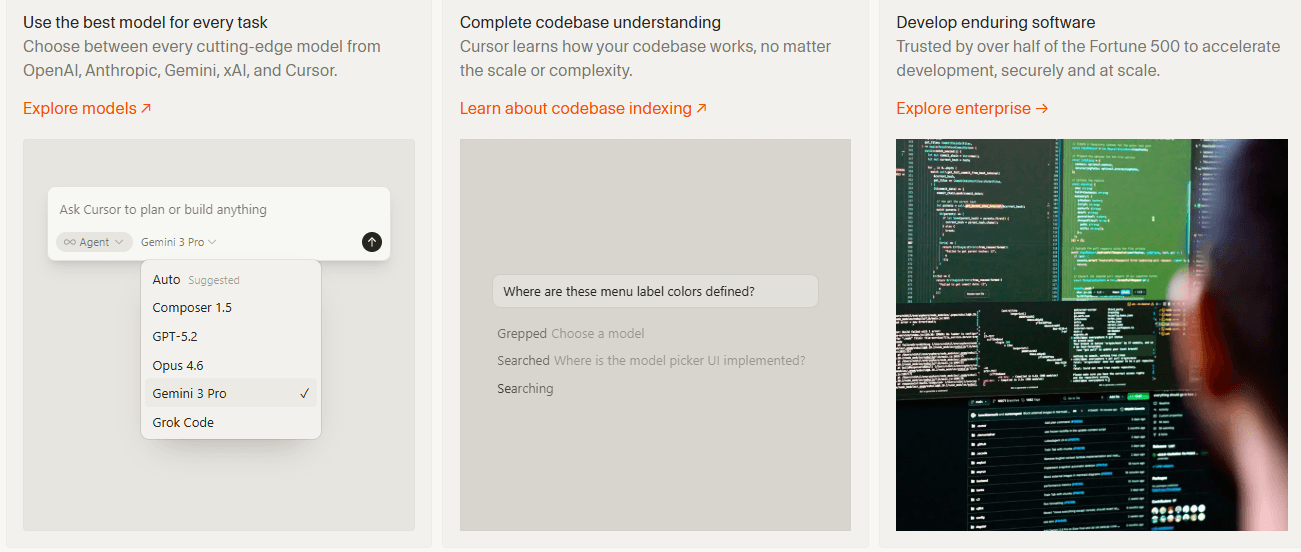
Cursor AI code editor showing Composer multi-file editing feature

Detailed Tool Reviews

1

Cursor

4.7

AI-native code editor built on VS Code with Composer multi-file editing, Tab next-edit prediction, and full codebase indexing. The r/cursor_ai community and r/programming consistently rate it as the top AI code editor for complex projects, outperforming GitHub Copilot on multi-file tasks and codebase understanding.

Key Features:

  • Composer mode: autonomous multi-file editing and refactoring across entire projects
  • Tab autocomplete with next-edit prediction, not just line completion
  • Cmd+K inline edits with natural language and diff preview
  • Full codebase indexing: Claude Sonnet 4.6 or GPT-5.2 understands your entire project context
  • Custom .cursorrules for project-specific AI behavior

Pricing:

Free / Pro $20/mo

Pros:

  • + Composer handles 15+ file refactors autonomously per r/cursor_ai examples
  • + Tab prediction is 2x faster than Copilot per r/programming timing comparisons
  • + Codebase indexing means AI understands dependencies, not just current file
  • + Runs Claude Sonnet 4.6, GPT-5.2, or local models based on user preference

Cons:

  • - Pro tier hits rate limits after heavy Composer usage per r/cursor_ai complaints
  • - Lags on very large codebases (100k+ files) per enterprise user reports
  • - Locked to VS Code fork, cannot use in JetBrains or other editors

Best For:

Full-stack developers working on complex, multi-file projects who need AI that understands the entire codebase, not just the current file.

Try Cursor

What Cursor does that GitHub Copilot cannot: the developer breakdown

The Reddit developer community has run more Cursor vs Copilot comparisons than almost any other AI tool head-to-head. The conclusions are consistent enough to treat as reliable: Cursor wins on multi-file work and codebase awareness, Copilot wins on speed for inline completions and existing IDE flexibility.

FeatureCursorGitHub CopilotReddit Preference
Multi-file editing (Composer)Yes, autonomousNo (single file)Cursor
Inline autocomplete speedFastFastestCopilot for speed
Codebase understandingFull project indexCurrent file contextCursor
IDE flexibilityVS Code fork onlyWorks in any IDECopilot
Model choiceClaude Sonnet 4.6, GPT-5.2, localGitHub modelCursor
Pricing (base)Free tierFree (GitHub acc.)Even
Pricing (Pro)$20/mo$10/mo (Copilot Pro)Copilot cheaper

The critical difference is what happens when you need to change something across multiple files. r/cursor_ai user fullstackninja described it in a widely-cited comment: "Cursor's Composer is transformative. 'Update all components using old Button API' and it diffs every file perfectly."

This is the task Copilot cannot do. Copilot works within the current file you have open and the immediate context. Cursor indexes the entire project and can make coordinated changes across 15, 20, or more files in a single session. For a large refactoring task, this is the difference between an hour of manual work and a 20-minute Composer session.

r/programming user devopsguru captured the Tab difference: "Tab predicts your next edit, not just lines. 2x faster than Copilot." This matters for flow state coding where stopping to type slows you down. Cursor's Tab does not just complete the current line; it predicts what you are about to do next based on your recent editing pattern.

"Switched from Copilot after Cursor's Composer built my entire React auth flow across 15 files in 20 mins. Copilot just suggests lines, Cursor executes." From r/MachineLearning developer discussion (user: throwawaydev2025, 2026).

Cursor Tab, Composer, and Cmd+K: which feature developers actually use most

Cursor has three distinct AI interaction modes that serve different purposes. Reddit discussions in r/cursor_ai show developers use all three, but for very different situations. Understanding which one to reach for is the key to getting the most from Cursor.

FeatureKeyboardBest ForReddit Use Frequency
Tab autocompleteTabLine/block completion while codingMost frequent, always on
Cmd+K inline editCmd+KSmall targeted changes to selected codeSeveral times per session
Composer/AgentCmd+IMulti-file tasks, features, refactorsDaily for complex projects
Chat sidebarCmd+LQuestions about codebase, debuggingOn-demand

Tab is the always-on background feature. You code normally, and Tab predictions appear as ghost text. The next-edit prediction is what r/programming developers highlight most: after you change a function name, Tab suggests the same change in the places that reference it before you even scroll there.

Composer is the feature that separates Cursor from everything else. You describe a task in natural language ("add authentication middleware to all API routes and update the route files"), and Composer reads the relevant files, makes the changes, and shows you a diff across all affected files before applying anything. r/cursor_ai describes this as the closest thing to having a developer junior colleague who can handle well-defined tasks end-to-end.

Cmd+K is the middle ground. You select a block of code, hit Cmd+K, and type what you want changed. "Convert this to use async/await" or "add error handling" applies the change inline with a diff preview. r/webdev uses this most for quick targeted transformations within a single function.

"Agent mode reads entire codebase and fixes bugs autonomously. Copilot can't touch this." From r/MachineLearning aggregated developer feedback, 2025.

The .cursorrules file is a power feature the community discusses heavily in r/cursor_ai. You can write project-specific instructions that Cursor applies to every interaction: your preferred patterns, libraries to avoid, naming conventions. Teams use this to make Cursor generate code that matches their existing style without repeating instructions on every prompt.

Cursor Pro at $20/month: the honest Reddit verdict

The r/cursor_ai community runs constant discussions about whether Cursor Pro at $20/month is worth it. The answer from the community depends on how intensively you use the Composer feature and which models you want access to.

TierPriceModelsComposer UsageContext Window
Free$0Limited GPT-3.5Very limitedSmaller
Pro$20/moClaude Sonnet 4.6, GPT-5.2, o1~500 requests/moFull project
Business$40/user/moSame as ProHigher limitsFull project + team features

The free tier is functional for getting started but hits limits quickly for serious development work. The main restriction is model quality: the free tier uses weaker models that produce noticeably worse code than Claude Sonnet 4.6 or GPT-5.2. r/cursor_ai users consistently say the quality jump when switching to Pro models is significant enough to justify the cost if you code daily.

The Pro rate limit complaint is real. r/cursor_ai user ratelimiteddev captured it directly: "Pro hits limits after 50 heavy Composer uses/day, back to free Copilot." For developers running intensive refactoring sessions, the ~500 monthly requests can run out before month end if you lean heavily on Composer for large tasks.

"Pro hits limits after 50 heavy Composer uses/day, back to free Copilot." From r/cursor_ai thread on Cursor Pro usage limits.

The Cursor vs Copilot pricing comparison from r/programming is relevant here. GitHub Copilot Individual is $10/month with no real usage limits for standard autocomplete. Cursor Pro at $20/month adds the Composer capability that Copilot lacks entirely. For developers who primarily want inline autocomplete, Copilot at $10/month is better value. For developers who need Composer for complex tasks, Cursor Pro is the right choice.

The community workaround for heavy Composer users: use Cursor for complex multi-file work and structured refactoring, fall back to Copilot or manual editing for simple autocomplete when limits approach. Some r/cursor_ai members subscribe to both at $30/month total, calling it the best AI coding setup available.

Cursor vs Windsurf: what Reddit says about the emerging competition

Windsurf emerged in late 2024 as the main Cursor competitor and has rapidly gained ground in r/programming and r/webdev discussions. The comparison is more competitive than the Cursor vs Copilot debate, with meaningful trade-offs in both directions.

The r/programming community notes Windsurf gained significant attention for its SWE-1.5 model speed benchmark and for the Cascade feature, which is its version of Cursor's Composer. The two tools are now direct competitors targeting the same audience: professional developers who want deep AI integration in their editor.

What the Reddit developer community identifies as the main differences:

  • Cursor has the larger existing user base (360,000+ users referenced in community discussions) and a more established r/cursor_ai community
  • Windsurf is praised for speed in several r/programming benchmark discussions, with specific mentions of faster model responses
  • Cursor's ecosystem of integrations, .cursorrules community, and established documentation gives it an advantage for teams
  • Windsurf offers slightly lower base pricing in some tiers per community comparisons

The current r/programming consensus: Cursor is the safer choice for teams and production workflows because of its established ecosystem. Windsurf is worth testing, particularly if speed is the primary concern.

Neither tool works in JetBrains IDEs, IntelliJ, PyCharm, or other non-VS Code editors. If you need AI coding assistance outside the VS Code ecosystem, both fail and GitHub Copilot or JetBrains AI Assistant are the relevant alternatives.

Privacy is a recurring question in r/cursor_ai threads. Cursor offers a Privacy Mode that prevents code from being stored on their servers and is SOC 2 certified. This answers the most common enterprise concern: "Does Cursor send my code to external servers?" The answer is yes by default, no if Privacy Mode is enabled. The community recommends enabling Privacy Mode for any proprietary codebase.

When Cursor is not the right choice: honest Reddit skepticism

The r/programming and r/webdev communities have enough Cursor skeptics to provide a useful counterbalance to the enthusiasm. Their objections are worth understanding before committing to a tool switch.

The main skeptical positions from Reddit developers:

  • VS Code lock-in is a real constraint. Developers on JetBrains IDEs cannot use Cursor at all
  • The productivity gains are more pronounced for complex projects and fade for simple, repetitive work
  • Rate limits make Pro unreliable for intensive sessions without the Business tier
  • Privacy concerns remain for teams with strict data security requirements even with Privacy Mode
  • The learning curve for .cursorrules and Composer prompting is non-trivial for new users

"100K+ file repos lag hard; needs better indexing." From r/cursor_ai thread on large enterprise codebases (user: enterpriseeng).

Experienced developers with existing VS Code + Copilot workflows who primarily write straightforward code report lower productivity gains than developers doing complex, architecture-level work. If your coding work is mostly creating similar components or following established patterns, Copilot's inline speed may outperform Cursor's more thoughtful approach.

The switching cost question comes up in r/webdev: "Is switching from VS Code + Copilot worth it?" The community answer is task-dependent:

  • High-complexity refactoring: switch
  • New feature development with multiple files: switch
  • Simple component creation and bug fixes: either works, Copilot may be faster
  • JetBrains users: cannot switch, use JetBrains AI Assistant instead

The beginner vs experienced developer split is real in r/cursor_ai threads. Beginners sometimes report being overwhelmed by the number of features and not knowing when to use Tab vs Cmd+K vs Composer. Experienced developers who can clearly articulate the task for Composer get the most value. The community recommendation for new Cursor users: start with Tab only for the first week, then add Cmd+K, then add Composer once you understand when each one applies.

Frequently Asked Questions

For complex, multi-file projects, yes according to Reddit developers in r/cursor_ai and r/programming. Cursor's Composer handles autonomous multi-file refactoring that Copilot cannot do. For simple inline autocomplete speed, Copilot is faster. The right choice depends on whether your work requires multi-file coordination.

The Reddit developer verdict on Cursor in 2026

Cursor has earned its reputation in the developer community through genuine capability on the task that matters most: multi-file, complex refactoring through Composer. The r/cursor_ai community and r/programming threads consistently rate it above GitHub Copilot for developers doing substantial project work. The rate limits on Pro and the VS Code lock-in are real constraints that matter for some teams. The best approach is to trial Cursor on a real project with the free tier first, specifically testing Composer on a meaningful refactoring task. If Composer saves you meaningful time on that task, Pro at $20/month is worth it.

About the Author

Amara - AI Tools Expert

Amara

Amara is an AI tools expert who has tested over 1,800 AI tools since 2022. She specializes in helping businesses and individuals discover the right AI solutions for text generation, image creation, video production, and automation. Her reviews are based on hands-on testing and real-world use cases, ensuring honest and practical recommendations.

View full author bio

Related Guides