
Data Center Cooling Systems: Air, Liquid, and Immersion Compared

Key Numbers
Key Takeaways
- 1Data center cooling removes heat from servers using air, liquid, or immersion systems. Air cooling handles up to 20-25 kW per rack with containment; direct-to-chip liquid cooling handles 30-100+ kW, the only viable option for modern AI GPU racks.
- 2Cooling accounts for approximately 40% of total data center energy consumption (CoreSite, 2024). Liquid cooling components for a single NVIDIA GB200 AI server rack cost around $55,000 (IDTechEx, December 2025), before the $1,000-$2,000 per kW facility installation cost.
- 3NVIDIA GB200 NVL72 racks generate 132 kW of heat each, a density no air system can match. Every major hyperscaler is building or retrofitting AI facilities with direct-to-chip liquid cooling as the baseline thermal infrastructure.
Data center cooling is the system that removes heat from servers, storage hardware, and networking equipment before temperatures damage components or cause downtime. Without it, a rack of GPU servers drawing 40 kilowatts would overheat within minutes. Cooling is not a secondary concern in data center design. It is the constraint that determines what hardware a facility can run and how dense that hardware can be packed.
The number that surprises most people: cooling accounts for approximately 40% of total data center energy consumption, according to CoreSite's 2024 State of the Data Center analysis. For every watt delivered to a server, roughly 0.4 watts goes toward moving heat out of the building. The ratio gets worse at higher rack densities unless the cooling technology changes.
This article covers the three main approaches: air cooling, liquid cooling in its various forms (rear-door heat exchangers, direct-to-chip, and immersion), and when each method breaks down. It also covers what the shift to AI GPU workloads has done to cooling requirements, with specific power figures from NVIDIA's current hardware that make the urgency concrete.
In This Article
What Is Data Center Cooling?
Data center cooling encompasses any system that transfers thermal energy from computing hardware to the external environment. Servers, GPUs, storage drives, and network switches generate heat as a byproduct of operation. Heat accumulates faster than passive ventilation can disperse it in any room with meaningful compute density. Active cooling is what makes high-density operation possible.
The industry measures cooling capacity in kilowatts per rack (kW/rack), the amount of heat a system can continuously remove from a standard server rack. The range of what different technologies can handle is wide:
| Cooling Method | Max Rack Density | Best For |
|---|---|---|
| Traditional air cooling | 5-15 kW/rack | General IT, legacy data centers |
| Air cooling with hot/cold aisle containment | 15-25 kW/rack | Mixed workloads, mid-density |
| Rear-door heat exchanger (RDHx) | 20-30 kW/rack | Retrofit on existing air infrastructure |
| Single-phase direct-to-chip liquid | 30-60 kW/rack | AI training racks, high-density GPU clusters |
| Two-phase direct-to-chip liquid | 60-100+ kW/rack | HPC, frontier AI model training |
| Full immersion cooling | 100+ kW/rack | Extreme density, next-generation AI |
Sources: 1-ACT Data Center Cooling Systems analysis, 2024; Legrand Data Center Cooling Guide, 2024.
There is also a metric called Power Usage Effectiveness (PUE), the ratio of total facility energy to IT equipment energy. A PUE of 1.0 means all power goes to compute with zero overhead. A PUE of 2.0 means for every watt of compute, another watt goes to infrastructure including cooling. The global average PUE is approximately 1.5. Google's fleet-wide average is 1.10, which comes partly from liquid cooling deployment at high-density AI pods.
Cooling technology selection is a long-term commitment. Retrofitting an air-cooled facility to support direct-to-chip liquid cooling requires new chilled water distribution loops, coolant distribution units (CDUs) near every rack row, modified server hardware with cold plates, and updated drainage infrastructure. Operators do not switch cooling approaches casually or cheaply.
Air Cooling: How It Works and Where It Stops
Air cooling has been standard in data centers since the 1950s. Computer Room Air Conditioning (CRAC) units or Computer Room Air Handlers (CRAH) push chilled air from a raised floor plenum or overhead ducting through server racks. Servers draw cool air in from the front, heat it as it passes over components, and exhaust it out the back. The returned hot air cycles back to the CRAC or CRAH unit to be cooled again.
The primary airflow improvement of the past two decades is hot/cold aisle containment. Without it, hot exhaust air from rack rears mixes with cool supply air before reaching server intakes, reducing efficiency. Containment structures physically separate the cold aisle (rack fronts, where cool air enters) from the hot aisle (rack rears, where hot air exits). Fully enclosed containment systems cost more to install but reduce wasted cooling by 20-30%.
Air cooling works well for its intended density range. The problems begin when rack power climbs above 25 kW.
Why air cooling becomes impractical at high density:
- Fan power scales roughly with the cube of airflow velocity. Doubling the cooling effect requires approximately eight times the fan power, which partly cancels the efficiency goal.
- At 40 kW/rack, the airflow volume required creates pressure differentials that pull hot air back into adjacent aisles, even with containment in place.
- CRAC units have fixed BTU/hour ratings. Exceeding them means adding more units, which competes for floor space with revenue-generating servers.
- Air has poor thermal conductivity compared to water. Moving heat via air requires moving large volumes of a less efficient medium.
A rack loaded with eight NVIDIA H100 GPUs draws approximately 40 kW. The NVIDIA GB200 NVL72 rack draws 132 kW per rack. No commercially available air cooling configuration reliably handles either of those densities. Air cooling was designed for the compute densities of the 2010s.
"Next-gen NVIDIA racks require 240kW of cooling capacity per rack." (Steven Carlini, Vice President of Innovation, Schneider Electric, Forbes, June 2025)
That 240 kW figure refers to future NVIDIA rack designs after Blackwell. Current GB200 racks at 132 kW are already beyond what air can reliably manage. The shift away from air cooling at AI-specific facilities is not a future planning exercise. It is happening now.
Liquid Cooling: Direct-to-Chip, Rear-Door, and Immersion
Liquid cooling moves chilled fluid through pipes or cold plates directly to the hottest components in a server rack. Water has approximately 4,000 times the thermal conductivity of air per unit volume. It can remove the same amount of heat with far less energy and far less volume of medium than air requires.
There are three main configurations used in data centers today.
Rear-door heat exchangers
A rear-door heat exchanger replaces the standard rear door of a server rack with a radiator through which chilled water circulates. Hot exhaust air from servers passes through the radiator before leaving the rack. The radiator absorbs heat and the cooled air continues into the hot aisle. RDHx systems handle 20-30 kW/rack and are the least disruptive upgrade for existing air-cooled facilities. They do not require modifications inside servers or major changes to floor-level infrastructure beyond adding water lines to rack rows.
Direct-to-chip liquid cooling
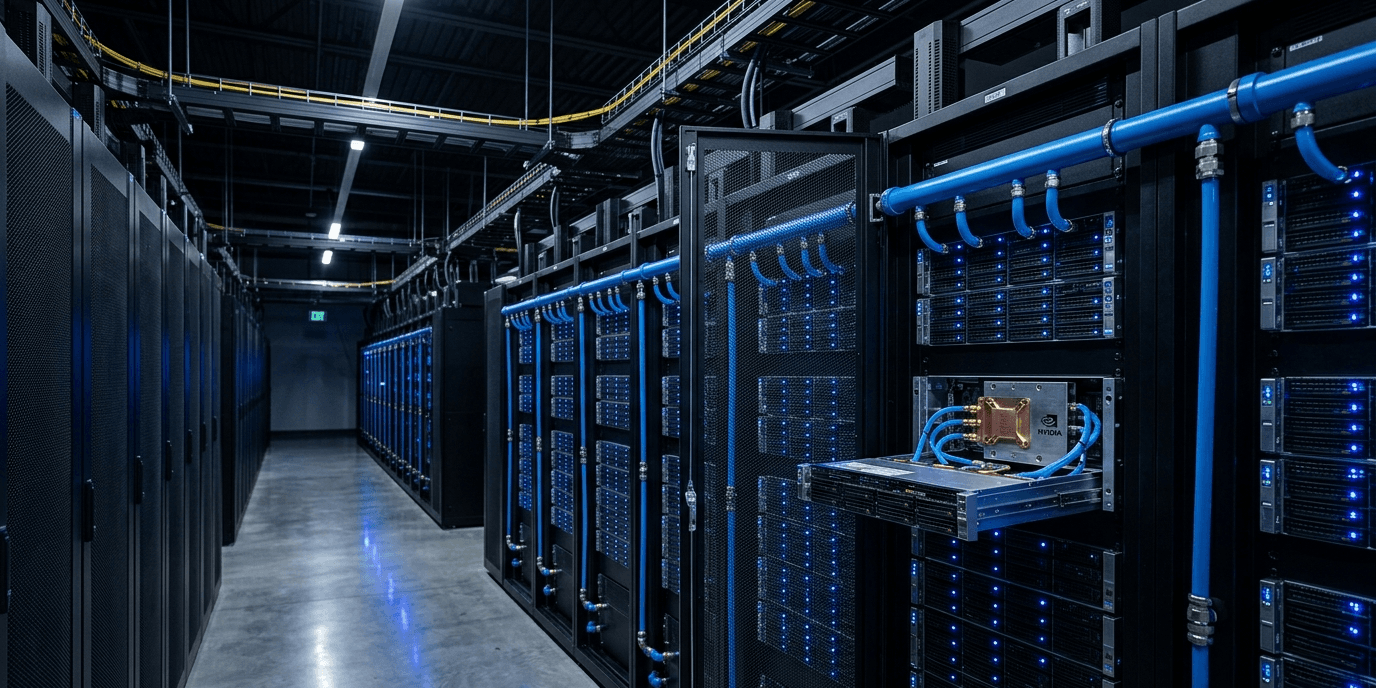
Direct-to-chip cooling attaches cold plates directly to CPUs and GPUs at the circuit board level. Chilled liquid enters the cold plate, absorbs heat at the chip surface, and returns to a coolant distribution unit (CDU) that transfers the heat to the building's external chilled water loop. The loop typically connects to a cooling tower or dry cooler outside the building.
Single-phase D2C uses liquid that stays liquid throughout the cycle, handling 30-60 kW/rack. Two-phase D2C uses refrigerant that vaporizes at the chip surface. Phase-change absorbs more energy than a temperature rise alone does, pushing the upper limit to 60-100+ kW/rack.
According to IDTechEx's December 2025 Thermal Management for Data Centers report, cooling components for a single NVIDIA GB200 AI server rack cost approximately $55,000, broken down as: $23,000 for the coolant distribution unit, $15,000 for manifolds, and $18,880 in server-level thermal content across eight AI servers per rack.
Immersion cooling
Immersion cooling submerges complete servers in tanks of non-conductive dielectric fluid. The fluid absorbs heat directly from all hardware surfaces, including GPUs, CPUs, memory, and power supplies, with no individual cold plates needed. Single-phase immersion uses fluid that remains liquid at all temperatures. Two-phase immersion uses a fluid with a boiling point around 50°C; the vapor condenses on a cooled lid above the tank and drips back in.
Immersion handles 100+ kW per tank. Servicing immersed hardware requires lifting servers from fluid rather than sliding them from a rack, and not all server hardware is compatible with immersion fluids.
One common misconception is that all liquid cooling systems use water. Many direct-to-chip and immersion systems use non-conductive dielectric fluids specifically to avoid the conductivity risks of water near live electrical components.
For the broader picture of why data center energy consumption has become a major infrastructure topic, see our overview of AI data center power consumption.
Cooling Costs and Efficiency: The Numbers Most Articles Skip
Cooling costs divide into capital expenditure (building the system) and operating expenditure (running it). The two do not move in the same direction, and the relationship is counterintuitive at high densities.
A 2020 Schneider Electric capital expenditure analysis compared air-cooled and liquid-cooled data centers at various rack densities. At standard densities, the two approaches cost roughly the same to build. The gap opens at 40 kW/rack:
| Rack Density | Air-Cooled Cost per Watt | Liquid-Cooled Cost per Watt | Liquid Advantage |
|---|---|---|---|
| ~5 kW/rack | $7.02/W | ~$7.02/W | None |
| ~20 kW/rack | $7.02/W | $6.98/W | Marginal |
| ~40 kW/rack | $7.02/W | $6.02/W | 14% cheaper |
| 60+ kW/rack | Not viable | Decreasing further | Air not feasible |
Source: Schneider Electric, February 2020.
On operating costs, the picture is clearer. Liquid cooling with direct-to-chip reduces annual fan energy by 10-20% compared to equivalent air cooling configurations, and total annual cooling costs in liquid-cooled facilities at comparable densities run 30-45% lower (Rittal Corporation analysis). Since cooling represents approximately 40% of total facility energy cost, a 30-45% cooling reduction translates to a 12-18% drop in total energy spend per year.
Installation costs for liquid cooling run $1,000-$2,000 per kilowatt cooled. A complete 1 MW cooling system costs approximately $1 million to build (Data Center Knowledge).
The number most guides don't show
Ten NVIDIA GB200 NVL72 racks generate 1.32 MW of continuous heat output (132 kW per rack multiplied by 10 racks). At $1,000-$2,000 per kW for direct-to-chip liquid cooling infrastructure, the cooling system for those ten racks costs $1.32 million to $2.64 million, before any server hardware is purchased.
Estimate the server hardware at roughly $3 million per GB200 NVL72 rack, derived from per-GPU pricing at current market rates, and ten racks total approximately $30 million in compute.
The cooling infrastructure is 4-9% of the hardware cost at this scale. For ten racks that seems manageable. For a 1,000-rack AI facility (several hyperscalers are building at this scale now), cooling infrastructure runs $132 million to $264 million on top of the hardware cost. That figure rarely appears in the headline project announcements, but it is a real line item in every large AI data center build announced in 2025 and 2026.
The Lawrence Berkeley National Laboratory's Liquid Cooling resource is the most comprehensive publicly available engineering reference for facility-level liquid cooling planning and design.
How AI GPU Workloads Changed Cooling Requirements
Before 2022, most data centers operated at average rack densities below 10 kW. Standard air cooling handled this without issue. The deployment of NVIDIA A100 GPUs in large-scale AI training clusters changed the calculus. Eight A100s in a server draw approximately 3.2 kW from GPUs alone. A fully loaded 4U A100 server pulls 6-8 kW total. At four servers per rack, that reaches 24-32 kW. Enhanced air cooling could still manage, barely.
NVIDIA H100 GPUs draw 700W each. Eight H100s total 5.6 kW from GPUs. A loaded H100 server pulls close to 10 kW. Fill a rack with four of those servers and you reach 40 kW, at the practical edge of what enhanced air cooling can reliably handle.
Then GB200 NVL72 entered production in 2025. At 132 kW per rack, it requires liquid cooling as a design requirement. There is no air system that handles 132 kW per rack.
"Efficient cooling is a significant factor in a data center's operating costs; cooling accounts for approximately 40% of a data center's energy consumption." (CoreSite, 2024 State of the Data Center)
The practical consequence is that any facility accepting GB200 hardware must support liquid cooling at the rack level. This is why Microsoft, Google, and Meta began publicly announcing liquid cooling deployments in 2024 and 2025 specifically for AI infrastructure.
The U.S. data center liquid cooling market is projected to grow at 21.6% CAGR from 2025 to 2030, according to Grand View Research. That growth rate reflects both new AI data center construction and retrofitting of existing facilities to support GPU rack densities.
Microsoft Azure facilities use a combination of direct evaporative cooling for lower-density standard compute and direct-to-chip liquid cooling for GPU clusters. Which approach depends partly on geography: facilities in cooler regions can use more evaporative methods, while hot or water-scarce locations require closed-loop liquid systems to meet sustainability targets.
This shift connects directly to how hyperscale data centers are being designed from 2025 onward. For new AI facilities, liquid cooling is not an upgrade option. It is the base infrastructure.
Matching Cooling to Workload
Cooling selection comes down to three variables: rack density, whether the facility is a new build or a retrofit, and the budget split between upfront capital and long-term operating cost.
For existing facilities with general IT workloads below 15 kW/rack, air cooling with hot/cold aisle containment remains economical. There is no reason to add liquid infrastructure at this density.
For densities creeping toward 25 kW, rear-door heat exchangers are the lowest-disruption upgrade path. They add water connections to rack rows but do not require server hardware modifications or raised floor changes.
For new builds or major retrofits hosting GPU workloads above 30 kW/rack, direct-to-chip liquid cooling is the practical choice. It handles current GPU rack densities, scales to the next GPU generation, and has a 14%+ capex advantage over air cooling at 40 kW/rack and above.
Immersion cooling makes sense at extreme densities above 100 kW or where space efficiency is the overriding priority. The operational change is significant and worth understanding before committing: servicing immersed hardware is a different process that requires different skills and different spare parts logistics.
| Use Case | Recommended Cooling | Primary Reason |
|---|---|---|
| General IT, below 15 kW/rack | Air with containment | Lowest total cost, standard operations |
| Mixed workloads, 15-30 kW/rack | Rear-door heat exchanger | Retrofit-compatible, handles moderate density |
| AI GPU clusters, 30-100 kW/rack | Direct-to-chip liquid (single-phase) | Required by GPU hardware thermal specs |
| Frontier AI training, 60-100 kW/rack | Two-phase direct-to-chip | Phase-change efficiency at extreme density |
| Highest density or space-constrained | Immersion | 100+ kW per tank, no rack airflow required |
For facilities hosting NVIDIA Blackwell GB200 hardware, direct-to-chip liquid cooling is not a choice. The GB200 NVL72 ships with integrated liquid cooling manifolds and a 132 kW thermal design power per rack. Accepting that hardware means accepting liquid cooling as the facility baseline.
One observation that does not appear in most comparison articles: immersion cooling at scale changes the organizational model, not just the engineering. When hardware is submerged, physical access procedures change, spare parts management changes, and the skills required for data center operations change. Facilities that move to large-scale immersion are not buying a different cooling product. They are committing to a different way of running a data center.
Frequently Asked Questions
What is data center cooling?
Data center cooling is the system that removes heat from servers, networking equipment, and storage hardware to prevent overheating and maintain reliable operation. The three main approaches are air cooling (fans and refrigeration units), liquid cooling (cold plates or rear-door heat exchangers with chilled water), and immersion cooling (servers submerged in non-conductive fluid). Cooling accounts for approximately 40% of total data center energy consumption, according to CoreSite's 2024 analysis.
What is the difference between air cooling and liquid cooling in data centers?
Air cooling uses fans and refrigeration units to move chilled air through server racks, handling up to 20-25 kW per rack with containment systems. Liquid cooling pipes chilled fluid directly to hot components via cold plates or rear-door radiators, handling 30-100+ kW per rack. At rack densities above 40 kW (standard for AI GPU servers), liquid cooling costs 14% less per watt to build and 30-45% less per year to operate. Air cooling cannot support current-generation AI GPU racks like the NVIDIA GB200 NVL72, which draws 132 kW per rack.
What is direct-to-chip liquid cooling in data centers?
Direct-to-chip (D2C) liquid cooling attaches cold plates directly to CPUs and GPUs at the circuit board level. Chilled liquid flows through the cold plate, absorbs heat at the chip surface, and returns to a coolant distribution unit (CDU) that transfers heat to the building's external cooling loop. Single-phase D2C handles 30-60 kW per rack. Two-phase D2C, which uses refrigerant that vaporizes at the chip surface, handles 60-100+ kW per rack. According to IDTechEx's December 2025 Thermal Management report, cooling components alone for an NVIDIA GB200 AI server rack cost approximately $55,000.
What is immersion cooling in data centers?
Immersion cooling submerges complete servers in tanks of non-conductive dielectric fluid that absorbs heat directly from all hardware surfaces: GPUs, CPUs, memory, and power supplies. Single-phase immersion uses fluid that remains liquid at all temperatures. Two-phase immersion uses a fluid with a boiling point around 50°C; the vapor condenses on a cooled lid and drips back into the tank. Immersion handles 100+ kW per tank. Servers are serviced by lifting them from fluid rather than sliding them from racks, which requires different operational procedures than standard air or direct-to-chip cooling.
Why do AI data centers need liquid cooling?
AI GPU servers draw far more power per rack than standard IT hardware. A rack of NVIDIA H100 GPUs draws approximately 40 kW. The NVIDIA GB200 NVL72, shipping to cloud providers from 2025, draws 132 kW per rack. Air cooling cannot handle either density reliably. Direct-to-chip liquid cooling is required by the thermal design specifications of current-generation AI GPU hardware. Microsoft, Google, and Meta are all retrofitting existing facilities and building new AI data centers with liquid cooling as the base thermal infrastructure.
How much does data center liquid cooling cost?
Direct-to-chip liquid cooling installation costs $1,000-$2,000 per kilowatt cooled. A complete 1 MW cooling system costs approximately $1 million to build (Data Center Knowledge). At 40 kW/rack density, liquid cooling costs $6.02 per watt to build versus $7.02 per watt for air cooling, a 14% capex advantage. Annual operating costs in liquid-cooled facilities at comparable densities run 30-45% lower than air-cooled equivalents (Rittal Corporation analysis).
What is PUE and how does cooling affect it?
Power Usage Effectiveness (PUE) is the ratio of total data center energy to IT equipment energy. A PUE of 1.0 means all power goes to compute. A PUE of 2.0 means for every watt of compute, another watt goes to overhead including cooling. The global average PUE is approximately 1.5. Google's fleet-wide average is 1.10, partly because of liquid cooling deployment at high-density AI infrastructure. Cooling is the largest single contributor to PUE overhead. Switching from air cooling to direct-to-chip liquid cooling at high rack densities typically reduces PUE by 0.1-0.3 points.
What is a rear-door heat exchanger in data centers?
A rear-door heat exchanger (RDHx) is a radiator mounted on the rear door of a server rack through which chilled water circulates. Hot exhaust air from servers passes through the radiator before leaving the rack, transferring heat to the water rather than to the room air. RDHx systems handle 20-30 kW per rack and are the lowest-disruption upgrade for existing air-cooled facilities: they require water connections at rack rows but do not require modifications inside servers or changes to raised floor infrastructure. They are widely used when a facility needs to raise its cooling capacity for higher-density workloads without a full liquid cooling build-out.