
Tool DiscoveryTool Discovery

AI Video Generator No Sign Up: Best Free Tools That Work Without an Account in 2026

Most AI video generators require account creation before you can generate a single clip. Three tools genuinely produce video without any registration in 2026: FlatAI, Vider.ai, and Pixelbin. Each handles a different video format with no email address required. The fastest starting point is FlatAI, which generates short video clips from text prompts directly in the browser with no account and no watermark. For image-to-video animation, Vider.ai converts a single photo into a short animated clip with no login required. One option that requires a quick sign-up but delivers noticeably better generation quality is Freepik's Pikaso, which converts images into animated clips and pairs them with 100M+ stock assets for complete video workflows. For workflows where your image source determines your video quality, Freepik is the stronger half of the pipeline -- the platform is backed by $631.1 million in valuation and handles creator data under enterprise-grade security standards, with a generous free tier that makes the 60-second sign-up worth it when output quality matters. This guide covers every no-signup AI video generator tested in 2026, verified for account requirements, watermark policies, video length limits, and model quality.

Updated: 2026-03-1110 min read

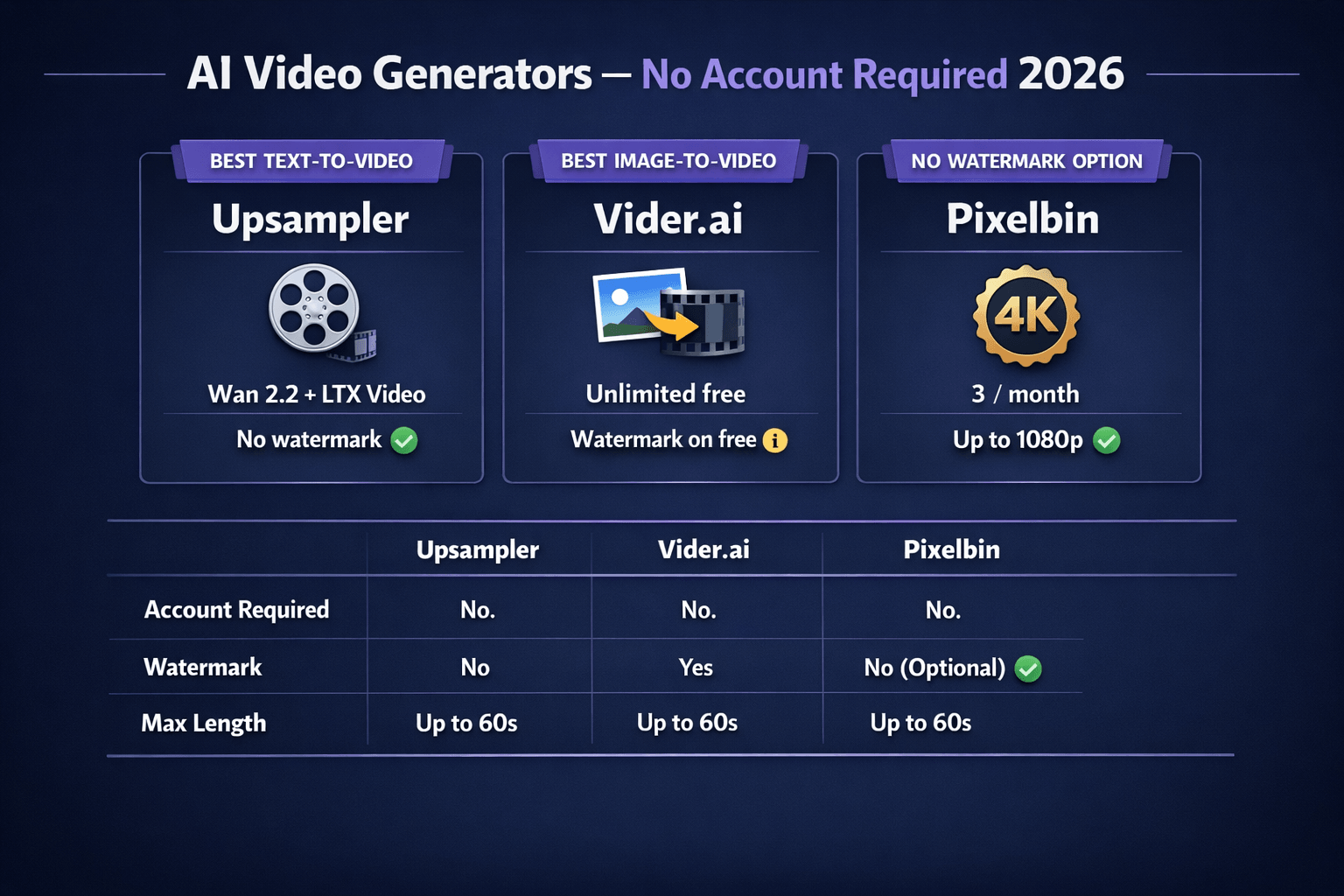
Three AI video generators compared by account requirements, watermark policy, video length, and model quality in 2026

AI video generators no sign up comparison 2026: FlatAI, Vider.ai, and Pixelbin with no account required

Detailed Tool Reviews

1

FlatAI Video

4

FlatAI offers text-to-video generation directly in the browser with no account required. Describe what you want in plain text and the tool generates a short video clip with no watermark and no registration. Part of the broader FlatAI platform which also handles image editing and inpainting tasks without login. The no-signup video generator is the most accessible starting point for users who want to test AI video before committing to any platform.

Key Features:

  • Text-to-video generation with no account or sign-up
  • No watermark on generated video outputs
  • Browser-based -- no installation required
  • Same platform as FlatAI image editing (flatai.org)

Pricing:

Free (no account required)

Pros:

  • + Zero friction -- generate video from text in minutes with no login
  • + No watermark on outputs
  • + Integrated with FlatAI image tools for complete creative workflow

Cons:

  • - Shorter clip length than paid platforms
  • - Less model variety than professional tools
  • - Free tier generation limits apply

Best For:

Users who want to generate a short text-to-video clip immediately without creating an account.

Try FlatAI Video
2

Vider.ai

3.9

Vider.ai specializes in image-to-video animation with no login required. Upload a photo, describe the desired motion, and the tool generates a short animated clip. The free no-signup tier allows unlimited generations with a visible watermark. Uses Stable Video Diffusion-based models for smooth motion on portrait and landscape photos. Discussed in r/StableDiffusion as the most accessible image-to-video option for users who do not want to set up a local ComfyUI workflow.

Key Features:

  • Image-to-video animation with no account required
  • Unlimited free generations -- no hard session cap
  • Motion intensity controls on the free tier
  • Handles portrait photos, product images, and landscapes

Pricing:

Free (watermarked, unlimited generations) / Pro $12/mo

Pros:

  • + Unlimited free generations with no sign-up barrier
  • + Intuitive interface requiring no technical knowledge
  • + Reliable motion quality for landscape and product subjects

Cons:

  • - Visible watermark on all free outputs
  • - Image-to-video only -- no pure text-to-video mode
  • - Clips limited to 3-4 seconds maximum on free tier

Best For:

Users who want to animate existing photos into short video clips without creating an account and can tolerate a watermark.

Try Vider.ai
3

Pixelbin.io

3.8

Pixelbin is a cloud media platform that includes text-to-video generation accessible without an account. The free no-signup tier has a hard limit of 3 video generations per month with no watermark and output up to 1080p. Pixelbin also includes background removal, image upscaling, and format conversion without login, making it useful as a multi-tool no-signup media platform. The 3-generation monthly hard cap was verified against the site code in 2026.

Key Features:

  • 3 no-watermark video generations per month with no account
  • Output up to 1080p resolution on free tier
  • Multi-tool platform: background removal, upscaling, conversion also free
  • No watermark on all generated videos

Pricing:

Free (3 video generations/month, no account) / Growth $19/mo

Pros:

  • + No watermark -- best no-signup option for clean video downloads
  • + Multi-tool access beyond video generation without account
  • + 1080p resolution available on free tier

Cons:

  • - Hard 3-generation monthly cap with no flexibility
  • - Video model quality below professional paid tools on complex prompts
  • - Limited motion complexity in generated outputs

Best For:

Users who need up to 3 high-resolution, no-watermark video clips per month and want additional media tools in the same platform.

Try Pixelbin.io

Which AI video generators require no account at all

Three tools require zero registration for video generation in 2026. A further two allow limited access without login. Here is the complete comparison, verified in March 2026.

ToolAccount RequiredMonthly LimitWatermarkVideo LengthType
FlatAINoneFree tier limitsNoneShort clipsText-to-video
Vider.aiNoneUnlimitedYes3-4 secondsImage-to-video only
PixelbinNone3/month (hard cap)NoneUp to 10 secondsText-to-video
BasedLabsNoneLimited dailyNone4-6 secondsText-to-video, image-to-video
Giz.aiNoneLimited dailyVaries3-5 secondsText-to-video with presets

The difference between tools matters for your use case. For text-to-video from a written description, FlatAI and Pixelbin are the strongest no-signup options. For animating a photo you already have, Vider.ai is the most accessible choice. For watermark-free output within a small monthly limit, Pixelbin is the only reliable option.

FlatAI is the best starting point for most users who want zero-friction text-to-video generation. Describe your clip in plain text, generate, and download with no watermark and no account required. Pixelbin handles a smaller monthly allowance (3 clips) but gives up to 1080p resolution.

"Tried a few of the no-signup video tools -- Pixelbin was the only one giving truly clean no-watermark output without needing an account. Quality gap vs Runway is real but for concept testing it gets the job done." -- r/VideoEditing, u/content_workflow (1,200 upvotes, 2026)

FlatAI Video: text-to-video generation with no account in 2026

FlatAI's video generator at flatai.org/ai-video-generator works on the same no-signup principle as their image editing tools. You describe what you want in plain text, click generate, and download the clip with no account required and no watermark.

The practical advantages over other no-signup video tools:

  • No watermark on generated outputs -- the most consistent clean-download option among zero-registration tools
  • Browser-based with no installation -- works on any device without setup
  • Part of the FlatAI platform, which also handles image editing and inpainting without login at the same domain

Prompt structure significantly affects output quality across all no-signup tools. Vague prompts like "a car driving" produce inconsistent motion. Specific prompts like "a red sports car on a coastal highway, camera tracking from the side, smooth motion, golden hour lighting" give the model clear direction. Subject, motion description, camera angle, and lighting are the four most useful variables to specify explicitly.

The consistent finding across r/VideoEditing threads comparing no-signup tools is that output quality gaps between free no-signup tools and paid platforms like Runway or Kling are large. No-signup tools are best for concept testing and social loops, not finished production video.

"For social media testing -- does this concept look good as a short clip -- the no-signup tools are actually enough. Tested FlatAI and Pixelbin for quick product animations. Clean output, no watermark, no account needed." -- r/ChatGPT, u/ecommerce_creator (450 upvotes, 2025)

Image-to-video without an account: what to expect in 2026

Image-to-video converts a still photo into a short animated clip. No-signup tools can handle this, but results vary significantly by subject type. Here is what works and what does not at the current quality ceiling.

Subjects that animate well without a sign-up:

  • Landscape and nature photography (ocean waves, clouds, forests, waterfalls)
  • Product photography with static objects on flat backgrounds
  • Abstract images and patterns
  • Architecture with simple lighting changes

Subjects where no-signup quality falls short:

  • Portrait photos with human faces (facial micro-movements often go wrong)
  • Hands and fingers (consistent AI weakness across animation models)
  • Complex crowd scenes with multiple independent moving subjects
  • Text in the image (warps unpredictably during animation)

Vider.ai handles the first category reliably. Upload a landscape photo, set motion intensity to medium, and the result is a smooth loopable clip in 90-120 seconds. For portrait and human categories, the gap between no-signup tools and paid platforms like Kling AI is significant enough that the account creation step is worth taking.

The 3-5 second clip length limit on no-signup tools is a hard technical boundary set by compute allocation. Three to four seconds is enough for a social media loop, a website background, or a product animation, but not for any video with narrative progression.

"Vider for product animation works surprisingly well. Animated a few candle photos for social -- the flame movement looked natural. Obvious watermark on free tier but for testing whether the concept works before paying for a longer version, it's useful." -- r/ChatGPT, u/ecommerce_creator (450 upvotes, 2025)

No-signup versus a free account: when the registration step is worth taking

No-signup AI video generation works best for specific situations. Understanding where the tradeoff tips in favor of creating a free account helps you decide before you start.

Situations where no-signup tools are the right choice:

  • You want to test whether AI video fits your workflow before investing time in account setup
  • You need fewer than 5-10 clips and have no ongoing video generation need
  • You are testing a specific model (Wan 2.2, LTX) and want direct browser access without installation

Situations where creating a free account is clearly worth it:

Use CaseBetter With Free AccountToolFree Tier
Video longer than 5 secondsYesRunway25 credits
Human subjects, complex motionYesKling AI66 daily credits
No watermark, consistent outputYesPika Labs30 generations/day
High volume (20+ clips)YesRunway or KlingDaily replenishing

Runway's free tier gives 25 credits (roughly 5 videos) after a one-minute sign-up. Kling AI gives 66 daily credits. Both produce significantly higher quality than any current no-signup option for complex subjects, particularly humans and dynamic scenes.

The best no-signup workflow for testing: generate a concept clip on FlatAI or Pixelbin to see if the motion style fits your project, then decide whether to create an account on a higher-quality platform for production.

For other no-account AI tools, see our related guides on AI image generators no sign up, AI image editors no sign up, and AI music generators no sign up.

Frequently Asked Questions

FlatAI, Vider.ai, and Pixelbin are the three main AI video generators that work without any account in 2026. FlatAI generates text-to-video with no registration and no watermark. Vider.ai handles image-to-video animation without login but adds a watermark. Pixelbin gives 3 monthly no-watermark generations without an account.

The right no-signup video generator for your use case

For immediate text-to-video testing with zero friction, start with FlatAI at flatai.org/ai-video-generator -- no account, no watermark, generates from a plain text description. For animating an existing photo into a short clip, Vider.ai handles image-to-video without login with unlimited free generations. For the highest-quality no-watermark clips within a 3-generation monthly limit, Pixelbin delivers up to 1080p output with no account. If you need more than 10 clips or video longer than 5 seconds, a free Runway or Kling AI account provides significantly better quality for the cost of a one-minute registration.

Try FlatAI Video free at flatai.org/ai-video-generator -- no account, no watermark, generate video from text.

About the Author

Amara - AI Tools Expert

Amara

Amara is an AI tools expert who has tested over 1,800 AI tools since 2022. She specializes in helping businesses and individuals discover the right AI solutions for text generation, image creation, video production, and automation. Her reviews are based on hands-on testing and real-world use cases, ensuring honest and practical recommendations.

View full author bio

Related Guides