

Tool DiscoveryTool Discovery

AI Image Generator No Sign Up: Best Free Tools That Work Without an Account in 2026

Most AI image generators block you behind a registration wall before you can generate a single image. If you want to test AI image generation without handing over your email address, five tools genuinely work without any account: Craiyon, Raphael AI, Perchance, Magic Studio, and Bing Image Creator in Edge on Windows. The fastest way to start: go to Raphael AI, type your prompt, and get a high-quality image in under 20 seconds with no login, no credit card, no daily cap. For nine images at once across multiple styles, Craiyon is the other genuinely unlimited no-account option. This guide compares every major no-signup AI image generator tested in 2026, covering image quality, daily limits, watermarks, and which use cases each one handles best.

Updated: 2026-03-0810 min read

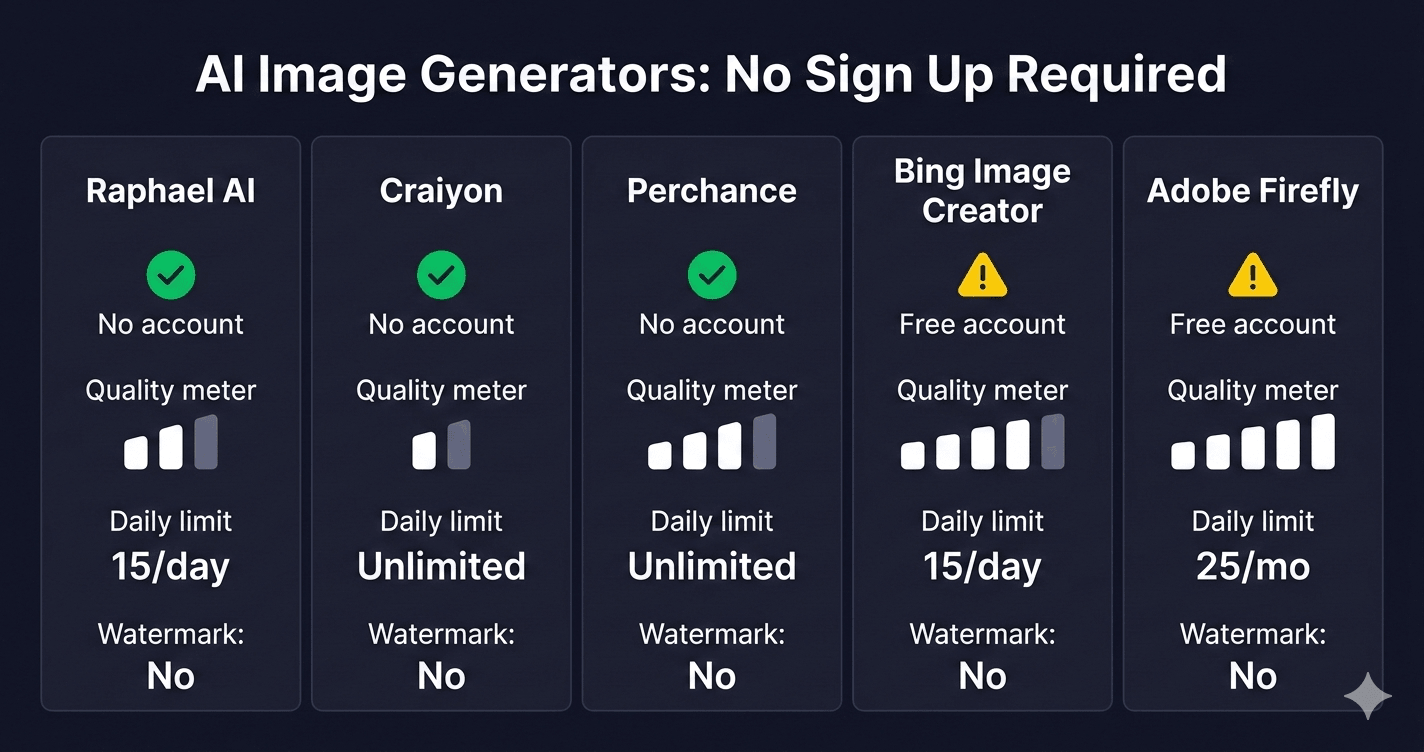
Five AI image generators compared by account requirements, daily limits, and watermark policy

AI image generators no sign up comparison: Raphael AI, Craiyon, Perchance, Bing Image Creator, Adobe Firefly

Detailed Tool Reviews

1

Craiyon

4.1

Craiyon (formerly DALL-E mini) generates nine AI images at once directly in your browser with zero account required. The free tier is unlimited but ad-supported and slower (45-60 seconds per batch). Multiple style modes: photo, drawing, art, and auto. No watermarks on generated images. Reddit users in r/StableDiffusion specifically recommend Craiyon for quick concept testing before committing to a paid tool.

Key Features:

  • No account or registration of any kind needed
  • Generates 9 images per prompt in multiple styles
  • Unlimited free generations (slower speed on free tier)
  • No watermarks on downloaded images

Pricing:

Free (ad-supported) / Supporter $5/mo / Professional $20/mo

Pros:

  • + Truly zero barrier -- no email, no account, start in seconds
  • + Nine images per batch gives variety to select from
  • + Multiple style modes on free tier

Cons:

  • - 45-60 second generation time on free tier
  • - Lower resolution than paid alternatives
  • - Ad-supported free experience

Best For:

First-time users who want to test AI image generation immediately with no sign-up friction.

Try Craiyon
2

Bing Image Creator

4.4

Microsoft's DALL-E 3-powered image generator built into Bing search and Edge browser. Produces the highest quality images of any free option. Windows and Edge users can access limited generations without a separate sign-in if already logged into Windows. A free Microsoft account (Outlook, Xbox, or Hotmail) unlocks 15 boosted generations daily with continued slower generation after that -- no hard daily cap.

Key Features:

  • Powered by DALL-E 3 -- highest quality among free options
  • 15 boosted (fast) generations daily on free account
  • Accessible inside Bing.com search results directly
  • Content-safe outputs with Microsoft moderation

Pricing:

Free with Microsoft account

Pros:

  • + DALL-E 3 quality at no cost
  • + Works inside Bing.com without a separate subscription
  • + Edge on Windows often works with Windows login context

Cons:

  • - Full use requires a Microsoft account (free)
  • - Content restrictions filter certain image types
  • - Slower generation after 15 daily boost credits

Best For:

Windows and Edge users who want the highest-quality free AI images and have or are willing to create a free Microsoft account.

Try Bing Image Creator
3

Adobe Firefly

4.5

Adobe Firefly requires a free Adobe account but offers 25 monthly generation credits at no cost. Built on commercially licensed Adobe Stock training data, every Firefly image is safe for commercial use without copyright concerns. Discussed in r/graphic_design and r/Adobe as the most commercially reliable free AI image option for professional and marketing use.

Key Features:

  • Trained on licensed Adobe Stock images -- commercially safe output
  • 25 free generative credits monthly on free Adobe account
  • Style controls: photo, art, graphic, vector
  • Content credentials marking AI generation for transparency

Pricing:

Free 25 credits/mo with free Adobe account / Premium $9.99/mo

Pros:

  • + Commercially safe for business and marketing use
  • + High quality outputs matching Adobe design standards
  • + Free account gives usable monthly credits

Cons:

  • - Requires free Adobe account (not truly no-signup)
  • - Only 25 free credits per month
  • - Advanced features require Creative Cloud subscription

Best For:

Designers and marketers who need commercially safe AI images and can create a free Adobe account.

Try Adobe Firefly

Which AI image generators require no account at all

Three tools require zero registration: Craiyon, Raphael AI, and Perchance. A further two have genuinely accessible free tiers that work with minimal friction. Here is the complete comparison.

ToolAccount RequiredDaily LimitQualityWatermarkSpeed
Raphael AINoneUnlimitedGood (FLUX.1)None15-20 sec
CraiyonNoneUnlimited (slower)BasicNone45-60 sec
PerchanceNoneUnlimitedGood (SD-based)None20-30 sec
Magic StudioNoneLimited dailyGoodNoneFast
Bing Image CreatorMicrosoft (free)15 boosted/dayExcellent (DALL-E 3)None10-15 sec
Adobe FireflyAdobe (free)25 credits/monthExcellentNone10-15 sec
IdeogramGoogle/Apple (free)10 free/dayVery goodNone15-20 sec

Raphael AI is the best starting point for no-signup image generation. It uses the FLUX.1 model, generates images without any account, has no daily limit, and produces noticeably better results than Craiyon on photorealistic prompts. The site explicitly states unlimited free generations with no hidden costs and no watermarks.

Craiyon's strength is the nine-images-per-batch approach, which gives you variety to select from in one generation. For abstract art, mood boards, or style exploration, generating nine at once is more useful than Raphael's single-image output.

Perchance runs Stable Diffusion in-browser with no session logging -- the most private option of the three, favored on r/StableDiffusion by users who want completely offline-style privacy without actually running a local model.

Why most AI image generators require sign-up (and why some do not)

AI image generation is compute-intensive. Each image generation costs the company real server resources. Without an account to tie usage to, platforms cannot enforce per-user limits, and a single user could monopolize compute for free at scale.

The no-signup tools solve this differently. Craiyon uses slower shared community compute, making abuse less economically attractive. Raphael AI monetizes through ad revenue and plans future premium upgrades -- free access is a user acquisition strategy rather than a charity. Perchance is a community platform where the image generator is one feature among thousands of user-built tools.

The content moderation answer matters too. When an account is attached to a generation, violations can be tracked and the account banned. No-signup tools rely on IP blocking and keyword filtering instead, which is why they tend to have looser but not absent content policies.

For you as a user, the practical difference is this: no-signup tools trade speed and occasionally quality for immediate access. You can be generating images within one minute of reading this guide without creating another account anywhere.

Bing Image Creator without a Microsoft account: what actually works in 2026

Bing Image Creator uses DALL-E 3, making it the highest-quality free AI image generator available. Whether it works without a Microsoft account depends on your browser and device.

In Microsoft Edge on Windows, the browser passes your Windows login context to Bing automatically. Many users report accessing image generation in Edge without actively signing in, because Edge infers identity from the Windows session. This is the closest thing to a truly no-signup experience at DALL-E 3 quality.

On Chrome, Firefox, or Safari visiting bing.com/images/create without a Microsoft account, you will be prompted to sign in before generating. A free Microsoft account (using any existing Outlook, Xbox, or Hotmail email) takes under two minutes to create. If you have ever had a Windows PC, you likely already have one.

The 15 boosted daily generations (fast, priority queue) require an active Microsoft account. After the boost credits are used, generation continues in a slower queue with no hard daily cap. There is no paywall for the image generation itself -- only the fast-priority credits are limited.

If you use Windows and Edge as your primary browser, Bing Image Creator at DALL-E 3 quality with no separate account is arguably the best no-friction option available in 2026.

How to get better results from no-signup AI image generators

No-signup tools have lower quality ceilings than paid platforms, but prompt structure closes a significant gap. Four practices consistently improve results.

Specify the medium and style explicitly. "A coffee shop" produces a vague result. "A coffee shop interior, warm afternoon light, wooden furniture, film photography style, shallow depth of field" gives the model the signal it needs. Adding the medium (photography, oil painting, digital illustration, 3D render) is the single highest-impact change to any prompt.

Use style modes where available. Craiyon's photo, drawing, art, and auto modes activate different model configurations -- not just cosmetic filters. Run the same prompt in photo mode and art mode and compare. The outputs differ significantly.

Add what you do not want. Craiyon and Raphael AI support basic negative prompting. Adding "blurry, distorted faces, low quality, watermark" after your main prompt steers the model away from the most common generation failures.

Generate in batches and select. Craiyon generates nine images per prompt. Raphael AI lets you generate multiple times quickly. Treat the first generation as a rough draft. The third or fourth generation with small prompt adjustments typically produces a noticeably better result than the first.

When no-signup tools hit their quality ceiling for your use case, Ideogram (10 free daily with a Google account) handles text-in-image better than any no-signup option. Bing Image Creator with a free Microsoft account handles photorealistic subjects best.

Frequently Asked Questions

Raphael AI, Craiyon, and Perchance are the three main AI image generators that require no account at all. Raphael AI uses the FLUX.1 model for high quality single images with no daily limit. Craiyon generates nine images at once across multiple styles. Perchance runs Stable Diffusion in-browser with no session logging for maximum privacy.

The right no-signup image generator for your use case

For immediate testing with zero friction, start with Raphael AI -- unlimited generations, no account, and quality that rivals many paid tools for photorealistic subjects. For nine-images-per-batch variety, Craiyon is the better choice. For the highest quality free option, Bing Image Creator with a free Microsoft account uses DALL-E 3 and is worth the two-minute setup. For commercial projects, Adobe Firefly's 25 monthly free credits are the most legally clear option among free AI image generators in 2026.

Try Raphael AI free at raphaelai.org -- no account, no limit, no watermark.

About the Author

Amara - AI Tools Expert

Amara

Amara is an AI tools expert who has tested over 1,800 AI tools since 2022. She specializes in helping businesses and individuals discover the right AI solutions for text generation, image creation, video production, and automation. Her reviews are based on hands-on testing and real-world use cases, ensuring honest and practical recommendations.

View full author bio

Related Guides