
Tool DiscoveryTool Discovery

AI Video Summarizer: Best Tools to Summarize YouTube Videos, Lectures, and Meetings in 2026

Watching a 45-minute conference talk to find the three relevant minutes is one of the highest-friction tasks in knowledge work. AI video summarizers solve this by converting any video to a structured text summary in under 30 seconds. The fastest way to start: install the Eightify Chrome extension and a summary button appears on every YouTube video you open -- no configuration, no account needed to try it. For uploaded files and non-YouTube videos, NoteGPT handles YouTube URLs, PDFs, and articles in one interface with 15 free monthly uses. This guide covers the best AI video summarizer for each use case: YouTube, uploaded video files, live meeting recordings, and educational lectures. Every tool listed has been tested in 2026 with verified free tier details.

Updated: 2026-03-0811 min read

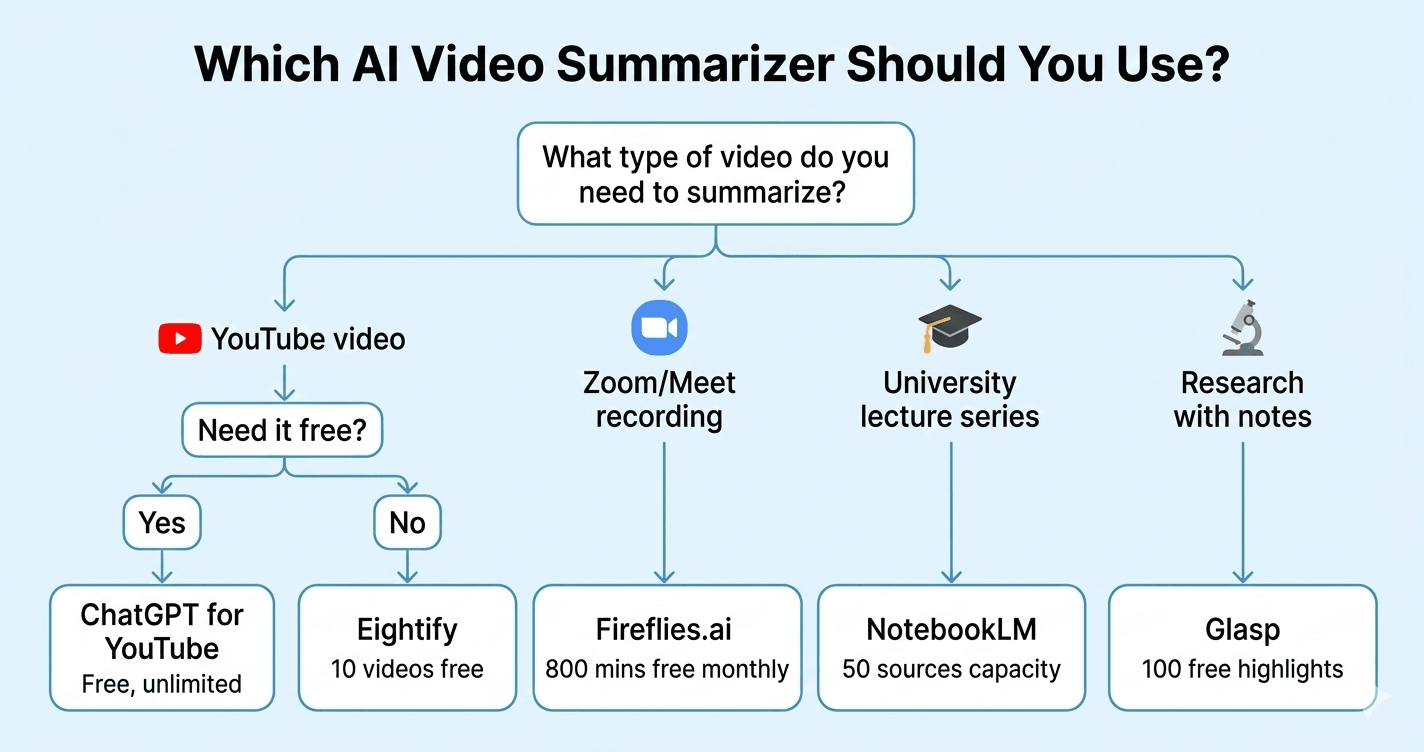
Decision flowchart: choose the right AI video summarizer for your use case in 2026

Which AI video summarizer to use: decision flowchart for YouTube, Zoom meetings, lectures and research

Detailed Tool Reviews

1

Eightify

4.5

Eightify is a Chrome extension that adds a summary panel directly to every YouTube page. It generates 8 key insights with timestamps, letting you jump to the exact moment in the video where each point is made. Supports 40+ languages. Tested by users in r/productivity and r/learnprogramming as the least-friction YouTube summarizer because it requires no separate tab or copy-pasting -- the summary appears where you already are.

Key Features:

  • 8 key ideas with clickable timestamps for each
  • Summary panel embedded directly in YouTube page
  • 40+ language support for non-English videos
  • Comment insights showing what viewers highlighted

Pricing:

Free (3 summaries) / Basic $4.99/mo / Unlimited $14.99/mo

Pros:

  • + Zero context-switching -- summary appears on the YouTube page
  • + Timestamps let you jump to the exact relevant moment
  • + Works on any YouTube video without URL copying

Cons:

  • - YouTube-only -- does not work on Vimeo or uploaded files
  • - Only 3 free summaries on the free tier
  • - Chrome extension required, no web app option

Best For:

Professionals and students who watch a lot of YouTube and want summaries without leaving the page.

Try Eightify
2

ChatGPT for Youtube

4.2

A free Chrome extension that displays the YouTube video transcript and an AI-generated summary directly in the YouTube sidebar. Requires no OpenAI account -- it uses YouTube's own transcript data and an integrated AI layer. The extension is particularly useful for academic and technical videos where the full transcript is valuable alongside the summary.

Key Features:

  • Free with no usage limits on free tier
  • Shows full video transcript alongside summary
  • Works on any YouTube video with auto-captions
  • No separate account or API key needed

Pricing:

Free Chrome extension

Pros:

  • + Completely free with no monthly usage cap
  • + Full transcript access alongside the AI summary
  • + No account or sign-in required

Cons:

  • - Summary quality depends on YouTube auto-caption quality
  • - YouTube-only, no support for other platforms
  • - Simpler interface than paid alternatives

Best For:

Users who want a permanently free YouTube summarizer with full transcript access and no usage limits.

Try ChatGPT for Youtube
3

Glasp

4.3

Glasp is a social web highlighter that adds AI summarization for YouTube videos, web articles, and PDFs. It integrates with ChatGPT, Claude, and Gemini to generate summaries using whichever AI model you prefer. Unique feature: a public research library where you can see what other researchers highlighted from the same video. Discussed in r/productivity and r/PKM (personal knowledge management) as the best free tool for researchers who need YouTube summaries that export to Notion and Obsidian.

Key Features:

  • AI summary using ChatGPT, Claude, or Gemini (your choice)
  • Highlights and annotations saved to your profile
  • Export to Notion, Obsidian, Roam Research
  • Community library showing others' highlights from same content

Pricing:

Free (core features) / Premium planned

Pros:

  • + Choice of AI model for summaries (ChatGPT, Claude, Gemini)
  • + Research-focused with export to note-taking apps
  • + Free core features with no usage cap

Cons:

  • - Requires Chrome extension plus your own AI subscription for advanced summaries
  • - Social profile aspect means highlights are public by default
  • - More setup than single-purpose summarizers

Best For:

Researchers, students, and knowledge workers who want YouTube summaries that integrate with their note-taking workflow.

Try Glasp
4

Fireflies.ai

4.6

Fireflies.ai automatically joins your Zoom, Google Meet, and Teams calls as a bot, records the audio, transcribes with speaker identification, and generates an AI summary with action items. The free tier stores up to 800 minutes of meeting recordings. Reviewed in r/productivity and r/projectmanagement as the most hands-free meeting summarizer since it joins calls automatically without manual recording.

Key Features:

  • Auto-joins Zoom, Google Meet, Teams calls as a bot recorder
  • Speaker-labeled transcription with 95%+ accuracy
  • Action item extraction from meeting content
  • 40+ integrations including Slack, Notion, HubSpot

Pricing:

Free (800 mins storage) / Pro $10/mo / Business $19/mo

Pros:

  • + Fully automated -- joins calls without any manual steps
  • + Speaker identification in transcripts
  • + Action items extracted automatically from discussion

Cons:

  • - Meeting participants see a bot joining the call
  • - Meeting-specific -- does not summarize pre-recorded videos
  • - Best features require paid tier

Best For:

Teams and professionals who run frequent Zoom, Meet, or Teams calls and want automatic notes and action items without manual recording.

Try Fireflies.ai
5

NotebookLM

4.7

Google NotebookLM accepts YouTube URLs, PDFs, Google Docs, and audio files as sources, then lets you ask questions, generate summaries, and create study guides from the content. For educational videos and lectures, it is uniquely powerful: you can upload 10-15 lecture videos and ask questions that draw from all of them simultaneously. The Audio Overview feature creates a podcast-style discussion of your sources. Discussed in r/MachineLearning and r/learnprogramming as the best tool for turning long technical video series into searchable, queryable knowledge.

Key Features:

  • Accepts YouTube URLs, PDFs, audio, Google Docs as sources
  • Ask questions across multiple videos simultaneously
  • Audio Overview: generates a podcast-style discussion of your sources
  • Study guide and FAQ generation from video content

Pricing:

Free / NotebookLM Plus (Google One AI Premium) $19.99/mo

Pros:

  • + Multi-source querying across multiple videos at once
  • + Audio Overview creates listenable summaries
  • + Free tier covers most use cases

Cons:

  • - Requires Google account
  • - Better for structured research than quick one-off summaries
  • - Slower setup than browser extension tools

Best For:

Students, researchers, and professionals who want to deeply analyze multiple long videos or lecture series, not just skim one.

Try NotebookLM

Best AI video summarizer by use case: YouTube, meetings, and lectures

The best AI video summarizer depends entirely on what type of video you are summarizing. A tool built for YouTube summaries works completely differently from one built for Zoom call notes. Here is the direct answer before the detailed comparison.

Use CaseBest ToolFree TierWhy
YouTube (quick summary)Eightify3 freeEmbedded in YouTube page with timestamps
YouTube (unlimited free)ChatGPT for YouTubeUnlimitedFree Chrome extension, full transcript
YouTube (research notes)GlaspFree coreExports to Notion/Obsidian, choice of AI model
Live meetings (Zoom, Meet)Fireflies.ai800 minsAuto-joins calls, speaker ID, action items
Lectures / multiple videosNotebookLMFreeQuery across 10+ videos simultaneously
Uploaded video filesDescript1 hour freeFull edit suite plus summarization
Podcasts + YouTube comboTubeOnAI200 free minsMulti-format: video, audio, PDFs

The most common mistake is using a YouTube-only extension (Eightify) for meeting notes, or a meeting recorder (Fireflies) for YouTube. Each category needs a different tool.

YouTube AI summarizers: Eightify vs ChatGPT for YouTube vs Glasp

These three tools all summarize YouTube videos but serve different workflow types.

Eightify is the right choice if you want a summary in the fewest steps possible. Install the Chrome extension, open any YouTube video, and the summary panel appears automatically in the right sidebar. The 8-key-ideas format with clickable timestamps is its defining feature -- you can jump directly to the 3-minute mark in a 45-minute video to see the specific point you care about. The free tier gives three summaries; the Basic plan at $4.99 per month is the cheapest paid upgrade in this category.

ChatGPT for YouTube is the right choice if you want unlimited free summaries and full transcript access. It shows the complete auto-generated YouTube transcript alongside the AI summary in the same sidebar. No usage limits. No account needed to try it. The trade-off is that summary quality depends on YouTube's auto-caption accuracy, which is excellent for clear English speech but lower for accented speakers or technical jargon.

Glasp is the right choice if YouTube summaries are part of a broader research workflow. You highlight sections of the transcript, save them to your profile, export to Notion or Obsidian, and use ChatGPT, Claude, or Gemini to generate the summary using whichever model you already subscribe to. The community research library -- where you can see what other Glasp users highlighted from the same video -- is a unique feature with no equivalent in Eightify or ChatGPT for YouTube.

For most users starting out, ChatGPT for YouTube covers the basic use case with no cost and no usage limits. Add Eightify if you want better timestamp navigation. Add Glasp if you are building a research knowledge base.

AI meeting summarizers: Fireflies vs Otter and automated vs manual recording

Meeting summarizers split into two models: tools that automatically join your call as a bot (Fireflies, Otter.ai, Fathom) and tools where you manually upload or record (Descript, Notta).

Fireflies.ai is the leading automated meeting summarizer. You connect it to your Google Calendar or Zoom account, and it automatically joins every scheduled meeting as "Fireflies.ai Notetaker." After the meeting ends, you get a transcript with speaker labels, a summary, and extracted action items. The free tier stores 800 minutes of meeting recordings with full transcript access. The main friction point is that everyone in the meeting sees the Fireflies bot join, which requires either informing participants or checking your company's recording consent policies.

Otter.ai is the strongest alternative to Fireflies for Teams and Outlook users. It integrates directly with Microsoft Teams and generates real-time live transcription as the meeting happens, not just a post-meeting summary. The free tier gives 600 minutes per month.

The key difference between Fireflies and Otter in 2026: Fireflies is stronger for CRM integration and sales teams (HubSpot, Salesforce connections, call analytics). Otter is stronger for Teams users and real-time transcription during calls.

For one-off meeting recordings without an ongoing subscription, Descript accepts any uploaded audio or video file and summarizes it with speaker identification. The free tier allows one hour of transcription per month.

NotebookLM for lecture and educational video summarization

NotebookLM handles educational video summarization differently from all other tools on this list. Instead of summarizing one video at a time, you add multiple sources -- YouTube URLs, PDFs, recorded lecture files -- and then interact with all of them as a unified knowledge base.

The typical workflow for a student or researcher: add the YouTube URL of a lecture series (10-15 videos), add the course PDF or reading list, then ask questions that draw from the entire collection. "What does the professor say about transformer architecture in the context of the readings?" pulls relevant clips and text from across all sources simultaneously.

The Audio Overview feature converts your entire source collection into a podcast-style conversation between two AI hosts who discuss, debate, and explain the key themes. Users in r/learnprogramming describe using Audio Overview to create a 20-minute "podcast" from a 10-hour lecture series that they listen to on commutes.

The free tier covers most use cases: up to 50 sources per notebook, 25 audio overviews per day, and full question-answering functionality. The NotebookLM Plus tier (part of Google One AI Premium at $19.99 per month) adds more sources, longer audio overviews, and sharing controls.

The limitation compared to Eightify or Glasp: NotebookLM is not a quick-summary tool. Setting up a notebook, adding sources, and getting a useful output takes 5-10 minutes the first time. It is the right tool for deep research and learning, not for quickly checking whether a 10-minute video is worth watching.

Free AI video summarizer tools: what the free tiers actually give you

Free tier limits are the most commonly misunderstood aspect of AI video summarizer tools. Here is the accurate picture for 2026.

ToolFree Tier LimitResetsAccount Required
ChatGPT for YouTubeUnlimitedNeverNone
GlaspUnlimited highlightsNeverGoogle login
Eightify3 summariesNeverChrome account
Fireflies.ai800 minutes storageNeverEmail account
NotebookLM50 sources, 25 audio overviews/dayDailyGoogle account
Descript1 hour transcriptionMonthlyEmail account
Summarize.tech~5 summaries/dayDailyNone
TubeOnAI200 minutes totalOne-timeEmail account

ChatGPT for YouTube is the only tool with truly unlimited free use and no account required. Glasp has unlimited highlighting with a Google login.

Summarize.tech (summarize.tech) is worth bookmarking as a web tool for occasional YouTube summaries without any extension or account -- paste a YouTube URL and get a chapter-by-chapter breakdown. The daily limit resets the following day.

Fireflies.ai's free tier is more generous than most users realize: 800 minutes of stored meeting recordings with full transcript access is enough for roughly 13 one-hour meetings. Many small teams run on the free tier indefinitely.

Frequently Asked Questions

ChatGPT for YouTube is the best free option with no usage limits and no account required -- it shows the full transcript and an AI summary directly on the YouTube page via a Chrome extension. Eightify is better if you want clickable timestamps and an 8-key-ideas format, but its free tier limits you to 3 summaries. Glasp is best if you need summaries that export to Notion or Obsidian.

Which AI video summarizer to use in 2026

For YouTube summaries with no cost and no account, install ChatGPT for YouTube and you are done. For better timestamps and key idea extraction, Eightify at $4.99 per month is the most focused tool in this category. For meeting notes from Zoom and Google Meet, Fireflies.ai automates everything with a 800-minute free tier that covers most small teams. For deep research across multiple lecture videos, NotebookLM is the most powerful free tool available -- it converts entire lecture series into queryable knowledge bases.

Try Eightify free at eightify.app -- summary panel appears on every YouTube video automatically.

About the Author

Amara - AI Tools Expert

Amara

Amara is an AI tools expert who has tested over 1,800 AI tools since 2022. She specializes in helping businesses and individuals discover the right AI solutions for text generation, image creation, video production, and automation. Her reviews are based on hands-on testing and real-world use cases, ensuring honest and practical recommendations.

View full author bio

Related Guides