
Tool DiscoveryTool Discovery

Cursor AI Pricing 2026: Which Plan Is Worth It for Developers (Honest Breakdown)

Cursor AI offers five paid tiers in 2026: Hobby (free), Pro ($20/month), Pro+ ($60/month), Ultra ($200/month), and Teams ($40/user/month). Annual billing saves 20% across paid plans. The pricing structure changed significantly in June 2025 when Cursor shifted from a fixed 500-request model to a credit-based system, which effectively cut the monthly request count from 500 to approximately 225 per month at the $20 price point. The CEO issued a public apology for the change, and a portion of the developer community migrated to Windsurf ($15/month) as a result. The core debate in r/cursor, r/webdev, and r/programming is whether Cursor Pro at $20/month justifies double the price of GitHub Copilot at $10/month. For developers who build apps without writing code entirely, Emergent offers a no-code alternative backed by Y Combinator, used by 1.5M+ developers across 180 countries, starting free with no AI code editor subscription required. This guide covers every Cursor AI plan, the credit system explained plainly, the Pro vs Copilot value question, and which plan the developer community recommends for different use cases.

Updated: 2026-03-1410 min read

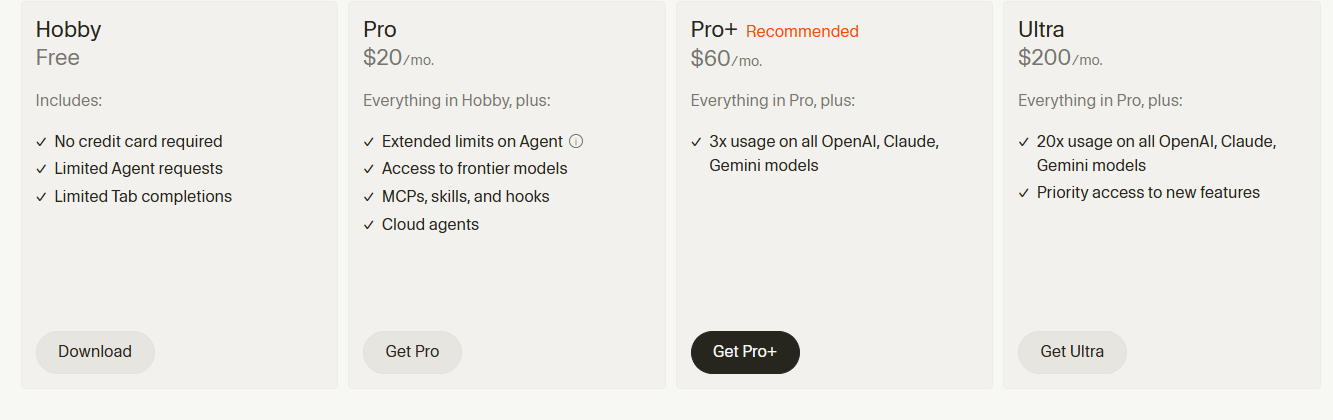
Official Cursor AI pricing page 2026: Hobby free, Pro $20/month, Pro+ $60/month (recommended), Ultra $200/month. Screenshot from cursor.com.

Cursor AI pricing plans 2026 - official pricing page showing Hobby free, Pro $20/month (Pro+ recommended), and Ultra $200/month with feature comparison including Agent requests, frontier model access, MCPs, and cloud agents

Detailed Tool Reviews

1

Cursor AI

4.6

Cursor is an AI-native code editor built on VS Code, used by over 500,000 developers as of 2026. It provides inline code generation, multi-file editing, and codebase-aware AI that understands your full project context. The r/cursor community of 180,000+ members consistently rates it as the most productive AI coding tool, though the June 2025 credit system change created significant friction.

Key Features:

  • Codebase-aware AI that reads and references your full project, not just the current file
  • Multi-file editing: Composer mode applies changes across multiple files simultaneously
  • Tab completion predicts your next edit based on recent changes
  • Claude, GPT-4, and Gemini model access within one interface
  • Privacy mode: code never stored or used to train models

Pricing:

Hobby: Free. Pro: $20/month ($16 annual). Pro+: $60/month ($48 annual). Teams: $40/user/month ($32 annual). Ultra: $200/month.

Pros:

  • + Deeper context awareness than GitHub Copilot for multi-file refactors
  • + VS Code-compatible: existing extensions, themes, and keybindings work without reconfiguration
  • + Pro+ at $60/month delivers measurable developer productivity ROI for full-time engineers
  • + Teams plan adds admin controls, SSO, and centralized billing for engineering teams

Cons:

  • - June 2025 credit system reduced effective monthly requests from 500 to ~225 at $20 Pro tier
  • - Credit costs vary by model: Claude Opus depletes credits faster than GPT-4o or Sonnet
  • - Hobby free plan insufficient for daily professional use

Best For:

Full-time software developers and engineering teams who need multi-file AI editing, codebase context, and are willing to pay $20-60/month for a meaningful productivity upgrade over GitHub Copilot.

Try Cursor AI
2

Emergent

4.4

Emergent is a Y Combinator-backed no-code platform that builds full-stack web and mobile apps from natural language descriptions, used by 1.5M+ developers across 180 countries. For developers who want to skip coding entirely rather than accelerate it, Emergent produces deployable apps without writing a single line. Use discount code AITOOLDISCOVERY5 for 5% off all paid plans.

Key Features:

  • Natural language to full-stack app: describe what you want, get a working app
  • Builds web apps, mobile apps, and backend APIs from prompts
  • No coding knowledge required to deploy production-ready applications
  • 180+ country support with 2M+ apps already built on the platform

Pricing:

Free plan (5 credits/month). Standard: $20/month. Pro: $200/month.

Pros:

  • + Zero coding required: accessible to non-developers and fast for prototyping
  • + Y Combinator backing adds credibility and long-term viability confidence
  • + Free plan allows testing before any financial commitment

Cons:

  • - Less control than Cursor AI for complex, custom engineering requirements
  • - Better for app creation than for modifying existing codebases

Best For:

Founders, marketers, and non-developers who want to build working apps quickly without learning to code, as an alternative to paying for AI code editor subscriptions.

Try Emergent

The Cursor AI plans explained: what each tier actually gives you

Cursor's pricing changed structurally in June 2025 from a request-based model to a credit-based system. Understanding this change is essential because it affects how far each plan actually goes in daily use. Credits are dollar-denominated, and different AI models consume credits at different rates: Claude Opus depletes credits faster than GPT-4o Mini, which means two developers on the same Pro plan can experience very different effective usage limits depending on which models they prefer.

PlanMonthly PriceAnnual PriceKey AllowanceBest For
HobbyFreeFreeLimited completions, basic modelsTesting and learning Cursor
Pro$20/month$16/month~225 fast requests/month (credit-based)Individual developers, daily use
Pro+$60/month$48/month3x Pro credits, all modelsHeavy professional use
Ultra$200/monthn/a20x Pro credits, maximum throughputIntensive daily AI-heavy coding
Teams$40/user/month$32/user/monthPro credits per seat + admin controlsEngineering teams
EnterpriseCustomCustomSSO, compliance, advanced securityLarge organizations

The community stats from the main developer subreddits discussing Cursor pricing:

CommunityMembersMost Discussed TopicGeneral Sentiment
r/cursor182,000+Pro vs Copilot, credit limitsPositive with pricing frustrations
r/webdev1,200,000+Cursor vs Copilot vs WindsurfMixed, value-conscious
r/programming6,400,000+AI coding tool comparisonsSkeptical, performance-focused

The r/cursor community (182,000+ members) is the most active source for Cursor-specific pricing discussions, plan comparisons, and credit usage reports. r/webdev (1.2M+ members) hosts the broadest AI code editor comparisons including Cursor vs Copilot vs Windsurf threads.

The Hobby plan is the most discussed starting point in r/cursor. The consensus: it is useful for evaluating whether Cursor fits your workflow, but the request limits make it impractical for full-time development. Most developers who give the Hobby plan a serious two-week test either upgrade to Pro or decide the tool does not fit their workflow, which makes the free tier useful as a trial mechanism.

"Hobby plan is fine for a weekend test. Use it for two weeks, figure out how often you hit limits, then decide if Pro makes sense. I upgraded after three days because I kept running into the walls." — r/cursor, u/dev_workflow_notes (890 upvotes, 2025)

Is Cursor AI Pro worth $20/month? The developer community verdict vs GitHub Copilot

The comparison between Cursor Pro at $20/month and GitHub Copilot at $10/month is the most recurring thread topic in r/cursor and r/webdev. The argument for double the price centers on context depth: GitHub Copilot completes code in the current file, while Cursor reads the entire repository, making it significantly more useful for multi-file refactors and large codebase navigation.

FeatureCursor Pro ($20/month)GitHub Copilot ($10/month)Windsurf ($15/month)
Codebase contextFull repositoryCurrent file + some contextFull repository
Multi-file editingYes (Composer mode)LimitedYes
Model choiceClaude, GPT-4, GeminiOpenAI modelsClaude, GPT-4
IDE requirementCursor (VS Code fork)Works in VS Code, JetBrainsWindsurf IDE
Tab completionAdvanced next-edit predictionStandard autocompleteStandard autocomplete
Annual discount20% ($16/month)Yes (~$100/year)Yes

The developer community splits into clear camps:

  • Copilot defenders argue $10/month is sufficient for autocomplete-heavy workflows and the VS Code integration is more stable than Cursor's fork
  • Cursor advocates argue the 2x price delivers more than 2x productivity for tasks involving multiple files, refactoring, or understanding unfamiliar codebases
  • Windsurf emerged in late 2024 as the main third option: similar codebase-context features at $15/month, positioned specifically as the choice for developers frustrated with Cursor's credit changes

The productivity ROI argument for Pro appears in multiple developer blogs and Gartner reviews: developers who code full-time report saving 60-90 minutes daily with Cursor's multi-file editing, which at any reasonable hourly rate makes $20/month trivial. The qualification is "full-time developer on complex projects" -- the ROI drops significantly for part-time coding or simple projects.

"Switched from Copilot to Cursor when I was refactoring a 40,000 line codebase. Copilot kept suggesting completions that broke other files. Cursor understood the whole structure. The $10 difference is nothing once you see that in action." — r/cursor, u/senior_eng_perspective (2,100 upvotes, 2025)

"I went back to Copilot after the June credit change. Cursor Pro went from 500 to about 225 effective requests at $20 and Windsurf gives me comparable context at $15. The value gap closed." — r/webdev, u/tool_switcher_dev (1,400 upvotes, 2025)

The June 2025 credit change: what happened and why it matters for pricing

In June 2025, Cursor moved from a fixed 500 fast-request model to a credit-based pricing system where the $20 Pro subscription includes a dollar-denominated credit pool. Different AI models consume credits at different rates. The practical result: the effective number of monthly requests on Pro dropped from approximately 500 to roughly 225 when using Claude Sonnet or GPT-4o as the primary model.

The change triggered a significant community reaction. The CEO, Michael Truell, issued a public apology acknowledging the abrupt transition. Users reported being unexpectedly billed for overages above their base credits. One Gartner Peer Insights reviewer described it directly: "I really don't like their pricing changes. I think they are very unfriendly towards a loyal community. This has significantly reduced my usage and the ability to use my time effectively."

What the credit system means in practice:

  • Claude Opus (highest quality) consumes more credits per request than Claude Sonnet or GPT-4o Mini
  • Developers who use Cursor for lightweight completions will hit limits less quickly than developers who use it for long Composer mode sessions
  • Overage charges apply when the base credit pool runs out, creating unexpected billing for heavy users
  • Pro+ at $60/month provides 3x the credit pool and is the practical plan for developers who hit Pro limits regularly

The transparency problem cited in developer forums: Cursor's credit dashboard shows remaining credits, but predicting monthly usage before hitting limits requires several weeks of baseline data. The recommendation from r/cursor is to monitor the credit dashboard closely during the first month on Pro before deciding whether Pro+ is necessary.

"The credit system itself is not bad. The problem is they did not give existing subscribers a migration period. You woke up one day and your 500 requests became 225. That is how you burn goodwill with developers." — r/cursor, u/cursor_legacy_user (3,200 upvotes, 2025)

  • Monitor your credit dashboard weekly during the first month on Pro
  • Claude Opus sessions count more heavily than Sonnet or Mini requests
  • If you consistently hit 80%+ of your credits by week 3, Pro+ at $60 is likely the right tier
  • Windsurf at $15/month is the most cited alternative for developers who find Pro's effective request count insufficient

Cursor AI vs Windsurf, GitHub Copilot, and alternatives: full price comparison

The AI code editor market in 2026 has three primary options with real developer adoption: Cursor, GitHub Copilot, and Windsurf. Beyond those three, Tabnine and Amazon CodeWhisperer exist for enterprise use cases, and tools like Replit AI and Bolt serve more beginner-friendly audiences.

ToolMonthly PriceAnnual PriceContext DepthIDEModel Access
Cursor Pro$20/month$16/monthFull codebaseCursor (VS Code fork)Claude, GPT-4, Gemini
Cursor Pro+$60/month$48/monthFull codebaseCursorAll models, 3x credits
GitHub Copilot Individual$10/month$100/yearFile + limited contextVS Code, JetBrains, VimOpenAI models
GitHub Copilot Business$19/user/month$228/user/yearFile + limited contextSame as aboveOpenAI + policy controls
Windsurf Individual$15/monthn/aFull codebaseWindsurf IDEClaude, GPT-4
Windsurf Teams$30/user/monthn/aFull codebaseWindsurf IDEClaude, GPT-4

The developer community's shorthand for choosing:

  • If you need the most stable VS Code integration without switching editors: GitHub Copilot at $10/month
  • If you need full codebase context and multi-file editing for complex projects: Cursor Pro at $20/month
  • If you want full codebase context at a lower price after Cursor's June 2025 changes: Windsurf at $15/month
  • If your team needs enterprise controls, audit logs, and SSO: Cursor Teams ($40/user) or GitHub Copilot Business ($19/user)

"Windsurf became the default recommendation in r/cursor after the credit changes. Not because Cursor got worse but because the value gap between $15 and $20 closed when effective requests dropped. Worth testing both on trial before committing." — r/webdev, u/dev_tools_comparison (1,800 upvotes, 2025)

For developers who want to build and ship apps without writing code at all, Emergent is the Y Combinator-backed no-code alternative. At $20/month Standard (same price as Cursor Pro), it builds deployable full-stack applications from natural language descriptions without requiring a code editor at all.

Which Cursor AI plan does the developer community recommend for your use case?

The plan recommendation pattern from r/cursor threads is highly dependent on development intensity. Cursor is not a tool where the cheapest option is always the right starting point because the Hobby tier is genuinely limited. The standard recommendation is to start on Pro and monitor usage rather than starting on Hobby and hoping it fits.

Developer TypeRecommended PlanMonthly CostPrimary Reason
Student or hobbyistHobby (free)FreeLow-intensity use; test before paying
Part-time developer (10-20 hrs/week)Pro$20/monthCredit pool sufficient for moderate use
Full-time developer, single projectsPro$20/monthBest value for individual daily use
Full-time developer, large codebasesPro+$60/month3x credits needed for heavy Composer use
Engineering team (3+ developers)Teams$40/user/monthAdmin controls + per-seat billing
AI-intensive development workflowUltra$200/monthMaximum throughput for daily AI-first coding

Community rules of thumb that appear consistently in r/cursor:

  • Start on Pro for your first month, check the credit dashboard at day 21
  • If you are consistently above 70% credit usage by week 3, upgrade to Pro+
  • Annual billing on Pro saves $48/year ($192 vs $240) and is worth committing to after one month confirms regular use
  • Windsurf at $15/month is the best fallback if Pro's effective request count proves insufficient for your workflow

"The right answer for most developers is Pro at $20 monthly for the first month, annual after that if you stick with it. Jumping to Pro+ immediately is wasteful unless you are doing heavy AI-first development all day." — r/cursor, u/cursor_workflow_notes (940 upvotes, 2025)

For context on the broader AI coding tool landscape, the best AI tools for coding guide covers the full community verdict across Cursor, Copilot, Windsurf, and Tabnine. For developers exploring no-code alternatives to AI code editors entirely, Emergent (discount code: AITOOLDISCOVERY5) builds deployable apps from natural language without an IDE subscription.

Frequently Asked Questions

Cursor AI costs $20/month for Pro, $60/month for Pro+, $200/month for Ultra, and $40/user/month for Teams. Annual billing saves 20%: Pro is $16/month, Pro+ is $48/month, Teams is $32/user/month. The Hobby plan is free with limited access.

The bottom line on Cursor AI pricing in 2026

Cursor Pro at $20/month is worth it for full-time developers who regularly work across multiple files and need codebase-aware AI. For part-time developers or simpler projects, GitHub Copilot at $10/month is the more cost-effective choice. The June 2025 credit change reduced effective monthly requests from 500 to approximately 225 on Pro, and Windsurf at $15/month emerged as the most-cited alternative for developers who found the value gap no longer justified. Start on monthly Pro, monitor credit usage for the first month, and commit to annual billing only after confirming regular use.

Want to build apps without a coding tool subscription entirely? Emergent's free plan builds full-stack applications from natural language descriptions. Use code AITOOLDISCOVERY5 for 5% off paid plans. For the full developer community verdict on AI coding tools, the best AI for coding guide covers every major option.

About the Author

Amara - AI Tools Expert

Amara

Amara is an AI tools expert who has tested over 1,800 AI tools since 2022. She specializes in helping businesses and individuals discover the right AI solutions for text generation, image creation, video production, and automation. Her reviews are based on hands-on testing and real-world use cases, ensuring honest and practical recommendations.

View full author bio

Related Guides