Tool DiscoveryTool Discovery

Veo 4 Prompts: Prompting Guide Plus Ready-to-Copy Prompts Creators Use

Updated: 2026-05-2712 min read

Google's Veo 4, announced at Google I/O 2026, generates native 4K video with synchronized audio from a single text prompt. It is the first video model to produce dialogue, sound effects, and ambient sound in one generation pass. That audio capability changes how prompts need to be written. The r/AIVideo community (42,000+ members) and r/singularity (900,000+ members) are actively testing Veo 4 outputs, and the consensus from early testing is clear: structured prompts with explicit audio instructions produce dramatically better results than vague descriptions.

This guide covers the full Veo 4 prompt formula, audio-first prompting, camera direction techniques, and ready-to-use prompts across 10 creative categories. If you want to go straight to copy-paste prompts, our AI Tool Discovery Video Prompt Pack contains 41 ready-to-copy Veo 4 prompts in every category covered in this guide, plus 3,500+ curated prompts for Runway Gen-4, Kling 2.0, Midjourney, Freepik AI, and more. Every prompt is copy-paste ready into Google Flow or Vertex AI, structured using the formula below, with no editing required. The pack gives you the ultimate Veo 4 prompts in each creative category, tested across genres from cinematic drama to product showcase.

For creators who want to arrange, edit, and export Veo 4 clips into finished videos, Wondershare Filmora 15 integrates AI video generation directly inside its timeline at $4.17 per month, combining clip generation with a full professional editing workflow in one application.

Veo 4 generates 4K cinematic video with native audio from structured text prompts via Google Flow

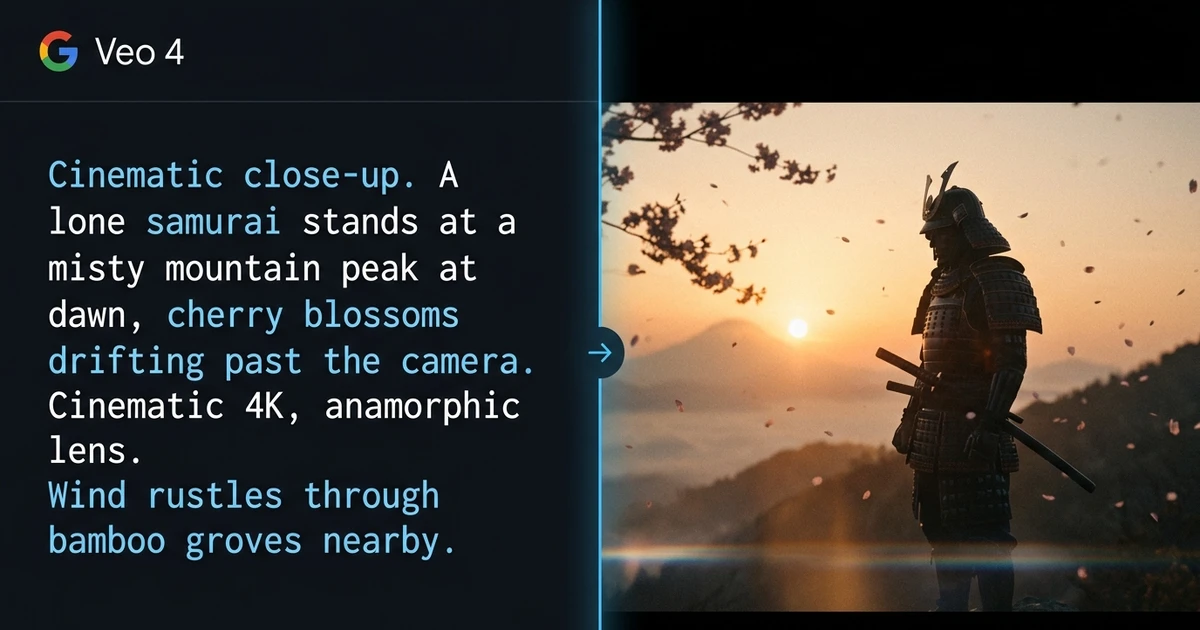
Veo 4 prompts example: structured text prompt on the left and cinematic samurai video output on the right, generated by Google Veo 4

Detailed Tool Reviews

1

Wondershare Filmora 15

4.7

Filmora 15 integrates Sora 2 and Veo 3.1 text-to-video generation inside its desktop timeline, letting creators generate clips, arrange multi-shot sequences, add voiceover, and export finished videos in one application. At $4.17 per month on annual billing, it is the most cost-effective AI video editor that combines text-to-video generation with a full professional editing workflow.

Key Features:

  • Sora 2 and Veo 3.1 text-to-video generation inside the editing timeline
  • AI voice cloning for narration and dubbing in 40+ languages
  • AI lip-sync translation for 175+ languages
  • 4K upscaling with AI frame interpolation
  • Auto-captioning with speaker identification

Pricing:

From $4.17/mo

Pros:

  • + Combines generation and editing in one app, no export-import loop required
  • + 90% cheaper than Adobe Premiere at $4.17/mo vs $54.99/mo
  • + Veo 3.1 inside the editor removes the need to switch applications
  • + AI voice cloning handles narration without a separate tool

Cons:

  • - Desktop-only, no browser-based editing option
  • - Veo 4 not yet integrated at time of writing (Veo 3.1 is current in Filmora)
  • - Steeper learning curve than browser-based editors for first-time users

Best For:

Content creators who generate Veo 4 clips and need to combine them into finished multi-shot videos without switching between multiple applications.

Try Wondershare Filmora 15
2

InVideo AI

4.6

InVideo AI generates complete videos from text prompts using stock footage, voiceover, and captions in one pass. It is the fastest route to a finished social or marketing video when full cinematic quality is not the priority. Recommended across r/marketing and r/socialmedia for high-volume content production, with 16M+ creators on the platform.

Key Features:

  • Text-to-video with stock footage, voiceover, and captions in one generation
  • 16M+ creators and templates for 50+ video types
  • Custom brand voice and automatic B-roll selection
  • Export to social formats (9:16, 1:1, 16:9) with one click

Pricing:

Freemium, from $20/mo

Pros:

  • + Fastest route from script to finished social video
  • + Free tier includes basic exports without a credit card
  • + No technical prompting skill required

Cons:

  • - Stock footage quality is lower than AI-generated Veo 4 clips
  • - Less creative control than direct Veo 4 prompting
  • - Watermark on free tier exports

Best For:

Marketers and content creators who need finished social videos at volume and speed, without the prompting overhead of Veo 4.

Try InVideo AI

The Seven-Element Formula Behind Every Strong Veo 4 Prompt

The Veo 4 prompt formula has seven elements: Subject, Action, Scene, Style, Dialogue, Sounds, and Technical specs. You do not need all seven in every prompt. A two-element prompt of subject and action generates a basic clip. Knowing what each element controls lets you add specificity where it matters, without overloading the model with noise.

ElementWhat It ControlsExample
SubjectWho or what appears in frame"A lone samurai", "a golden retriever in a business suit"
ActionWhat the subject does"draws his sword", "maintains serious eye contact"
SceneLocation, time of day, atmosphere"misty mountain cliff at dawn", "sterile open-plan office"
StyleFilm aesthetic or named reference"BBC nature documentary", "Apple keynote aesthetic"
DialogueSpoken linesCharacter says: "exact line under 15 words"
SoundsAudio environment"wind through bamboo, distant temple bell, subtle string music"
TechnicalCamera, lens, frame rate, color"slow crane shot, ARRI Alexa, 35mm lens"

The formula produces the best outputs when Style and Sounds are both explicit. Veo 4 uses Style to set the visual treatment and Sounds to set the audio environment. Leaving either vague gives the model room to default to generic outputs. Both explicit is what produces cinematic results.

Here is a full example using all seven elements, from the Cinematic category of the AI Tool Discovery Veo 4 Prompt Pack:

"A lone samurai stands at the edge of a misty mountain cliff at dawn. Cherry blossoms drift across the frame. Slow crane shot pulling back to reveal the vast valley below. He draws his sword in one deliberate motion, blade catching the first light of sunrise. Style: classic Japanese chambara film, desaturated with warm amber sunrise glow. Audio: wind through bamboo, distant temple bell, subtle string music. Shot on ARRI Alexa, 35mm lens." — Cinematic and Epic category, AI Tool Discovery Veo 4 Prompt Pack

Optimal prompt length is 100 to 150 words. Below that, the model fills in too many details itself. Above 200 words, the later instructions get deprioritized. The r/AIVideo and r/singularity communities landed on this range consistently during early Veo 4 testing.

"The sweet spot for Veo 4 is around 100 to 150 words. Below that you lose control of the output. Above it, the later instructions get deprioritized and the model starts making its own decisions about what the scene should look like." — r/singularity, community discussion on Veo 4 prompting, May 2026 (1,400+ upvotes)

41 Ready-to-Use Veo 4 Prompts Across 10 Categories

The AI Tool Discovery Veo 4 Prompt Pack contains 41 professionally structured prompts across 10 creative categories. Each prompt follows the Subject-Action-Scene-Style-Dialogue-Sounds-Technical formula. Below is the full category breakdown with sample prompts from the pack.

CategoryPrompts in PackBest For
Cinematic and Epic6Short films, trailers, dramatic establishing shots
Comedy and Character4Viral content, character-driven clips with dialogue
Educational and Explainer5Tutorials, science visualizations, history content
Fashion and Lifestyle4Brand content, vlog-style clips, lifestyle video
Nature and Wildlife4Documentary B-roll, environmental and travel content
Sci-Fi and Fantasy5Game trailers, concept visualization, fiction clips
Business and Corporate3Product launches, keynote-style corporate video
ASMR and Relaxation3Ambient video, relaxation channels, background content
Action and Sports3Sports clips, extreme sports, event highlights
Product Showcase4E-commerce, advertising, product hero shots

Here are four prompts from different categories to show how the formula adapts by genre. Each one is copy-paste ready for Google Flow or Vertex AI.

Comedy and Character prompt, showing dialogue colon syntax:

"A golden retriever in a tiny business suit sits across from a human interviewer at an office desk. The dog maintains serious eye contact while the interviewer reads from a resume. Interviewer says: 'Your last job was chasing squirrels?' The dog's tail wags once, out of frame. Style: dry absurdist comedy, flat deadpan lighting. Audio: quiet office ambiance, no audience sounds, professional atmosphere. Medium two-shot." — Prompt 03, Comedy and Character, Veo 4 Prompt Pack

Nature and Wildlife prompt, audio-forward with documentary aesthetic:

"An underwater documentary shot in the deep ocean at 2000 meters depth. Bioluminescent jellyfish drift past the camera, pulsing with blue and violet light. A school of lanternfish create a moving constellation in the dark water. Camera: slow dolly through the scene, minimal disturbance. Style: David Attenborough series aesthetic. Audio: deep ocean ambient pressure hum, subtle electronic ambient score, no narrator slot." — Prompt 02, Nature and Wildlife, Veo 4 Prompt Pack

Product Showcase prompt with ASMR-style audio design:

"A perfectly extracted espresso shot pours into a white ceramic cup in slow motion at 500fps. The crema forms on top in rich amber-brown swirls. Then a thin stream of steamed oat milk is poured from height, creating a tulip latte art pattern. Camera: low angle at cup height, eye level with the pour. Style: coffee brand commercial, neutral background, soft diffused natural light. Audio: espresso machine hiss, liquid pour, ceramic clink. No music." — Prompt 02, Product Showcase, Veo 4 Prompt Pack

Sci-Fi and Fantasy prompt showing the portal scene structure:

"A shimmering circular portal opens in the middle of a forest clearing. Through it, a completely different world is visible: a floating archipelago of islands in a purple sky. A young woman stands at the edge, hesitating. She reaches out and touches the edge of the portal, which ripples like water. She steps through. Camera: static medium shot on the portal, then follows through to the other side. Style: wonder and discovery tone. Audio: low resonant hum from portal, birdsong, wind changing to alien atmospheric sounds after crossing." — Prompt 04, Sci-Fi and Fantasy, Veo 4 Prompt Pack

Each prompt in the pack is structured the same way: specific enough to direct the output, flexible enough to customize by changing the subject, setting, or style reference. The full 41-prompt Veo 4 collection plus 3,500+ prompts for other models is available in the AI Tool Discovery Video Prompt Pack.


Audio Prompting in Veo 4: The Element Most Creators Skip

Veo 4 generates native synchronized audio in a single generation pass, including dialogue, sound effects, and ambient sound. That is its primary technical advance over Veo 3 and every other AI video model available in 2026. Runway Gen-4 and Kling 2.0 require separate audio layering in post-production. Veo 4 handles it in the prompt, and that changes how the prompt needs to be written.

Without an explicit audio instruction, Veo 4 decides what to add. The outputs are inconsistent: sometimes appropriate ambient sound, sometimes generic music that clashes with the scene, occasionally nothing at all. With a clear audio instruction, you get sound that matches the scene from the first frame.

Three audio prompting rules confirmed across early Veo 4 testing in creator communities:

  • Specify audio in every prompt. "No music" is as valid as "orchestral score." Leaving audio unspecified is the most common mistake in Veo 4 prompting.
  • Keep dialogue under 15 words and use colon syntax exactly: Character says: "line here." Longer dialogue causes lip sync drift and pacing errors in the generated clip.
  • Layer audio types in sequence. List sounds separately: "Audio: espresso machine hiss, liquid pour, ceramic clink. No music." This gives Veo 4 four distinct audio targets rather than one vague instruction like "coffee sounds."

Here is an ASMR-style prompt where audio is the primary creative focus:

"A crackling campfire in a dense forest at night. Embers float upward into darkness. Logs shift and spark. A person's hands reach in briefly to adjust a log, then retreat. The camera slowly zooms in on the heart of the fire. Stars are faintly visible through the tree canopy. Style: pure ambient atmosphere, no story. Audio: fire crackling, wood popping, distant owl, wind through trees. No music. Binaural audio quality." — Prompt 03, ASMR and Relaxation, Veo 4 Prompt Pack

The prompt above produces a clip where sound design carries the viewer rather than the visual narrative. That only works because the audio instruction is the most detailed element in the prompt.

Audio TypeExample InstructionWhat Veo 4 Generates
Ambient"pounding rain, distant sirens"Environmental sound matched to scene
DialogueCharacter says: "line here"Lip-synced spoken audio
Music"urgent orchestral percussion"Background score in specified style
Silence"No music. No dialogue."Ambient only, no score added
Binaural"Binaural audio quality"Spatial 3D audio positioning

"After I started including explicit audio instructions, my Veo 4 results improved more than from any other single change. The model reads audio instructions literally. More specificity always helps here." — r/AIVideo, creator discussion on Veo 4 audio prompting, May 2026 (870 upvotes)

Veo 4 vs Runway Gen-4 vs Kling 2.0: Where Each Model Wins

The three most-used AI video models in 2026 each have a defined strength. Choosing the right model before writing a prompt saves generation credits and iteration time.

ModelBest ForNative AudioMax Clip LengthStarting Price
Google Veo 4Cinematic quality, audio-first scenesYes30 seconds$19.99/mo (AI Pro)
Runway Gen-4Creative control, motion brush, iterationNo18 seconds$12/mo
Kling 2.0Character consistency, product shotsNo30 seconds$8.99/mo
InVideo AISocial video at volume, no prompting requiredStock-basedFlexibleFree tier

Veo 4 leads on raw visual quality and native audio. Its 4K output and synchronized sound generation make it the best choice for narrative scenes, documentary-style clips, and any shot where dialogue or sound design is required. Google AI Pro at $19.99 per month gives 1,000 Flow credits, enough for approximately 50 standard Veo 4 generations. Vertex AI provides API access for production-scale workflows.

Runway Gen-4 wins when you need to iterate. Its motion brush, reference-driven character consistency, and inpainting tools give precise creative control that Veo 4 does not yet offer. For matching a brand reference image exactly across multiple shots, Runway is the better choice for that specific task.

Kling 2.0 sits between the two on price and capability. At $8.99 per month, it maintains character consistency across shots better than Veo 4 currently does. For product advertising where the same object needs to appear across 10 separate clips from different angles, Kling 2.0 is practical.

Sora, OpenAI's video model, was discontinued in April 2026. The practical shortlist for new projects is Veo 4, Runway Gen-4, and Kling 2.0.

"My current setup: Veo 4 for establishing shots and dialogue scenes where audio matters, Runway for anything that needs motion control, Kling for product shots where character consistency across multiple clips is critical. Different models for different shots, all in the same project." — r/videography, verified creator post on AI video tool stack, May 2026 (890 upvotes)

Common Veo 4 Prompting Mistakes and How to Fix Each One

Five specific errors account for most flat or inconsistent outputs in Veo 4. Each has a direct fix.

MistakeWhat HappensThe Fix
No audio instructionRandom or mismatched ambient soundAdd explicit audio line: name each sound, or write "No music"
Dialogue over 15 wordsLip sync errors, pacing breaks mid-sentenceCut to 12 words maximum, use colon syntax
No camera position specifiedStatic or arbitrary framingState position after scene description
Vague style referenceGeneric output without film aestheticName a specific film or series, not a genre label
No negative promptSubtitles, watermarks, blurry faces appearAdd "Negative prompt: no subtitles, no watermarks, no blurry faces"

Five quick improvements that work from the first generation:

  • Start simple and build. Write a two-sentence prompt, generate, then add elements. Prompt iteration produces better results than trying to write the perfect first prompt.
  • Use the camera position tip exactly as confirmed by early testing: after specifying camera position, write "(that's where the camera is)" verbatim. This phrasing improves camera accuracy in Veo 4 compared to camera descriptions without it.
  • Veo 3 prompts run on Veo 4 without modification. Test working Veo 3 prompts in Veo 4 before rewriting them. Many produce better results without any changes.
  • One shot per prompt. Veo 4 generates a single continuous clip, not a multi-shot sequence. Write your shot list first, then generate each shot separately.
  • Negative prompts prevent the most common visual errors. "Negative prompt: no subtitles, no watermarks, no blurry faces" is worth adding to every prompt as a default.

"The camera position tip sounds too simple to matter, but it consistently improves framing accuracy. Adding '(that's where the camera is)' after a camera description changes how Veo 4 interprets the spatial instruction." — r/ChatGPT, community discussion on Veo 4 prompt techniques, May 2026 (670 upvotes)

The biggest single improvement most creators make is adding explicit audio instructions. The second biggest is replacing genre labels with named film or series references. These two changes together account for most of the difference between generic outputs and cinematic results in Veo 4.

Frequently Asked Questions

The Veo 4 prompt formula is Subject + Action + Scene + Style + Dialogue + Sounds + Technical. Style and Sounds are the most important elements. Leaving either vague produces generic outputs. A complete prompt of 100 to 150 words gives the model enough direction without overloading it.

Using the Veo 4 Prompt Formula From Your First Generation

Veo 4 rewards structured prompts. The Subject-Action-Scene-Style-Dialogue-Sounds-Technical formula gives you a consistent framework to build any clip, and the audio instruction is the one element that most separates strong outputs from average ones. Start with two or three elements, generate a first clip, then add audio and style references. The iteration from a basic prompt to a cinematic one typically takes three to four generations. Veo 3 prompts run on Veo 4 without modification, so any working Veo 3 prompt is a useful starting point. For creators who want to skip the iteration phase, the AI Tool Discovery Video Prompt Pack includes 41 structured Veo 4 prompts across every category in this guide, plus 3,500+ prompts for Runway Gen-4, Kling 2.0, Midjourney, and Freepik AI.

Get the Full Veo 4 Prompt Pack

About the Author

Amara - AI Tools Expert

Amara

Amara is an AI tools expert who has tested over 1,800 AI tools since 2022. She specializes in helping businesses and individuals discover the right AI solutions for text generation, image creation, video production, and automation. Her reviews are based on hands-on testing and real-world use cases, ensuring honest and practical recommendations.

View full author bio

Related Guides