
Tool DiscoveryTool Discovery

Midjourney Prompts: Complete Guide With Copy-Paste Examples for V6 and V7 (2026)

Midjourney V6.1 no longer needs the "word salad" prompt style that earlier versions required. Natural language descriptions produce good results. But precision still matters. The difference between a generic image and a usable one comes down to how specifically you describe the subject, environment, lighting, camera or medium style, and mood. This guide covers the complete V6 and V7 prompt anatomy, copy-paste prompts organized by use case, a basic vs professional prompt comparison for each category, and the key parameters that control output format and style. For every category, the actual prompt is in the highlighted box so you can copy it directly. If you need free Midjourney alternatives without the subscription cost, the Midjourney free alternative guide covers the best no-cost options currently generating high-quality results. For generating multiple Midjourney prompt variations from a single concept, Originality.ai's AI Prompt Generator produces several structured options in seconds so you can pick the strongest starting point.

Updated: 2026-03-0912 min read

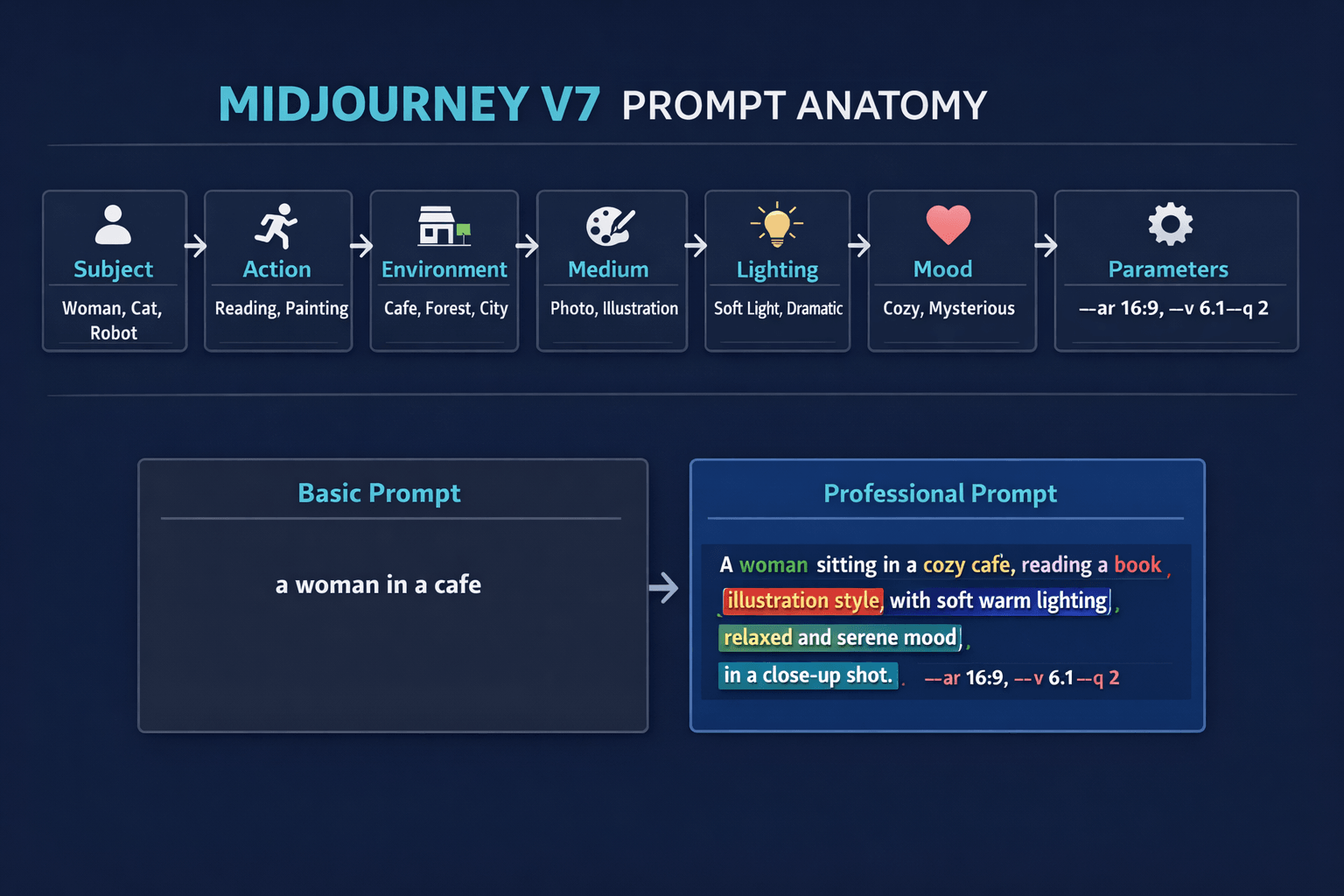
Midjourney V6 and V7 prompt anatomy: the 7-element formula with basic vs professional prompt comparison.

Midjourney V7 prompt anatomy infographic showing Subject, Action, Environment, Medium, Lighting, Mood and Parameters with basic vs professional prompt comparison

Detailed Tool Reviews

1

Midjourney

4.8

Midjourney generates photorealistic and artistic images from text prompts via Discord and a web interface. V6.1 is the current production model as of early 2026, with V7 in alpha testing. The r/midjourney community of 680,000 members consistently rates it as the highest-quality text-to-image tool for photorealism and artistic coherence.

Key Features:

  • V6.1 produces photorealistic portraits and scenes with significantly improved hand and face rendering
  • Niji mode (--niji 6) specializes in anime and illustrated styles with a dedicated model
  • Vary Region allows inpainting: redraw specific parts of an image without regenerating from scratch
  • Style Reference (--sref) applies the visual style of a reference image to your new generation
  • Aspect ratio control (--ar) from square 1:1 to widescreen 21:9 and portrait 9:16

Pricing:

Basic: $10/month (200 images). Standard: $30/month (unlimited relaxed). Pro: $60/month (stealth mode)

Pros:

  • + Photorealism quality exceeds competing tools at equivalent pricing tiers
  • + Niji anime model produces consistently high-quality illustrated art styles
  • + Web interface launched in 2024 offers organization, editing, and generation in one place
  • + r/midjourney community shares tested prompt formulas reducing trial-and-error time

Cons:

  • - No free tier: minimum commitment is $10/month for 200 images
  • - Images generated on Basic and Standard plans are publicly visible in the Midjourney gallery
  • - V7 alpha introduces changes to prompt behavior that require learning adjustments

Best For:

Designers, marketers, and content creators who need consistent, high-quality images for commercial use and are willing to invest in the highest-output text-to-image tool available.

Try Midjourney

The V6 and V7 prompt anatomy: what each part does

Midjourney processes prompts by weighting every word. Earlier versions (V4, V5) rewarded longer, more descriptive prompts. V6 and V7 understand natural language more accurately, so over-stuffing prompts with synonyms and adjectives produces diminishing returns. The formula below gives you the eight elements that have the most influence on output quality.

ElementWhat It ControlsExample Values
SubjectWhat the image is abouta woman reading, a mountain at dawn, a cat
Action/PoseWhat the subject is doingsitting, running, standing on a cliff
EnvironmentWhere the scene takes placein a Tokyo subway, on a studio white background, forest clearing
MediumHow it looks technically35mm photography, oil painting, vector illustration, 3D render
LightingQuality and direction of lightgolden hour, soft diffused window light, neon glow, dramatic chiaroscuro
MoodEmotional tone of the imagemelancholic, energetic, serene, mysterious
CompositionHow the frame is organizedclose-up portrait, wide-angle aerial view, bird's eye view, Dutch angle
ParametersTechnical settings appended at end--ar 16:9 --v 6.1 --s 750 --q 2

Basic vs professional prompt comparison:

VersionPromptResult Quality
Basic"a woman in a cafe"Generic seated figure, inconsistent style
Professional"A woman in her 30s sitting at a small marble table in a Parisian cafe, afternoon light filtering through lace curtains, holding a cappuccino, subtle smile, shallow depth of field, 85mm lens, warm film grain, analog photography style --ar 4:5 --v 6.1 --s 650"Specific, usable, consistent style
Basic"a futuristic city"Generic sci-fi skyline
Professional"Aerial view of a futuristic city district at blue hour, tiered glass towers with vertical gardens, autonomous vehicles on elevated roads, volumetric fog at street level, cinematic color grade, 32mm wide angle photography --ar 21:9 --v 6.1 --q 2"Detailed, specific, cinematic

Key parameters reference:

ParameterWhat It DoesRecommended Range
--ar X:YSets aspect ratio1:1 square, 4:5 portrait, 16:9 landscape, 9:16 vertical
--v 6.1Specifies Midjourney model version6.1 for current production quality
--s (0-1000)Stylization: 0 = literal, 1000 = artistic400-750 for most use cases
--q 1 or 2Render quality: 2 costs 2x moreUse 2 for final images, 1 for testing
--niji 6Switches to anime/illustration modelUse instead of --v for illustrated styles
--no [word]Excludes elements from the image--no text --no watermark --no blur

"I spent a year using V5 prompts on V6 and wondering why results were inconsistent. V6 wants natural language, not keyword lists. Writing it like a photography brief changed everything." — r/midjourney, u/photoreal_mj (2,100 upvotes, 2025)

Midjourney prompts for photography and portraits

Photography-style prompts produce the most commercially useful output from Midjourney. The key is specifying the camera type, lens, and lighting setup as if briefing a photographer. V6.1 renders hands and faces significantly more accurately than previous versions.

Portrait photography prompts:

"Close-up portrait of a woman in her late 20s, natural window light from the left, soft bokeh background, genuine expression, shot on Sony A7IV with 85mm f/1.4 lens, warm skin tones, light film grain, analog photography style --ar 4:5 --v 6.1 --s 550"

"Professional headshot of a man in his 40s, clean white studio background, soft box lighting, confident expression, business casual attire, no harsh shadows, sharp focus on eyes, commercial photography style --ar 1:1 --v 6.1 --q 2"

Product photography prompts:

"Luxury skincare product bottle on white Carrara marble surface, minimal styling, soft diffused studio lighting with subtle shadow, water droplets on glass, e-commerce product photography, ultra-sharp, no background distractions --ar 1:1 --v 6.1 --q 2"

"Overhead flat-lay of artisan coffee on a dark wood table, ceramic cup and small plate, scattered coffee beans, morning light from window, warm neutral color palette, lifestyle product photography --ar 1:1 --v 6.1 --s 400"

Environmental and landscape prompts:

"Scottish Highlands at golden hour, mist rising from the valleys between rolling hills, single ancient oak tree silhouetted on a ridge, long exposure photography effect, cinematic warm color grade, dramatic cloud formation --ar 16:9 --v 6.1 --q 2 --s 700"

"Aerial view of a turquoise lagoon with white sand islands, clear water revealing coral patterns below, small sailboat in frame, golden hour light, drone photography style, National Geographic quality --ar 16:9 --v 6.1 --q 2"

Basic vs professional comparison for portraits:

VersionPromptKey Difference
Basic"portrait of a woman"No lighting, no lens spec, no mood
Professional"close-up portrait, natural window light, 85mm lens, warm film grain, --ar 4:5"Lighting source + lens + post-processing style specified
Basic"product photo of a bottle"No surface, no lighting setup
Professional"on white marble, soft box lighting, water droplets, e-commerce style, --q 2"Surface + lighting + style + quality setting

Midjourney prompts for commercial design: social media, ads and branding

Commercial design prompts require specifying the end use: what platform, what audience, what visual language the brand uses. Midjourney V6 understands design conventions well enough to produce platform-ready compositions when you specify the format and context.

Social media content prompts:

"Minimalist Instagram post visual for a wellness brand, sage green and cream color palette, flat lay composition, small plant and ceramic mug, clean lifestyle aesthetic, no text, natural daylight --ar 4:5 --v 6.1 --s 300"

"TikTok thumbnail concept for a cooking channel, vibrant close-up of a colorful dish, person in background slightly blurred, bold energetic composition, warm kitchen lighting, high contrast, shot on iPhone style --ar 9:16 --v 6.1 --s 500"

"LinkedIn banner image for a technology company, abstract blue and white geometric pattern, professional and modern, subtle gradient, clean corporate aesthetic, no text, 16:9 ratio --ar 16:9 --v 6.1 --s 200"

Marketing and advertising visuals:

"Hero image for a SaaS landing page, person working on a laptop in a bright modern co-working space, authentic candid composition, diverse team visible in blurred background, soft natural light, aspirational corporate lifestyle photography --ar 16:9 --v 6.1 --q 2"

"Email header banner for a health and wellness brand, fresh vegetables and fruits arranged in a circle, flat lay on white background, pastel color accents, clean editorial food photography style, space for text overlay at top --ar 3:1 --v 6.1 --s 350"

Brand and logo concept prompts:

"Minimalist logo concept for a coffee brand, clean geometric shape incorporating a coffee bean or cup, monochrome black and white, vector illustration style, simple enough to work at small sizes, modern and memorable --ar 1:1 --v 6.1 --s 200 --no gradients --no complex details"

"Brand mascot concept for a fintech startup, friendly abstract character made of geometric shapes, approachable and trustworthy expression, flat design illustration style, bold primary colors, clean white background --ar 1:1 --niji 6 --s 400"

Use CaseKey Elements to SpecifyRecommended Aspect Ratio
Instagram feed postColor palette, lifestyle context, no text4:5 portrait
TikTok thumbnailEnergy level, subject visibility, platform cues9:16 vertical
Website hero imageAuthenticity level, team diversity, space for text16:9 landscape
Email headerProduct or lifestyle focus, text space needed3:1 wide
Logo conceptSimplicity level, color constraints, style1:1 square

"I've used Midjourney for client work for 18 months. The single biggest shift was treating prompts like design briefs rather than image descriptions. Specify the platform, the audience, and what the visual has to communicate. The output is completely different." — r/midjourney, u/design_director_sg (1,800 upvotes, 2025)

Art styles and illustration prompts: digital art, anime and concept work

Style-focused prompts produce the most consistent output when you reference a specific artistic tradition, technique, or visual medium rather than a general adjective like "artistic." Saying "impressionist oil painting with visible brushstrokes" produces far more consistent results than "artistic painting."

Digital illustration prompts:

"Vector illustration of a mountain landscape at sunset, flat design style, limited color palette of 4 to 5 colors, bold geometric shapes, no gradients, clean Scandinavian design aesthetic, suitable for poster or app icon --ar 1:1 --v 6.1 --s 300"

"Editorial illustration for an article about remote work, person at floating desk in a cloud environment, whimsical conceptual style, warm pastel colors, detailed linework, editorial magazine quality --ar 16:9 --v 6.1 --s 600"

Anime and illustrated styles (use --niji for best results):

"Young warrior standing at the edge of a cliff overlooking a fantasy city at dusk, flowing cloak caught in the wind, determined expression, soft rim lighting, detailed anime illustration style, Makoto Shinkai color palette --ar 9:16 --niji 6 --s 650"

"Cozy cafe interior scene, warm afternoon light through tall windows, illustrated anime style, two characters at different tables, detailed background art, Studio Ghibli-inspired atmosphere --ar 16:9 --niji 6 --s 500"

Classic art style prompts:

"Mediterranean fishing village at dusk, boats reflected in still harbor water, terracotta rooftops and whitewashed walls, impressionist oil painting technique, warm ochre and coral palette, visible expressive brushstrokes --ar 3:2 --v 6.1 --s 750"

"Botanical illustration of tropical flowers and leaves, detailed watercolor technique, scientific illustration style, crisp white paper background, precise botanical accuracy, hand-painted quality --ar 2:3 --v 6.1 --s 350"

Concept art and worldbuilding prompts:

"Underground library carved into living rock, bioluminescent plants providing amber light, massive stone bookshelves reaching 30 feet, small figure in foreground for scale, detailed fantasy concept art, digital painting style --ar 16:9 --v 6.1 --q 2 --s 700"

"Cyberpunk street market at night, rain-slicked cobblestones reflecting neon signs in Japanese and English, street food vendor stalls, diverse crowd, cinematic wide shot, atmospheric fog at street level, Blade Runner visual language --ar 21:9 --v 6.1 --q 2"

Style CategoryKey Prompt TermsAvoid
PhotorealismCamera model, lens, f-stop, lighting setup"photorealistic" alone (too vague)
Oil painting"impressionist," "visible brushstrokes," "palette knife""painting style" (too generic)
Anime/MangaUse --niji 6 + studio or artist reference--v 6.1 for anime (weaker results)
Concept art"digital painting," "matte painting," "cinematic key art""concept art" alone without context
Vector/Flat"flat design," "limited color palette," "--no gradients"Complex lighting descriptions

Advanced Midjourney techniques: parameters, negative prompts and multi-prompts

Once you have the basic prompt anatomy working, four advanced techniques give you significantly more control over output: negative prompts, word weights, multi-prompts, and style references.

Negative prompts with --no:

The --no parameter tells Midjourney what to exclude. It is the fastest way to fix recurring unwanted elements.

"Close-up portrait of a woman, natural light, 85mm lens style, warm tones --ar 4:5 --v 6.1 --no glasses --no hat --no jewelry --no text --no watermark"

"Product photography of a ceramic coffee mug, white background, studio lighting --ar 1:1 --v 6.1 --q 2 --no shadows --no reflections --no people --no hands"

Word weights with :: for multi-subject prompts:

Word weights let you tell Midjourney which parts of the prompt matter most. Add :: followed by a number after any word or phrase. Higher numbers get more visual weight.

"mountain landscape::2 sunset::1 lone figure::0.5 impressionist style::1 --ar 16:9 --v 6.1"

This gives the mountain twice the visual priority of the sunset, and four times the priority of the lone figure.

Combining style references with new subjects:

"A futuristic Tokyo street market at night --sref [URL of your reference image] --sw 100 --ar 16:9 --v 6.1"

The --sref parameter applies the color palette, lighting style, and visual language of the reference image to your new generation. --sw controls how strongly the style reference influences output (0 to 1000).

Aspect ratios for every platform:

PlatformRecommended RatioParameter
Instagram post4:5--ar 4:5
Instagram story / TikTok9:16--ar 9:16
Twitter / X header3:1--ar 3:1
YouTube thumbnail16:9--ar 16:9
Pinterest2:3--ar 2:3
Widescreen cinematic21:9--ar 21:9
Square (all platforms)1:1--ar 1:1

Prompt iteration workflow used by professional designers:

  • Start with a short 8 to 10 word prompt to test the core concept
  • Run 4 variations and identify the one closest to the target
  • Add lighting, medium, and composition details to the chosen direction
  • Use Vary Region on specific areas rather than regenerating the whole image
  • Add --no parameters to fix recurring unwanted elements
  • Set --q 2 only on final outputs to conserve GPU credits

"The workflow shift that saved me the most time: stop trying to write the perfect prompt on the first try. Short prompt, pick the best of 4, then add detail to that direction. You get better results in half the generation credits." — r/midjourney, u/mj_workflow_tips (3,400 upvotes, 2025)

For other AI image generators that produce comparable quality without Midjourney's subscription cost, the community verdict on AI image generators covers the tools r/StableDiffusion, r/AIArt, and r/midjourney users recommend most. The Stable Diffusion community guide is the main free alternative with comparable control. The prompt engineering guide covers the universal principles behind effective prompting that apply across every AI tool.

Frequently Asked Questions

The most reliable beginner formula is: Subject + Medium + Lighting + Aspect Ratio. Example: "woman sitting in a cafe, analog 35mm photography, golden hour window light --ar 4:5 --v 6.1." This four-element structure produces consistently better results than a single noun prompt and does not require advanced parameter knowledge.

Getting consistently better results from Midjourney prompts

The most important shift in V6 and V7 prompting is moving from keyword lists to natural language descriptions. Write your prompt like a photography brief or art direction note: specify the subject, the medium, the lighting, the mood, and the aspect ratio. Use --no to exclude recurring unwanted elements. Use --q 2 for final outputs and --q 1 for testing. The copy-paste prompts throughout this guide are ready to use as starting points, with modifications for your specific subject and style.

For free AI image generation without Midjourney's subscription, the Midjourney free alternative guide covers the best no-cost options currently available. For prompting principles that work across ChatGPT, Claude, Copilot, and Midjourney, the prompt engineering guide covers the universal methods.

About the Author

Amara - AI Tools Expert

Amara

Amara is an AI tools expert who has tested over 1,800 AI tools since 2022. She specializes in helping businesses and individuals discover the right AI solutions for text generation, image creation, video production, and automation. Her reviews are based on hands-on testing and real-world use cases, ensuring honest and practical recommendations.

View full author bio

Related Guides