
← Back to Tools
Reglyph
Reglyph is a web app for one narrow job: translating a scanned PDF without wrecking the page. Most translators either refuse an image-only file or hand back plain text. Reglyph takes the scan, replaces the words in place and returns a PDF that looks like the original, with columns, tables, stamps, signature lines and figures where they were printed. It can also export a bilingual PDF with the original on one side and the translation on the other. It targets documents like birth and marriage certificates, transcripts and diplomas, bank statements, contracts, manuals and academic papers. Its language pages list 39 language pairs into English and 16 out of English, and it says Chinese, Japanese, right-to-left Arabic, Devanagari, Cyrillic and Thai render correctly. A file can run to 300 pages and 100 MB. New accounts get 5 free pages with no card. After that you pay $0.30 a page from a $3 minimum, or take a $9 or $29 monthly plan. Reglyph is machine translation, not a certified translation service, so an agency that asks for certification won't take its output as is. A one-off 10-page certificate costs $3. Someone translating scans every week should look at Pro's $0.06 a page instead. Prices were checked on 19 November 2026.
Reglyph Screenshots & Visuals
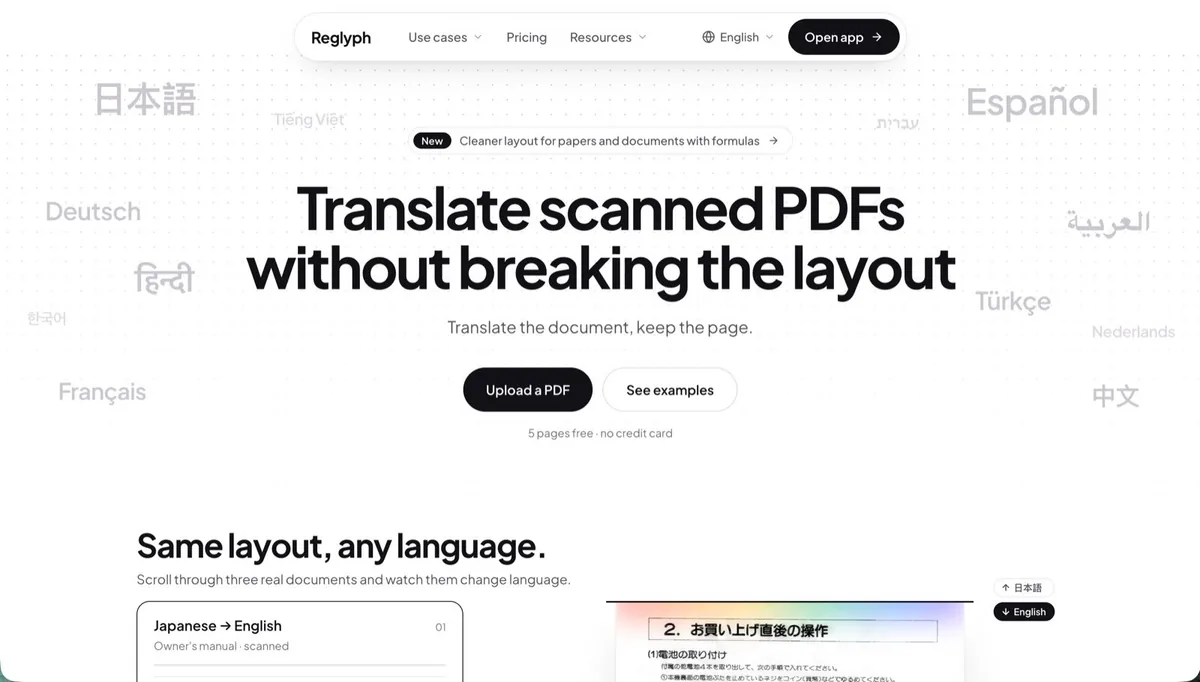
Reglyph - Scanned PDF Translator That Keeps the Layout
Reglyph homepage with the headline 'Translate scanned PDFs without breaking the layout', Upload a PDF and See examples buttons, and a note that 5 pages are free with no credit card
Visual overview of Reglyph's interface, features, and capabilities
What is Reglyph and who should use it?
Reglyph is reglyph is a web app for one narrow job: translating a scanned pdf without wrecking the page. most translators either refuse an image-only file or hand back plain text. reglyph takes the scan, replaces the words in place and returns a pdf that looks like the original, with columns, tables, stamps, signature lines and figures where they were printed. it can also export a bilingual pdf with the original on one side and the translation on the other. it targets documents like birth and marriage certificates, transcripts and diplomas, bank statements, contracts, manuals and academic papers. its language pages list 39 language pairs into english and 16 out of english, and it says chinese, japanese, right-to-left arabic, devanagari, cyrillic and thai render correctly. a file can run to 300 pages and 100 mb. new accounts get 5 free pages with no card. after that you pay $0.30 a page from a $3 minimum, or take a $9 or $29 monthly plan. reglyph is machine translation, not a certified translation service, so an agency that asks for certification won't take its output as is. a one-off 10-page certificate costs $3. someone translating scans every week should look at pro's $0.06 a page instead. prices were checked on 19 november 2026.
Designed for:
StudentsResearchersBusiness Owners
What can Reglyph do?
Translates scanned and image-only PDFs, including phone scans saved as PDF
Keeps columns, tables, stamps, signature lines and figures in their original positions
39 language pairs into English and 16 out of English, with CJK, Arabic, Devanagari, Cyrillic and Thai rendering
Bilingual PDF export with the original and translation side by side
Files up to 300 pages and 100 MB, and no watermark on the download
How much does Reglyph cost?
5 free pages; pay as you go from $0.30 a page; plans from $9/month
Reglyph offers a free tier with core features. Premium features are available through paid plans.
How does Reglyph integrate with existing workflows?
Reglyph is designed to fit into professional ai productivity workflows. Visit the official website to explore specific integration options, API access, and compatibility with your existing tools.
Quick Access
Category
AI ProductivityProfessional Context
Target Users
Students, Researchers
Pricing Model
Freemium
Verification Status
Community Listed
Similar to Reglyph


Trello is a versatile project management tool that empowers teams to organize tasks and collaborate seamlessly through visually intuitive kanban boards. With its array of productivity features and customizations, Trello helps users strategize, prioritize, and efficiently track their progress, making it essential for managing projects of any size.
Organize tasks with powerful visual tools like Inbox, Boards, and PlannerTransform emails into tasks for effective communication integrationAutomate repetitive processes with built-in no-code automation
Compare Similar Tools
View all comparisons →AI Productivity
Asana vs ClickUp
Compare Asana and ClickUp for ai productivity work. See features, pricing, and which tool fits your workflow.
Compare now
AI Productivity
ClickUp vs Trello
Compare ClickUp and Trello for ai productivity work. See features, pricing, and which tool fits your workflow.
Compare now
AI Productivity
Trello vs Airtable
Compare Trello and Airtable for ai productivity work. See features, pricing, and which tool fits your workflow.
Compare now
AI Productivity
Airtable vs Evernote
Compare Airtable and Evernote for ai productivity work. See features, pricing, and which tool fits your workflow.
Compare now
AI Productivity
Evernote vs Monday.com
Compare Evernote and Monday.com for ai productivity work. See features, pricing, and which tool fits your workflow.
Compare now
AI Productivity
Monday.com vs Obsidian
Compare Monday.com and Obsidian for ai productivity work. See features, pricing, and which tool fits your workflow.
Compare now