
How to Run Laguna XS 2.1 on Ollama: Local Setup Guide (2026)
Poolside's Laguna XS 2.1 is a 33B MoE coding model with real local Ollama tags. Compare q4_K_M, q8_0, and bf16, check GPU needs, and set up agentic coding.

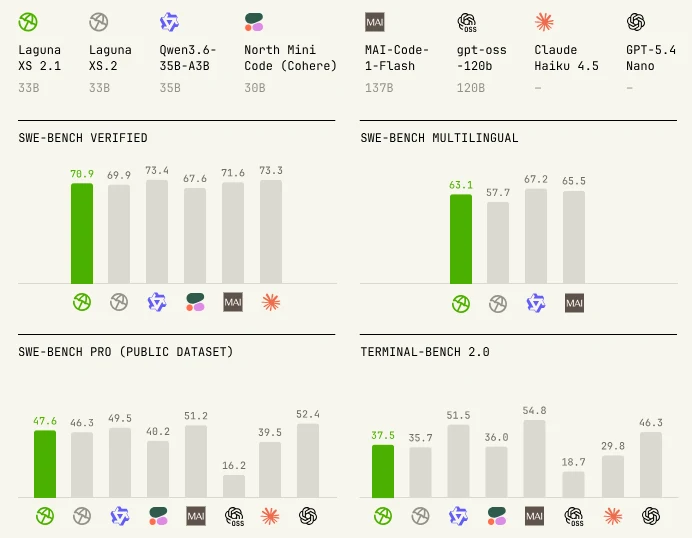
Laguna XS 2.1 is Poolside's latest small coding model, released July 2, 2026, and built for what the company calls agentic coding and long-horizon work on a local machine. It is a 33 billion parameter mixture-of-experts model spread across 256 experts plus one shared expert, but only about 3 billion parameters activate per token, so it runs close to 3B-model speed while carrying 33B-model knowledge. On Ollama, three real tags are available, from 20GB to 67GB, not a cloud-only manifest like several other recent flagship releases covered on this site.
One detail worth knowing before you pick a tag: only 10 of the model's 40 transformer layers use full global attention. The other 30 use a 512-token sliding window instead, and the key-value cache is quantized to FP8 by default. That combination is what lets a 262,144-token (256K) context window stay usable without the memory blowup a dense model with the same context would cause.
This guide covers picking the right quantization tag for your hardware, installing Ollama, running your first prompt, wiring Laguna XS 2.1 into an agentic coding workflow through Ollama's OpenAI-compatible endpoint, and a known macOS output bug Poolside is still investigating. The alternatives section compares it to its own predecessor, Laguna XS.2, plus Qwen3.6-35B-A3B and Claude Haiku 4.5 on the same benchmark suite Poolside published.
Prerequisites
- Ollama, updated to its latest release (run `ollama --version`; the install command below updates it if the model is not recognized)
- 24 GB or more of combined RAM and VRAM for the default q4_K_M tag (20GB download), 40 GB+ for q8_0 (36GB), and 72 GB+ for the full-precision bf16 tag (67GB)
- 20-67 GB of free disk space depending on which tag you pull
- A Linux host with an NVIDIA GPU for reliable chat output; macOS with Metal currently has a known empty-output bug (see Troubleshooting)
- Basic terminal familiarity for `ollama pull` and `ollama run` commands
- (Optional) A rented GPU if your machine cannot handle the q8_0 or bf16 tags locally
Need more GPU power?
Rent a RTX 4090 on Vast.ai from $0.20/hr. On-demand GPU rentals by the hour, useful for running larger models without buying hardware.
In This Guide
What Laguna XS 2.1 Is and Which Tag to Run
Laguna XS 2.1 is Poolside's second update to its XS line, released July 2, 2026, and built for agentic coding and long-horizon work you can run entirely on your own hardware. It is a mixture-of-experts model: 33 billion total parameters spread across 256 experts plus one shared expert, but only about 3 billion parameters activate for any given token. Ollama still has to hold the full 33 billion parameters, at whichever quantization tag you pick, in memory before inference starts, so the RAM and VRAM requirements reflect the full model, not the smaller active portion.
The attention design underneath is worth understanding before you choose a tag. Of the model's 40 transformer layers, only 10 use full global attention across the entire context. The remaining 30 use a 512-token sliding window instead, and the key-value cache is quantized to FP8 by default. Together, those choices let Laguna XS 2.1 hold a 262,144-token (256K) context window without the memory growth a dense model of the same size and context would cause. Poolside trained the model with the Muon optimizer and licenses it under OpenMDW-1.1, a permissive license distinct from a standard MIT or Apache 2.0 grant, so check the exact terms before shipping a commercial product built on it.
On Ollama's library, the `laguna-xs-2.1` tag holds three real quantizations:
| Tag | Download Size | Recommended RAM/VRAM | Best For |
|---|---|---|---|
| laguna-xs-2.1 (= q4_K_M) | 20 GB | 24 GB+ | A single 24 GB consumer GPU (RTX 4090) or a 32 GB unified-memory Mac |
| laguna-xs-2.1:q8_0 | 36 GB | 40 GB+ | Dual 24 GB GPUs or a 48-64 GB workstation |
| laguna-xs-2.1:bf16 | 67 GB | 72 GB+ | A single 80 GB datacenter GPU or a rented multi-GPU instance |
The plain `laguna-xs-2.1` tag and the explicit `q4_K_M` tag point at the identical 20GB download. Poolside says this release is a direct upgrade over its predecessor, Laguna XS.2, which shares the same 33B/3B architecture but caps out at a 131,072-token (128K) context window. Laguna XS 2.1 doubles that to 256K and adds a 5.4 percentage point jump on SWE-bench Multilingual, among other gains covered in the benchmarks section below.
Install Ollama and Run Your First Laguna XS 2.1 Prompt
Getting Laguna XS 2.1 running takes about ten minutes on a normal connection, most of it spent downloading the 20GB default tag.
Step 1: Install Ollama
# Linux and macOS, one-command installer
curl -fsSL https://ollama.com/install.sh | shOn Windows, download the installer from ollama.com/download, or use winget:
winget install Ollama.OllamaConfirm Ollama is on its latest release, since Laguna XS 2.1 was added recently:
ollama --versionStep 2: Pull and Run laguna-xs-2.1
The plain tag pulls the 20GB q4_K_M build, a reasonable starting point for a single 24GB GPU:
ollama run laguna-xs-2.1Expected output on first run:
pulling manifest
pulling 4f9a2c18... 100% ▕████████████████▏ 20 GB
pulling tokenizer...   100% ▕████████████████▏ 3.8 MB
success
>>> Send a message (/? for help)Step 3: Send a Test Prompt
>>> Write a Python function that finds the longest palindromic substring, then explain its time complexity.Laguna XS 2.1 streams its response once the model finishes loading. The first load takes longer than repeat calls, since Ollama caches the loaded weights afterward.
Step 4: Pull a Larger Tag
If you have the VRAM to spare and want output closer to full precision, pull `q8_0` or `bf16` instead:
# 36GB, needs 40GB+ combined RAM/VRAM
ollama pull laguna-xs-2.1:q8_0

# 67GB, needs 72GB+ combined RAM/VRAM
ollama pull laguna-xs-2.1:bf16Use Laguna XS 2.1 for Agentic Coding Tasks
Poolside built Laguna XS 2.1 specifically for agentic coding: multi-step tasks where a model edits files, runs commands, and iterates on its own output rather than answering a single prompt. Its published benchmark numbers reflect that design goal directly.
| Model | Size | SWE-bench Verified | SWE-bench Multilingual | SWE-bench Pro | Terminal-Bench 2.0 |
|---|---|---|---|---|---|
| Laguna XS 2.1 | 33B | 70.9% | 63.1% | 47.6% | 37.5% |
| Laguna XS.2 | 33B | 69.9% | 57.7% | 46.3% | 35.7% |
| Qwen3.6-35B-A3B | 35B | 73.4% | 67.2% | 49.5% | 51.5% |
| Claude Haiku 4.5 | - | 73.3% | - | 39.5% | 29.8% |
Poolside ran these evaluations using the Laude Institute's Harbor framework combined with its own open-source agent harness, `pool`, capped at 500 steps per task with sandboxed execution. Poolside's own comparison chart also benchmarks against North Mini Code, MAI-Code-1-Flash, gpt-oss-120b, and GPT-5.4 Nano, though the four models above are the ones Poolside quotes exact figures for across the full table. Qwen3.6-35B-A3B leads on three of the four listed benchmarks, most clearly on Terminal-Bench 2.0 (51.5% versus 37.5%), and it is worth being direct about that instead of only showing the numbers where Laguna wins. Where Laguna XS 2.1 does lead is against its own predecessor across every metric, and against Claude Haiku 4.5 on SWE-bench Pro and Terminal-Bench 2.0, both of which measure longer, more autonomous task sequences rather than single-file bug fixes.
Connect an Agent Framework via the OpenAI-Compatible Endpoint
Ollama exposes Laguna XS 2.1 through the same OpenAI-compatible API used by Hermes Agent and OpenClaw, at `http://localhost:11434/v1`:
from openai import OpenAI

client = OpenAI(base_url="http://localhost:11434/v1", api_key="ollama")

response = client.chat.completions.create(
    model="laguna-xs-2.1",
    messages=[{"role": "user", "content": "Refactor this function to remove the nested loop, then add type hints."}],
)
print(response.choices[0].message.content)Point any agent framework's model configuration at `laguna-xs-2.1`, `laguna-xs-2.1:q8_0`, or `laguna-xs-2.1:bf16` and it runs with no other changes needed.
Faster Inference with DFlash Speculator Models
Alongside each XS 2.1 checkpoint, Poolside separately released draft models under the DFlash name, built specifically for speculative decoding. In its release announcement, Poolside states these roughly double achieved tokens per second on engines that support loading a matching draft model. As of this writing, Ollama's official `laguna-xs-2.1` tags do not document DFlash draft-model loading, so the speedup applies to inference engines like vLLM that support pairing a separate speculator checkpoint, not to a default `ollama run` session.
Configure Context Length and Check llama.cpp Compatibility
Laguna XS 2.1's 262,144-token context window is more than most local coding sessions need, and lowering it with a Modelfile reduces KV cache memory even with FP8 quantization already applied.
Create a Custom Modelfile
FROM laguna-xs-2.1
PARAMETER num_ctx 65536
SYSTEM "You are a coding assistant. Make one change at a time and explain your reasoning before editing."Build and run it:
ollama create my-laguna -f Modelfile
ollama run my-lagunallama.cpp Compatibility Status
If you use raw llama.cpp directly instead of Ollama, mainline support for Laguna XS 2.1 is not merged yet. Poolside's model card states support "requires building llama.cpp from the upstream PR that adds Laguna XS 2.1 support until it lands," and the company's announcement describes llama.cpp support as "coming soon."
This does not affect Ollama users. Ollama ships its own bundled inference engine, and the tags on ollama.com/library/laguna-xs-2.1 already work today with a plain `ollama pull` or `ollama run`, independent of when the upstream llama.cpp pull request merges.
Run Laguna XS 2.1 with Open WebUI
For a chat interface instead of the terminal, Open WebUI detects every locally pulled Ollama model automatically, including all `laguna-xs-2.1` tags, with no extra configuration needed.
Troubleshooting
`ollama run laguna-xs-2.1` returns "model not found"
Cause: The installed Ollama version predates Laguna XS 2.1 support
Fix: Update Ollama by re-running the install command (`curl -fsSL https://ollama.com/install.sh | sh` on Linux/macOS, or re-download on Windows), then retry.
Chat responses come back empty on macOS
Cause: Poolside has confirmed a known bug in Metal-based chat mode (`ollama run` and `/api/chat`) that is not fixed as of this writing
Fix: Run Laguna XS 2.1 on a Linux host with an NVIDIA GPU instead, or call the `/api/generate` endpoint with `"raw": true` as a workaround.
`laguna-xs-2.1:q8_0` or `:bf16` loads slowly or crashes with an out-of-memory error
Cause: The machine has less than the 40GB or 72GB combined RAM/VRAM these tags need
Fix: Switch to the default `laguna-xs-2.1` tag (20GB, q4_K_M), or run the larger tag on a rented multi-GPU instance instead of local hardware.
Inference speed looks unchanged despite reading about DFlash
Cause: Ollama does not currently document loading a separate DFlash speculator checkpoint alongside the base model
Fix: The DFlash speedup applies to inference engines like vLLM that support pairing a draft model for speculative decoding. Through Ollama, run the base tag directly; no setting enables or disables DFlash.
A raw llama.cpp build fails to load the model
Cause: Mainline llama.cpp has not yet merged the pull request adding Laguna XS 2.1 support
Fix: Use Ollama instead, which ships prebuilt support for the current tags, or build llama.cpp from the pending upstream PR if you specifically need a non-Ollama runtime.
First response after `ollama create` for a custom Modelfile is slow
Cause: Building a custom model layer triggers a cold load of the base weights
Fix: This is normal and only happens once per custom model. Subsequent runs load from cache at normal speed.
Alternatives to Consider
| Tool | Type | Price | Best For |
|---|---|---|---|
| Laguna XS.2 | Local (Ollama) | Free | Poolside's own predecessor, with a 128K context window instead of 256K, for hardware that does not need the newer version's gains. |
| Qwen3.6-35B-A3B | Local (Ollama) | Free | Leads Laguna XS 2.1 on three of four published benchmarks, most notably Terminal-Bench 2.0 (51.5% versus 37.5%). |
| GLM 5.2 via Ollama Cloud | Cloud (Ollama) | Free within Ollama Cloud limits | An agentic coding alternative with no local hardware requirement, for machines that cannot handle even the 20GB tag. |
| Claude Haiku 4.5 | Cloud (API) | Pay-per-token | The highest SWE-bench Verified score in the comparison (73.3%), with zero local hardware requirement. |
Frequently Asked Questions
How much RAM or VRAM do I need to run Laguna XS 2.1?
It depends on the tag. The default `laguna-xs-2.1` tag (q4_K_M, 20GB download) needs about 24GB of combined RAM and VRAM to run comfortably, which fits a single 24GB consumer GPU like an RTX 4090 or a Mac with 32GB of unified memory.
The `q8_0` tag (36GB) needs roughly 40GB or more, and the full-precision `bf16` tag (67GB) needs 72GB or more, typically a single 80GB datacenter GPU or a rented multi-GPU instance. Add extra headroom for the operating system and Ollama itself on top of these figures.
Is Laguna XS 2.1 free to use, including commercially?
Laguna XS 2.1 ships under Poolside's own OpenMDW-1.1 license, not a standard MIT or Apache 2.0 grant. Downloading and running the model through Ollama costs nothing, but the license terms govern what you can do with outputs and fine-tuned derivatives.
Read the exact terms in the OpenMDW-1.1 license file on Poolside's Hugging Face repository before shipping a commercial product built on it, since the permissions differ from the fully permissive licenses used by some other open models on this site.
What is the difference between Laguna XS 2.1 and Laguna XS.2?
Laguna XS.2 is the direct predecessor, also a 33B total parameter mixture-of-experts model with 3B active parameters, but with a 131,072-token (128K) context window instead of Laguna XS 2.1's 262,144-token (256K) window.
Poolside reports Laguna XS 2.1 scores 5.4 percentage points higher than XS.2 on SWE-bench Multilingual (63.1% versus 57.7%) and improves on every benchmark in its published comparison table, including SWE-bench Verified (70.9% versus 69.9%), SWE-bench Pro (47.6% versus 46.3%), and Terminal-Bench 2.0 (37.5% versus 35.7%).
Does Laguna XS 2.1 work on macOS?
Partially, as of this writing. Poolside has confirmed that chat mode, meaning both `ollama run` and the `/api/chat` endpoint, can return empty output on macOS with Metal, and the company says the root cause is not yet fully understood even after investigating it with the Ollama team.
Two workarounds exist: run Laguna XS 2.1 on a Linux host with an NVIDIA GPU instead, or call the `/api/generate` endpoint with the `raw` parameter set to true, which Poolside confirms works around the bug.
What do the DFlash speculator models do, and does Ollama support them?
DFlash is Poolside's name for a set of draft models it released alongside each Laguna XS 2.1 checkpoint, built specifically for speculative decoding. Poolside states these roughly double achieved tokens per second on inference engines that support loading a matching draft model.
Ollama's official `laguna-xs-2.1` tags do not currently document loading a separate DFlash checkpoint, so the speedup is not available through a plain `ollama run` session. Engines like vLLM that support pairing a base model with a separate speculator checkpoint can use DFlash directly.
Can I use raw llama.cpp instead of Ollama to run Laguna XS 2.1?
Not yet, at least not on mainline llama.cpp. Poolside's model card states support "requires building llama.cpp from the upstream PR that adds Laguna XS 2.1 support until it lands," and the company's own announcement describes llama.cpp support as "coming soon."
This does not affect Ollama users. Ollama ships its own bundled inference engine, and the tags on ollama.com/library/laguna-xs-2.1 already run today with a plain `ollama pull` or `ollama run`, independent of when the llama.cpp pull request merges.
How does Laguna XS 2.1 compare to Qwen3.6-35B-A3B and Claude Haiku 4.5?
On Poolside's own published benchmark table, Qwen3.6-35B-A3B leads on three of four metrics: SWE-bench Verified (73.4% versus 70.9%), SWE-bench Multilingual (67.2% versus 63.1%), and Terminal-Bench 2.0 (51.5% versus 37.5%). Claude Haiku 4.5 leads narrowly on SWE-bench Verified (73.3%) but trails Laguna XS 2.1 on SWE-bench Pro (39.5% versus 47.6%) and Terminal-Bench 2.0 (29.8% versus 37.5%).
Laguna XS 2.1's clearest advantage is running entirely on local hardware you control, at three real Ollama tags from 20GB to 67GB, compared to Claude Haiku 4.5's cloud-only API access.
What does '33B total, 3B active' mean for Laguna XS 2.1?
Laguna XS 2.1 is a mixture-of-experts model with 256 experts plus one shared expert, totaling 33 billion parameters. For any given token, only about 3 billion of those parameters activate, which is why the model generates text close to 3B-model speed.
Ollama still has to load the full 33 billion parameters, at whichever quantization tag you choose, into memory before inference starts, so the RAM and VRAM requirements reflect the full 33B model, not the 3B active portion.
Can I connect Laguna XS 2.1 to an agent framework like Hermes Agent or OpenClaw?
Yes. Ollama exposes Laguna XS 2.1 through its OpenAI-compatible endpoint at `http://localhost:11434/v1`, the same endpoint used by Hermes Agent and OpenClaw.
Point either framework's model configuration at `laguna-xs-2.1`, `laguna-xs-2.1:q8_0`, or `laguna-xs-2.1:bf16` depending on your hardware, and it runs with no other setup changes, since Poolside designed the model specifically for agentic, multi-step coding tasks.
Does Poolside offer a hosted API for Laguna XS 2.1 instead of running it locally?
Yes. Poolside prices its own API at $0.10 per 1M input tokens, $0.20 per 1M output tokens, and $0.05 per 1M cache-read tokens. That is a genuine alternative if your hardware cannot handle even the 20GB q4_K_M tag, or if you want to test the model before committing to a local download.
Running it through Ollama instead removes per-token costs entirely and keeps prompts and generated code on your own machine, which matters most for private codebases.
Related Guides
How to Run Ollama Locally: Complete Setup Guide (2026)
Best Local LLM Models to Run in 2026 (Benchmarks + Use Cases)
How to Run Gemma 4 on Ollama: Complete Setup Guide (2026)
How to Run Mistral Medium 3.5 Locally with Ollama (2026 Guide)
How to Run GLM 5.2 on Ollama: Cloud Setup Guide (2026)