
How to Run MedGemma on Ollama: Local Setup Guide (2026)
MedGemma is Google's medical AI model built on Gemma 3. Run medgemma:4b or 27b locally with Ollama, send medical images, and check RAM needs and licensing.

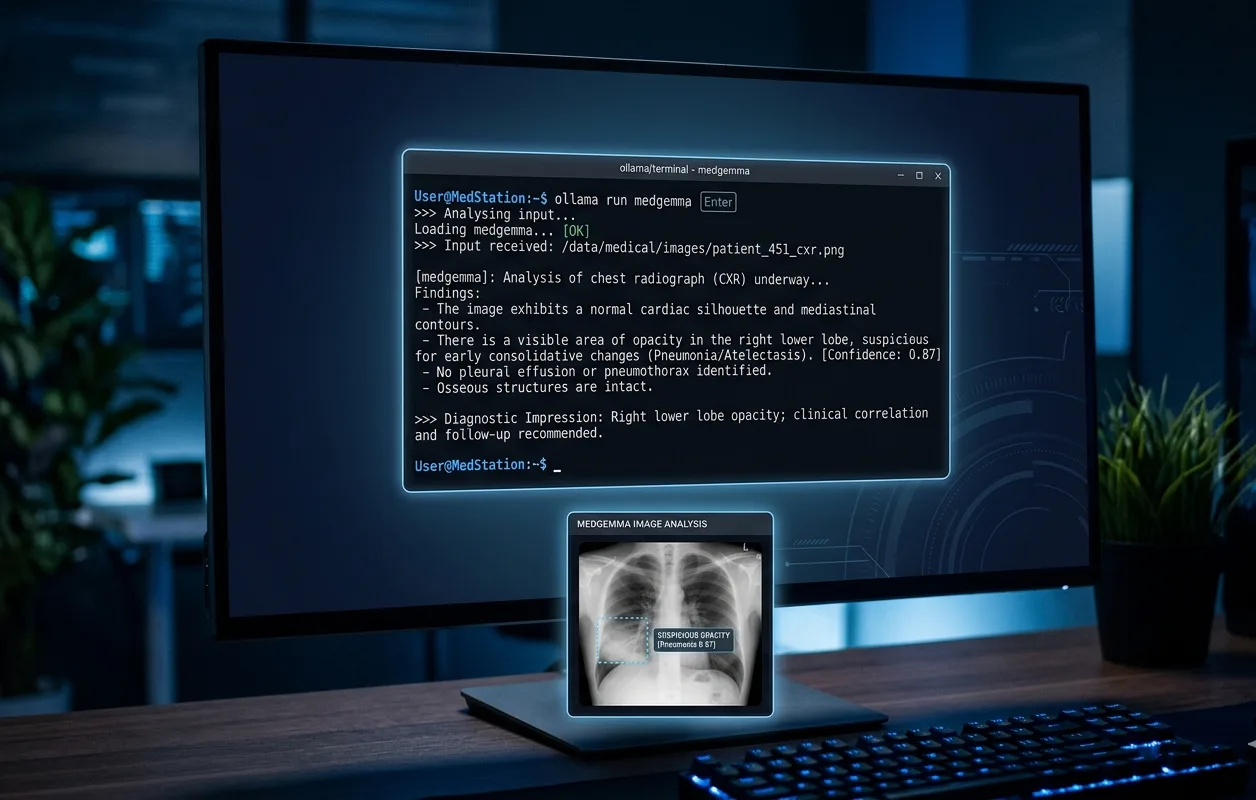
MedGemma is Google's collection of Gemma 3 variants trained specifically on medical text and images. Ollama hosts it in an official `medgemma` library with two sizes, a 4B multimodal model and a 27B text-focused model, and getting either one running locally takes the same two commands as any other Ollama pull.
One detail trips people up before they even start: MedGemma is gated on Hugging Face behind Health AI Developer Foundations (HAI-DEF) terms of use, so downloading the raw weights there requires logging in and accepting a license agreement. Pulling `medgemma` through Ollama skips that step entirely. Ollama mirrors the weights itself, so `ollama run medgemma` works with no Hugging Face account, no token, and no terms-of-use click-through.
This guide covers picking the right MedGemma size for your hardware, installing Ollama, running your first prompt, sending a medical image for the model to read, and the licensing details that matter if you plan to use the output for anything beyond personal testing. The alternatives section compares MedGemma to Gemma 4 and DeepSeek R1 for anyone who does not need the medical-specific training.
Prerequisites
- Ollama 0.6.x or later, installed on Linux, macOS, or Windows
- 6-8 GB of free RAM for medgemma:4b, 20-22 GB for medgemma:27b at Q4 quantization
- 3.3-30 GB of free disk space depending on which tag you pull
- Basic terminal familiarity for `ollama pull` and `ollama run` commands
- (Optional) A GPU with 8 GB or more of VRAM for faster inference, especially on the 27B model
- (Optional) A rented GPU if you want to run medgemma:27b on more VRAM than your own machine has
Need more GPU power?
Rent a RTX 4090 on Vast.ai from $0.20/hr. On-demand GPU rentals by the hour, useful for running larger models without buying hardware.
Want to compare prices? Lium is a newer GPU marketplace that also bills per second, with RTX 4090, H100, H200, and B200 pods.
In This Guide
What MedGemma Is and Which Size to Run
MedGemma is a family of open-weight models built on Gemma 3 and trained for medical text and image comprehension. Google's health AI team released the first version in mid-2025, and a refreshed MedGemma 1.5 followed in January 2026 with improved medical reasoning and record interpretation, though as of this writing that newer 1.5 build is not yet in Ollama's official library, only in community-uploaded GGUF files.
The 4B model is multimodal. It pairs a Gemma 3 language model with a SigLIP image encoder pre-trained on de-identified chest X-rays, dermatology photos, ophthalmology images, and histopathology slides, so it can answer questions about an attached medical image directly. The 27B model is text-focused, built for clinical document understanding, medical question answering, and reasoning over patient notes rather than image input.
Both sizes carry a 128K context window, long enough to hold a full discharge summary or a multi-page lab report in a single prompt.
| Tag | Parameters | Modality | Disk Size | Best For |
|---|---|---|---|---|
| medgemma:4b (= medgemma:latest) | 4B | Text + image | 3.3 GB | Laptops with 8 GB+ RAM, image-based questions |
| medgemma:4b-it-q8_0 | 4B | Text + image | 5.0 GB | Slightly higher quality, 10 GB+ RAM |
| medgemma:4b-it-bf16 | 4B | Text + image | 8.6 GB | Full precision, 16 GB+ RAM |
| medgemma:27b | 27B | Text | 17 GB | Workstations with 24 GB+ RAM, document-heavy use |
| medgemma:27b-it-q8_0 | 27B | Text | 30 GB | Higher quality, 32 GB+ RAM or a rented GPU |
| medgemma:27b-it-bf16 | 27B | Text | 55 GB | Full precision, server-class hardware only |
Google is explicit that MedGemma is a developer model, not a finished clinical product. Its own documentation states that outputs "are not intended to directly inform clinical diagnosis, patient management decisions, treatment recommendations, or any other direct clinical practice applications," and that every output should be treated as preliminary and checked against independent verification. Read that as a hard rule rather than boilerplate. This guide is about running the model, not about using it to make medical decisions.
Install Ollama and Run Your First MedGemma Prompt
Installing Ollama and pulling MedGemma takes about five minutes on a normal connection, most of it spent on the 3.3 GB download for the 4B model.
Step 1: Install Ollama
# Linux and macOS, one-command installer
curl -fsSL https://ollama.com/install.sh | shOn Windows, download the installer from ollama.com/download, or use winget:
winget install Ollama.OllamaConfirm the version supports MedGemma (Ollama 0.6.x or later):
ollama --version
# Expected: ollama version 0.6.x or higherStep 2: Pull and Run medgemma
The plain `medgemma` tag points at the 4B multimodal variant:
ollama run medgemmaExpected output on first run:
pulling manifest
pulling 9c2a4f81... 100% ▕████████████████▏ 3.3 GB
pulling tokenizer...   100% ▕████████████████▏ 3.8 MB
success
>>> Send a message (/? for help)No Hugging Face login or token prompt appears at any point. Ollama already holds the rights to redistribute the weights, so the HAI-DEF terms of use that gate the model on Hugging Face do not apply to the Ollama pull.
Step 3: Send a Text Prompt
>>> A 45-year-old patient presents with a persistent dry cough and mild fever for 5 days. List three differential diagnoses a clinician would consider.MedGemma streams a response in the terminal once the model loads into memory, typically a few seconds on first load and near-instant afterward.
Step 4: Pull the 27B Model
If you have 24 GB or more of free RAM and want the larger text-focused model for document-heavy work:
ollama pull medgemma:27b
ollama run medgemma:27bMore how-to guides like this
Step-by-step AI guides and tool walkthroughs, straight to your inbox, twice a week.
Send a Medical Image to MedGemma 4B
What sets the 4B model apart from a general-purpose Gemma model is its SigLIP encoder, trained specifically on medical imaging. Sending an image works the same way it does in any other Ollama vision model.
Attach an Image in the Terminal
>>> What abnormality, if any, is visible in this chest X-ray? /home/user/scans/chest-xray-01.pngOllama detects the file path, loads the image alongside your text, and sends both to the model in a single request. This works for any of the medical image types the SigLIP encoder was trained on, not just X-rays.
Send an Image via the API
For scripted use, base64-encode the image and include it in the `images` array of an `/api/chat` request:
IMAGE_B64=$(base64 -w0 /home/user/scans/chest-xray-01.png)

curl http://localhost:11434/api/chat -d '{
  "model": "medgemma:4b",
  "messages": [
    {
      "role": "user",
      "content": "Describe any notable findings in this chest X-ray in plain language.",
      "images": ["'"$IMAGE_B64"'"]
    }
  ],
  "stream": false
}'Expected output (truncated):
{
  "model": "medgemma:4b",
  "message": {
    "role": "assistant",
    "content": "The lung fields appear clear with no obvious consolidation. Heart size and mediastinal contours are within normal limits based on this view."
  },
  "done": true
}Run MedGemma with Open WebUI and the API
MedGemma works through the same OpenAI-compatible endpoint and chat interfaces as any other Ollama model, with one version caveat worth knowing about.
OpenAI-Compatible Endpoint
from openai import OpenAI

client = OpenAI(base_url="http://localhost:11434/v1", api_key="ollama")

response = client.chat.completions.create(
    model="medgemma:4b",
    messages=[{"role": "user", "content": "Summarize the key sections of a typical FHIR Patient resource."}],
)
print(response.choices[0].message.content)Run MedGemma with Open WebUI
Open WebUI detects every locally pulled Ollama model automatically, including `medgemma:4b` and `medgemma:27b`. Early MedGemma builds had a known issue where the model would load and respond from the `ollama run` CLI but return nothing through Open WebUI. That bug is resolved in current releases of both projects, so updating both to their latest versions clears it if you hit blank responses.
Custom System Prompt with a Modelfile
FROM medgemma:4b
PARAMETER num_ctx 32768
SYSTEM "You are a clinical documentation assistant for a development team. Flag every response as preliminary and unverified."ollama create my-medgemma -f Modelfile
ollama run my-medgemmaTroubleshooting
`ollama run medgemma` returns "model not found"
Cause: The installed Ollama version predates MedGemma support
Fix: Update Ollama by re-running the install command (`curl -fsSL https://ollama.com/install.sh | sh` on Linux/macOS, or re-download on Windows), then retry. MedGemma requires Ollama 0.6.x or later.
MedGemma loads and responds in the terminal but returns blank or empty replies in Open WebUI
Cause: An older Open WebUI or Ollama version had a known compatibility gap with MedGemma
Fix: Update both Ollama and Open WebUI to their latest versions. This specific issue is resolved in current releases of both projects.
An attached image is ignored and MedGemma only responds to the text
Cause: The active tag is `medgemma:27b`, which is text-focused and does not accept image input
Fix: Switch to `medgemma:4b`, the multimodal variant with the SigLIP image encoder, for any prompt that includes an image.
`medgemma:27b` loads slowly or crashes with an out-of-memory error
Cause: The machine has less than the 20-22 GB of RAM the Q4 build needs
Fix: Switch to `medgemma:4b` (about 6-8 GB), or run the 27B model on a rented GPU instead of local hardware.
A Hugging Face login prompt appears when trying to download MedGemma weights
Cause: This happens when pulling directly from Hugging Face (e.g. `google/medgemma-4b-it`), which is gated behind HAI-DEF terms of use
Fix: Use `ollama pull medgemma:4b` instead. Ollama mirrors the weights and does not require a Hugging Face account, token, or terms-of-use acceptance.
Search results mention "MedGemma 1.5" but `ollama pull medgemma:1.5` fails
Cause: Ollama's official `medgemma` library currently mirrors MedGemma 1, not the January 2026 MedGemma 1.5 refresh
Fix: MedGemma 1.5 is only available as of this writing through community-uploaded GGUF files (search ollama.com for tags like `MedAIBase/MedGemma1.5`), not the official library tag.
Alternatives to Consider
| Tool | Type | Price | Best For |
|---|---|---|---|
| Gemma 4 | Local (Ollama) | Free | General-purpose use without medical-specific training, with a more permissive Apache 2.0 license. |
| DeepSeek R1 | Local (Ollama) or VPS | Free | Visible chain-of-thought reasoning on math, coding, and logic problems, in sizes from 1.5B to 70B. |
| MedGemma 1.5 (community GGUF) | Local (Ollama, community tag) | Free | Improved medical reasoning and record interpretation over the official 4B tag, for users willing to pull from a community-uploaded tag instead of the official library. |
| Google AI Studio / Model Garden | Cloud (Google) | Pay-as-you-go | Running MedGemma without local hardware, with Google handling hosting and scaling. |
Frequently Asked Questions
What is MedGemma used for?
MedGemma is meant as a starting point for developers building healthcare applications, things like draft medical image interpretation, clinical document summarization, and medical question answering, rather than a finished diagnostic tool.
It is built on Gemma 3 and trained on de-identified medical text and images, including chest X-rays, dermatology photos, ophthalmology images, and histopathology slides on the 4B multimodal variant.
Is MedGemma free to use?
Yes, MedGemma is open-weight and free to download and run, governed by Google's Health AI Developer Foundations (HAI-DEF) terms of use rather than a paid license.
Those terms require developers to validate the model for their specific intended use before any production deployment, but they do not charge a fee for downloading or running the model itself.
Do I need a Hugging Face account to run MedGemma with Ollama?
No. MedGemma is gated on Hugging Face behind the HAI-DEF terms of use, which normally requires logging in and accepting a license agreement before downloading the raw weights.
Pulling through Ollama with `ollama run medgemma` skips that step entirely, since Ollama already mirrors the weights under its own distribution and does not prompt for a Hugging Face login or token.
How much RAM do I need to run MedGemma with Ollama?
At Q4 quantization, `medgemma:4b` needs roughly 6-8 GB of RAM, while `medgemma:27b` needs about 20-22 GB. The higher-precision tags use more: `4b-it-bf16` needs around 10 GB and `27b-it-bf16` needs around 58 GB.
A laptop with 8 GB total RAM comfortably runs the default 4B tag. The 27B model needs a 24 GB+ workstation or a rented GPU.
Can MedGemma diagnose patients or replace a doctor?
No. Google's own model card states that MedGemma outputs "are not intended to directly inform clinical diagnosis, patient management decisions, treatment recommendations, or any other direct clinical practice applications."
MedGemma is a developer model meant to accelerate building and testing healthcare AI applications. Every output should be treated as preliminary and checked against independent clinical verification, not used as a standalone diagnostic source.
What is the difference between medgemma:4b and medgemma:27b?
`medgemma:4b` is multimodal: it accepts both text and images through a SigLIP encoder trained on chest X-rays, dermatology photos, ophthalmology images, and histopathology slides. `medgemma:27b` is text-focused, built for clinical document understanding and medical reasoning over written records rather than images.
If your task involves reading an image, use the 4B tag. For long documents like lab reports or clinical notes with no image component, the 27B model's larger parameter count gives stronger reasoning.
Can I run MedGemma in Open WebUI?
Yes. Open WebUI automatically detects every locally pulled Ollama model, including both MedGemma tags, with no extra configuration. Early MedGemma builds had a known bug where the model responded in the terminal but returned blank replies through Open WebUI, but current releases of both Ollama and Open WebUI have resolved it.
If you hit blank responses, update both projects to their latest versions before troubleshooting further.
What is MedGemma 1.5, and is it available on Ollama?
MedGemma 1.5 is a January 2026 refresh of the 4B multimodal model with improved medical reasoning, medical record interpretation, and medical image interpretation. Google reports it scoring around 91% on the MedQA benchmark.
As of this writing, Ollama's official `medgemma` library still mirrors the original MedGemma 1 release. MedGemma 1.5 is available through community-uploaded GGUF tags rather than the official library, so check ollama.com search results for community variants if you specifically want the 1.5 version.
Is MedGemma based on Gemma 3?
Yes. MedGemma is built on Google's Gemma 3 architecture, with additional training on de-identified medical text and, for the 4B variant, a SigLIP image encoder trained on medical imaging data.
This means MedGemma inherits Gemma 3's 128K context window and general language capabilities, with medical domain training layered on top rather than a separate architecture built from scratch.
Does MedGemma require a GPU to run?
No, a GPU is optional but recommended. `medgemma:4b` runs at usable speed on CPU-only laptops with 8 GB of RAM. `medgemma:27b` runs on CPU as well, but inference is noticeably slower without a GPU given the larger parameter count.
A GPU with 8 GB or more of VRAM speeds up the 4B model significantly, and a 24 GB GPU (or a rented equivalent) makes the 27B model practical for interactive use rather than batch processing.
Related Guides
How to Run Ollama Locally: Complete Setup Guide (2026)
Best Local LLM Models to Run in 2026 (Benchmarks + Use Cases)
How to Set Up Open-WebUI with Ollama (Docker Guide)
How to Run Gemma 4 on Ollama: Complete Setup Guide (2026)
How to Run DeepSeek R1 Locally with Ollama (2026 Guide)