
How to Run Ornith 1.5 on Ollama: Local Setup Guide (2026)
Ornith 1.5 adds vision input and beats Ornith 1.0 on every published benchmark. Pull ornith-1.5:9b, 35b, or the new 397b tag in Ollama and run it today.

Ornith 1.5 is DeepReinforce's follow-up to Ornith 1.0, released August 19, 2026. Where Ornith 1.0 trained a model to generate its own task scaffold for a fixed set of coding problems, Ornith 1.5 pushes the same self-improvement idea further. It jointly optimizes task generation, scaffold construction, and solution rollouts, meaning the model doesn't just solve problems inside a scaffold it invented. It proposes its own new training tasks too, then learns from attempting them. DeepReinforce calls this "a major step toward building foundation models through end-to-end self-improvement."
Two things changed on the Ollama side. Ornith 1.5 adds image input across every tag, a real gap in 1.0, which was text-only. And the 397 billion parameter mixture-of-experts checkpoint, the size DeepReinforce's own benchmark charts lean on most heavily, is now a real pullable Ollama tag alongside the familiar 9B and 35B sizes, rather than sitting Hugging Face-only the way it did for 1.0.
This guide covers picking the right tag for your hardware, installing Ollama, running your first prompt, sending an image, connecting Ornith 1.5 to agent tools like OpenClaw, and how its real benchmark numbers stack up against Ornith 1.0, DeepSeek-V4-Flash, GLM-5.2, and Claude Opus 4.8.
Prerequisites
- Ollama 0.6.x or later, installed on Linux, macOS, or Windows
- At least 8 GB of RAM and 7 GB of free disk space for `ornith-1.5:9b` (6.6 GB download)
- At least 24 GB of VRAM, or 32 GB of combined RAM/VRAM, for `ornith-1.5:35b` (23 GB download)
- A multi-GPU setup or 250 GB+ of combined RAM/VRAM for the new `ornith-1.5:397b` tag (242 GB download), realistically a rented cloud instance rather than a personal machine
- A GPU is optional for the 9B model but strongly recommended for 35B and required in practice for 397B
- Basic terminal familiarity for running `ollama pull` and `ollama run` commands
- (Optional) OpenClaw or another Ollama-compatible coding agent if you want to use Ornith 1.5 as an agentic backend, covered later in this guide
Need more GPU power?
Rent a RTX 4090 on Vast.ai from $0.20/hr. On-demand GPU rentals by the hour, useful for running larger models without buying hardware.
In This Guide
What's New in Ornith 1.5 and Which Tag to Run
Ornith 1.5 comes from DeepReinforce, the same lab behind Ornith 1.0, still published on Hugging Face under the `deepreinforce-ai` organization. The core idea behind the family hasn't changed: train a model on multi-step agentic coding work by rewarding it on whether its self-generated approach actually solves the problem, not on imitating a fixed human-written harness.
What's different in 1.5 is the scope of that self-improvement loop. Ornith 1.0 generated its own scaffold for a given task, then solved it inside that scaffold. Ornith 1.5 generates the training tasks themselves too, alongside the scaffold and the solution, all optimized jointly through reinforcement learning. DeepReinforce describes the model as continuously proposing new problems, discovering strategies for solving them, and improving its own policy from the results, rather than staying bound to a fixed, human-curated task set.
Two capability changes carry over into how you actually use the model. Every Ornith 1.5 tag now accepts image input alongside text. And Ollama's library now hosts the full 397 billion parameter mixture-of-experts checkpoint, sitting alongside the same 9B and 35B sizes from before. The 35B tag activates roughly 3B parameters per token, which is part of why it stays practical on a single high-end consumer GPU despite its larger total size.
Here's what Ollama hosts as of Ornith 1.5's release:
| Tag | Parameters | Download size | Context window | Inputs |
|---|---|---|---|---|
| `ornith-1.5:9b` | 9B dense | 6.6 GB | 256K | Text, Image |
| `ornith-1.5:35b` | 35B MoE | 23 GB | 256K | Text, Image |
| `ornith-1.5:397b` | 397B MoE | 242 GB | 256K | Text, Image |
All three tags keep the same 256K token context window as Ornith 1.0. The 397B size is realistically a rented multi-GPU cloud instance rather than a personal machine, covered in the hardware section below.
Install Ollama and Run Ornith 1.5 Locally
Running Ornith 1.5 through Ollama takes the same four steps as any Ollama model: install Ollama, pull a tag, run it, and verify it loaded.
Step 1: Install Ollama
# Linux and macOS, one-command installer
curl -fsSL https://ollama.com/install.sh | shOn Windows, download the installer from ollama.com/download, or use winget:
winget install Ollama.OllamaVerify the installation:
ollama --version
# Expected: ollama version 0.6.x or higherStep 2: Pull and Run Ornith 1.5
ollama run ornith-1.5This pulls the default tag, `ornith-1.5:9b`, and drops you into a prompt once the 6.6 GB download finishes:
pulling manifest
pulling 4b7f2e91... 100% ▕████████████████▏ 6.6 GB
success
>>> Send a message (/? for help)Step 3: Pull a Specific Size
ollama pull ornith-1.5:9b
ollama pull ornith-1.5:35b
ollama pull ornith-1.5:397bStep 4: Verify the Models
ollama listNAME SIZE MODIFIED
ornith-1.5:9b 6.6 GB 2 minutes ago
ornith-1.5:35b 23 GB 5 minutes agoStep 5: Test an Agentic Coding Prompt
>>> Write a Python function that validates a JSON schema against a nested dictionary, then propose your own test cases for it.Because Ornith 1.5 was trained to generate its own tasks and scaffolds, not just solve fixed ones, prompts that ask it to propose its own verification approach tend to surface that training more clearly than a plain code-completion request.
Choosing Between the 9B, 35B, and 397B Tags
Three sizes now means three real hardware tiers instead of two.
| ornith-1.5:9b | ornith-1.5:35b | ornith-1.5:397b | |
|---|---|---|---|
| Download size | 6.6 GB | 23 GB | 242 GB |
| Minimum RAM (CPU only) | 8 GB | 32 GB | Not realistic on CPU alone |
| Recommended GPU VRAM | 6 GB+ | 24 GB+ | 200 GB+ across multiple GPUs |
| Realistic hardware | Any modern laptop | Desktop with a high-VRAM GPU, or a rented cloud GPU | A rented multi-GPU cloud instance |
| Context window | 256K | 256K | 256K |
`ornith-1.5:9b` is the right starting point on ordinary hardware, the same as it was for 1.0. It scores noticeably higher than Ornith 1.0 on most of DeepReinforce's published benchmarks (see the benchmark section below) while keeping the same modest download size.
`ornith-1.5:35b` is the practical ceiling for a single consumer GPU. A 24 GB card like an RTX 4090 handles it with full offload. Without one, plan on 32 GB or more of system RAM and slower CPU-assisted inference.
`ornith-1.5:397b` is a different category of hardware requirement entirely. At 242 GB, it doesn't fit on any single consumer GPU, and running it well means a multi-GPU cloud instance, not a personal machine.
If you're unsure where to start, pull `ornith-1.5:9b` first. It's a fraction of the download time of the larger tags and gives you a direct feel for what changed since Ornith 1.0 before deciding whether 35B or 397B is worth the extra hardware.
Using Ornith 1.5's New Vision Input
Ornith 1.0 was text-only. Every tag in Ornith 1.5 now accepts images alongside text, which matters for agentic coding work that involves reading a screenshot, a diagram, or a rendered UI rather than only raw code.
Send an Image from the Terminal
ollama run ornith-1.5 "What's wrong with this layout? ./screenshot.png"The model reads the image directly alongside your text prompt in the same request, useful for debugging a UI bug from a screenshot or checking a rendered diagram against what the code is supposed to produce.
Send an Image via the API
curl http://localhost:11434/api/chat -d '{
  "model": "ornith-1.5:9b",
  "messages": [
    { "role": "user", "content": "Does this chart match the data in report.csv?", "images": ["<base64-encoded-image>"] }
  ],
  "stream": false
}'How Ornith 1.5 Compares: Real Benchmark Numbers
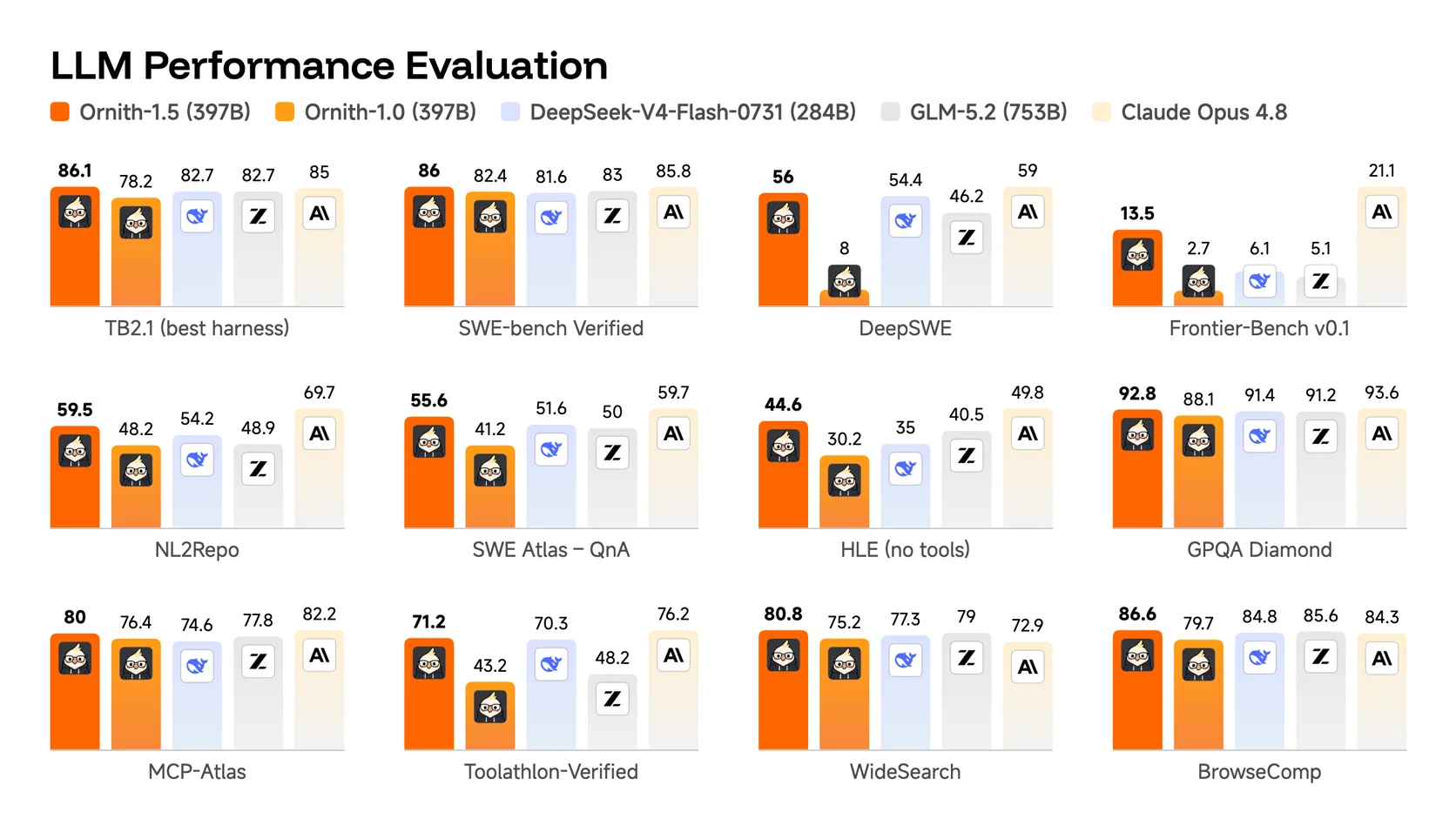
DeepReinforce published a 12-benchmark comparison for the 397B size of Ornith 1.5 against Ornith 1.0, DeepSeek-V4-Flash-0731 (284B), GLM-5.2 (753B), and Claude Opus 4.8. These are vendor-reported numbers, so treat them as a starting point rather than a final verdict, but the gap over Ornith 1.0 specifically is large enough across every benchmark shown to be worth noting.
| Benchmark | Ornith 1.5 (397B) | Ornith 1.0 (397B) | DeepSeek-V4-Flash (284B) | GLM-5.2 (753B) | Claude Opus 4.8 |
|---|---|---|---|---|---|
| TB2.1 (best harness) | 86.1 | 78.2 | 82.7 | 82.7 | 85.0 |
| SWE-bench Verified | 86.0 | 82.4 | 81.6 | 83.0 | 85.8 |
| DeepSWE | 56.0 | 8.0 | 54.4 | 46.2 | 59.0 |
| Frontier-Bench v0.1 | 13.5 | 2.7 | 6.1 | 5.1 | 21.1 |
| NL2Repo | 59.5 | 48.2 | 54.2 | 48.9 | 69.7 |
| SWE Atlas - QnA | 55.6 | 41.2 | 51.6 | 50.0 | 59.7 |
| HLE (no tools) | 44.6 | 30.2 | 35.0 | 40.5 | 49.8 |
| GPQA Diamond | 92.8 | 88.1 | 91.4 | 91.2 | 93.6 |
| MCP-Atlas | 80.0 | 76.4 | 74.6 | 77.8 | 82.2 |
| Toolathlon-Verified | 71.2 | 43.2 | 70.3 | 48.2 | 76.2 |
| WideSearch | 80.8 | 75.2 | 77.3 | 79.0 | 72.9 |
| BrowseComp | 86.6 | 79.7 | 84.8 | 85.6 | 84.3 |
A few numbers stand out. On DeepSWE, Ornith 1.5 scores 56.0 against Ornith 1.0's 8.0, a jump too large to attribute to noise alone. Toolathlon-Verified moves from 43.2 to 71.2 across the same generation gap. On WideSearch, Ornith 1.5 actually outscores Claude Opus 4.8, 80.8 to 72.9, despite Opus being a proprietary frontier model.
GLM-5.2 carries almost double Ornith 1.5's parameter count at 753B, yet Ornith 1.5 beats it on 10 of the 12 benchmarks shown here. Parameter count alone doesn't predict which model wins a given benchmark.
Using Ornith 1.5 with OpenClaw and Other Coding Agents
DeepReinforce's own benchmark suite includes MCP-Atlas and Toolathlon-Verified, both built around tool-calling agent behavior, which makes Ornith 1.5 as natural a fit for OpenClaw with Ollama as its predecessor was. Since Ollama exposes the same OpenAI-compatible endpoint for every model it serves, pointing an existing agent at Ornith 1.5 is a configuration change, not a new install.
Point OpenClaw at Ornith 1.5
model:
  default: ornith-1.5:35b
  provider: custom
  base_url: http://localhost:11434/v1
context_length: 256000Swap in `ornith-1.5:9b` for lighter hardware, or `ornith-1.5:397b` if you're running it through a rented multi-GPU instance.
Call Ornith 1.5 Directly from the API
curl http://localhost:11434/api/chat -d '{
  "model": "ornith-1.5:9b",
  "messages": [
    { "role": "user", "content": "Add input validation to this function and explain the test cases you would write for it." }
  ],
  "stream": false
}'{
"model": "ornith-1.5:9b",
"message": {
"role": "assistant",
"content": "Here is the validated function, along with the edge cases I would test..."
},
"done": true
}Troubleshooting
`ollama run ornith-1.5` downloads the 9B model when I wanted a larger tag
Cause: `ornith-1.5` and `ornith-1.5:latest` both alias to `ornith-1.5:9b`
Fix: Pull the size you want explicitly with `ollama pull ornith-1.5:35b` or `ollama pull ornith-1.5:397b`, then run that tag by name.
Out of memory error or extremely slow responses with `ornith-1.5:35b`
Cause: The 35B model exceeds available VRAM and Ollama is offloading layers to slower system RAM, or system RAM itself is insufficient
Fix: Drop to `ornith-1.5:9b` if your hardware is limited, or rent a 24 GB+ VRAM GPU instance on Vast.ai instead of running 35B on underpowered hardware.
`ollama pull ornith-1.5:397b` fails, stalls, or the machine runs out of disk space
Cause: The 397B tag is a 242 GB download that exceeds what most personal machines can store or realistically run
Fix: Confirm 250 GB or more of free disk space before starting, and plan on a rented multi-GPU cloud instance rather than a personal machine to run the model once downloaded.
Sending an image returns an error or gets ignored
Cause: The image path is wrong, or the API request is missing the `images` field
Fix: Double-check the file path from the terminal, or confirm the API request includes a base64-encoded `images` array alongside the text `content`, as shown in the vision input section above.
"model not found" running `ollama run ornith-1.5`
Cause: An outdated Ollama installation predates Ornith 1.5 being added to the official library
Fix: Update Ollama by re-running the install command (`curl -fsSL https://ollama.com/install.sh | sh` on Linux/macOS, or re-download on Windows), then retry the pull.
Connecting OpenClaw or another agent to Ornith 1.5 returns a connection error
Cause: The Ollama server is not running, or the agent is pointed at the wrong port
Fix: Confirm Ollama is running with `ollama serve` (or that the background service is active), and check that the agent config uses `http://localhost:11434/v1`, the default Ollama API port.
Alternatives to Consider
| Tool | Type | Price | Best For |
|---|---|---|---|
| Ornith 1.0 | Local (Ollama) | Free | The previous generation of this same family, useful to check if you already have 1.0 tags pulled and want to know whether the download for 1.5 is worth it. |
| Gemma 4 | Local (Ollama) | Free | A general-purpose model without the self-scaffolding RL layer. Good if you want Google's model rather than coding-specific training. |
| GLM 5.2 | Cloud (Ollama) | Free within Ollama Cloud limits | A 753B parameter agentic coding model with a 1M token context window, for tasks that need more context than any local Ornith tag offers. |
| Kimi K2 | Cloud (Ollama) | Free within Ollama Cloud limits | Tool-use and agentic orchestration at a larger scale than the local Ornith 1.5 tags, for users comfortable with a cloud-hosted model. |
| DeepSeek R1 | Local (Ollama) or VPS | Free | Reasoning-heavy tasks with visible chain-of-thought output, on hardware ranging from 4 GB (distilled) up to 64 GB or more (70B). |
Frequently Asked Questions
Is Ornith 1.5 free to use?
Yes. DeepReinforce released Ornith 1.5 under an MIT license on August 19, 2026, so the weights are free for personal and commercial use with no API costs when run locally through Ollama.
The only cost involved is the hardware needed to run it, or a rented GPU instance if your own machine can't handle the 35B or 397B tags.
What's new in Ornith 1.5 compared to Ornith 1.0?
Ornith 1.0 generated its own task scaffold for a fixed set of coding problems and solved the problem inside that scaffold. Ornith 1.5 jointly optimizes task generation, scaffold construction, and solution rollouts, meaning it proposes its own new training tasks too, not just the scaffold for solving them.
On the Ollama side, every Ornith 1.5 tag now supports image input, which 1.0 never had, and the full 397B checkpoint is now a real pullable Ollama tag rather than Hugging Face-only.
Does Ornith 1.5 support images?
Yes. All three tags, `ornith-1.5:9b`, `ornith-1.5:35b`, and `ornith-1.5:397b`, accept image input alongside text in the same request. This is new for the family: Ornith 1.0 was text-only.
See the "Using Ornith 1.5's New Vision Input" section above for the exact terminal and API syntax.
What is the difference between the 9B, 35B, and 397B tags?
`ornith-1.5:9b` is a 9B dense model, a 6.6 GB download that runs on most modern laptops. `ornith-1.5:35b` is a 35B mixture-of-experts model activating roughly 3B parameters per token, a 23 GB download that needs a 24 GB+ VRAM GPU for full offload. `ornith-1.5:397b` is the full 397B mixture-of-experts flagship, a 242 GB download realistically limited to a rented multi-GPU cloud instance.
All three share the same 256K token context window and the same self-improving training method.
How much RAM or VRAM do I need to run Ornith 1.5?
For `ornith-1.5:9b`, 8 GB of RAM is the practical minimum, with 16 GB giving smoother performance. A GPU is optional but speeds up responses.
For `ornith-1.5:35b`, plan on a GPU with at least 24 GB of VRAM for full offload, or 32 GB or more of combined system RAM without one. For `ornith-1.5:397b`, plan on a rented multi-GPU cloud instance rather than a personal machine.
Is Ornith 1.5 better than Ornith 1.0?
On every benchmark DeepReinforce published for the 397B size, yes. The gap is largest on DeepSWE, where Ornith 1.5 scores 56.0 against Ornith 1.0's 8.0, and on Toolathlon-Verified, where it moves from 43.2 to 71.2.
These are vendor-reported numbers for the 397B tag specifically, so the exact margins on the smaller 9B and 35B tags will differ, though the direction of improvement should hold. See the benchmark section above for the full 12-benchmark table.
Is Ornith 1.5 better than Claude Opus 4.8?
It depends on the benchmark. Ornith 1.5's 397B tag actually outscores Claude Opus 4.8 on WideSearch (80.8 vs 72.9), but Opus leads on most of the other 11 benchmarks DeepReinforce published, including Frontier-Bench v0.1 (21.1 vs 13.5) and NL2Repo (69.7 vs 59.5).
These are DeepReinforce's own reported numbers, not an independent third-party comparison, so treat the gap as directional rather than final. For fully local, hardware-bound use, Ornith 1.5 is free and open-weight, while Opus is a proprietary cloud model.
Can I use Ornith 1.5 with OpenClaw or other coding agents?
Yes. DeepReinforce's own benchmark suite includes MCP-Atlas and Toolathlon-Verified, both agentic tool-use benchmarks, and any agent that talks to Ollama's OpenAI-compatible endpoint at `http://localhost:11434/v1` can use Ornith 1.5 with a model name change in its configuration.
See the "Using Ornith 1.5 with OpenClaw and Other Coding Agents" section above for the exact configuration, or the dedicated OpenClaw with Ollama guide if you haven't set up OpenClaw itself yet.
Who is DeepReinforce?
DeepReinforce is the research lab behind both Ornith 1.0 and Ornith 1.5, focused on reinforcement learning methods for coding agents. The team publishes weights on Hugging Face under the `deepreinforce-ai` organization and released Ornith 1.5 on August 19, 2026, less than two months after Ornith 1.0's June 26, 2026 launch.
Related Guides
How to Run Ollama Locally: Complete Setup Guide (2026)
How to Run Ornith 1.0 on Ollama: Local Setup Guide (2026)
How to Run Gemma 4 on Ollama: Complete Setup Guide (2026)
How to Run GLM-5.3-Flash on Ollama: Cloud Setup Guide (2026)
How to Run GLM 5.2 on Ollama: Cloud Setup Guide (2026)
How to Run Kimi K2 on Ollama: Cloud Setup Guide (2026)
How to Run OpenClaw with Ollama Local Models (2026 Guide)