
How to Run Ornith 1.0 on Ollama: Local Setup Guide (2026)
Ornith 1.0 is DeepReinforce's MIT-licensed model that learns to write its own coding scaffolds. Pull ornith:9b or :35b in Ollama and run it locally today.

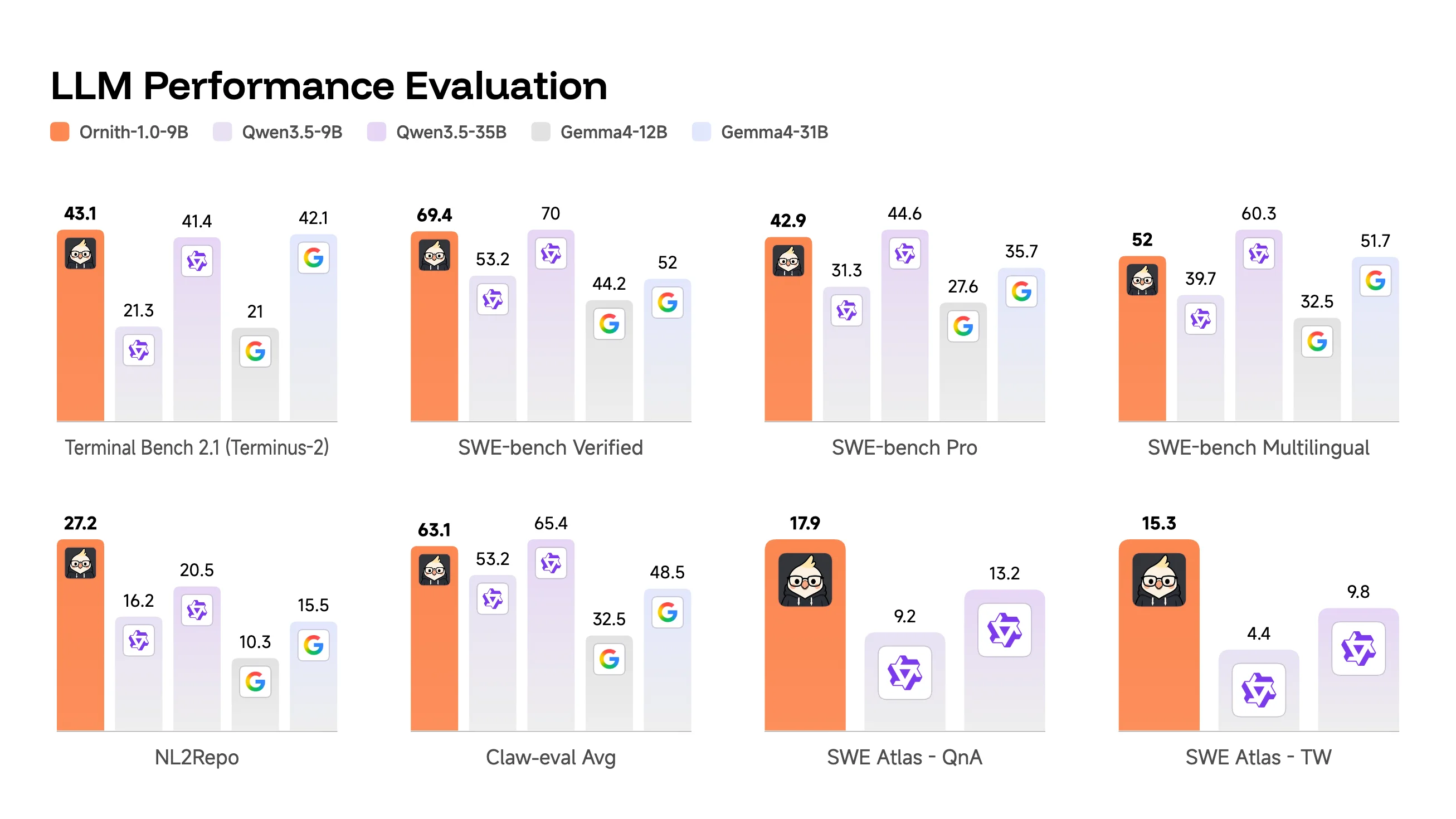
Ornith 1.0 is an open-weight coding model from DeepReinforce, released on June 26, 2026 under an MIT license. What sets it apart from most local coding models is how it was trained. Instead of relying on a fixed, human-built scaffold to drive each coding task, Ornith learns through reinforcement learning to generate its own scaffold and its own solution at the same time, then reinforces whichever combination actually solves the problem. DeepReinforce describes Ornith 1.0 as a "self-improving family" of models rather than a single checkpoint, since the same training recipe produced several sizes.
Ollama added Ornith to its official library the same week it launched. Two tags are available as of late June 2026: `ornith:9b`, a 5.6 GB download that runs on most modern laptops, and `ornith:35b`, a 21 GB download aimed at heavier agentic coding work. Both carry a 256K token context window, large enough to hold a mid-sized codebase in a single session. DeepReinforce's Hugging Face collection also lists larger 31B dense and 397B mixture-of-experts checkpoints, though neither has reached Ollama's library yet.
This guide covers installing Ollama, pulling both Ornith sizes, picking the right one for your hardware, and connecting Ornith to agent tools like OpenClaw that already speak Ollama's API.
Prerequisites
- Ollama 0.6.x or later, installed on Linux, macOS, or Windows
- At least 8 GB of RAM and 6 GB of free disk space for `ornith:9b` (5.6 GB download)
- At least 24 GB of VRAM, or 32 GB of combined RAM/VRAM, for comfortable use of `ornith:35b` (21 GB download)
- A GPU is optional for the 9B model but strongly recommended for the 35B model
- Basic terminal familiarity for running `ollama pull` and `ollama run` commands
- (Optional) OpenClaw or another Ollama-compatible coding agent if you want to use Ornith as an agentic backend, covered later in this guide
Need more GPU power?
Rent a RTX 4090 on Vast.ai from $0.20/hr. On-demand GPU rentals by the hour, useful for running larger models without buying hardware.
In This Guide
What Ornith 1.0 Is and How Its Self-Scaffolding Training Works
Ornith 1.0 comes from DeepReinforce, a research lab focused on reinforcement learning for coding agents, with weights published on Hugging Face under the `deepreinforce-ai` organization. The model targets agentic coding specifically: multi-step tasks where an AI has to plan, call tools, run tests, and revise its own work, rather than answer a single prompt.
The training loop behind the self-scaffolding idea works in rounds. DeepReinforce samples candidate scaffolds for a given coding task, runs the resulting trajectories against tests or benchmark harnesses, and scores each attempt on whether the code actually passes, not just whether it looks plausible. The model then gets reinforced on the scaffold-and-solution pairs that worked, so over many rounds it learns which kinds of self-generated harnesses tend to lead somewhere useful. According to DeepReinforce's model card, this is what lets the model "discover better search trajectories and generate higher-quality solutions" compared to filling in a fixed, human-written harness.
Ornith's smaller sizes are post-trained on top of Gemma 4, and its larger sizes build on Qwen 3.5, which explains why the family spans such a wide parameter range while sharing the same training recipe. Every size ships under an MIT license, the same permissive terms as the base models it builds on.
DeepReinforce reports Ornith's results on Terminal-Bench 2.1, SWE-Bench, NL2Repo, and OpenClaw, benchmarks chosen specifically because they test multi-step, tool-using coding work rather than single-turn code completion. The company's own numbers put Ornith ahead of comparably sized open-weight coding models on these benchmarks, though independent third-party benchmark runs were not yet published in the days after launch. Treat vendor-reported scores as a starting point, not a final verdict.
Here's what Ollama hosts as of late June 2026:
| Tag | Parameters | Download size | Context window | Notes |
|---|---|---|---|---|
| `ornith:9b` | 9B dense (Gemma 4 base) | 5.6 GB | 256K | Default tag, runs on most laptops |
| `ornith:35b` | 35B MoE (Qwen 3.5 base) | 21 GB | 256K | Needs a high-VRAM GPU or 32GB+ RAM for full local use |
| `ornith:latest` | Same as `ornith:9b` | 5.6 GB | 256K | Alias, defaults to the 9B tag |
DeepReinforce's Hugging Face collection also includes 31B dense and 397B mixture-of-experts checkpoints, but neither tag has reached Ollama's official library yet.
Install Ollama and Run Ornith Locally
Running Ornith through Ollama takes four steps: install Ollama, pull a tag, run the model, and verify it loaded. The whole setup takes under ten minutes once the download finishes.
Step 1: Install Ollama
# Linux and macOS, one-command installer
curl -fsSL https://ollama.com/install.sh | shOn Windows, download the installer from ollama.com/download, or use winget:
winget install Ollama.OllamaVerify the installation:
ollama --version
# Expected: ollama version 0.6.x or higherStep 2: Pull and Run Ornith
ollama run ornithThis pulls the default tag, currently `ornith:9b`, and drops you into a prompt once the 5.6 GB download finishes:
pulling manifest
pulling 3a8e1c9f... 100% ▕████████████████▏ 5.6 GB
success
>>> Send a message (/? for help)Step 3: Pull a Specific Size
If you want the 9B and 35B tags side by side, pull each explicitly instead of relying on the default:
ollama pull ornith:9b
ollama pull ornith:35bStep 4: Verify the Models
ollama listBoth tags should appear with their download sizes:
NAME            ID              SIZE      MODIFIED
ornith:9b       7f2a91b3...     5.6 GB    2 minutes ago
ornith:35b c4d8e027... 21 GB 5 minutes agoStep 5: Test an Agentic Coding Prompt
>>> Write a Python function that retries a failing HTTP request up to 3 times with exponential backoff, then explain your scaffold for testing it.Because Ornith was trained to generate its own task scaffold alongside the solution, responses to multi-step prompts like this often include the model's own plan for verifying its answer, not just the code.
Choosing Between ornith:9b and ornith:35b
The right tag depends on your hardware, not just on wanting the bigger model. Here's how the two compare:
| ornith:9b | ornith:35b | |
|---|---|---|
| Download size | 5.6 GB | 21 GB |
| Minimum RAM (CPU only) | 8 GB | 32 GB |
| Recommended GPU VRAM | 6 GB+ | 24 GB+ |
| Realistic hardware | Any modern laptop | Desktop with a high-VRAM GPU, or a rented cloud GPU |
| Context window | 256K | 256K |
`ornith:9b` runs comfortably on a laptop with 16 GB of RAM and no dedicated GPU, though responses are faster with even a modest GPU. It's the right starting point for testing Ornith's self-scaffolding behavior before committing disk space and download time to the larger model.
`ornith:35b` is the size DeepReinforce's own benchmark numbers lean on most heavily for agentic coding work. Running it well, meaning full GPU offload rather than slow CPU fallback, needs a GPU with at least 24 GB of VRAM, like an RTX 4090. Without that, you're looking at 32 GB or more of system RAM and noticeably slower responses as Ollama offloads layers to the CPU.
If you're unsure which to start with, pull `ornith:9b` first. It downloads in a fraction of the time and gives you a feel for how the model's self-generated scaffolds behave before you decide whether the 35B size is worth the extra hardware.
Using Ornith with OpenClaw and Other Coding Agents
DeepReinforce specifically benchmarked Ornith on OpenClaw, which makes it a natural fit for anyone already running OpenClaw with Ollama as a local coding agent. Because Ollama exposes the same OpenAI-compatible endpoint for every model it serves, switching OpenClaw (or any other Ollama-compatible agent) over to Ornith is a configuration change, not a new install.
Point OpenClaw at Ornith
Update the agent's model configuration to use Ornith's tag instead of whatever local model it was pointed at before:
model:
  default: ornith:35b
  provider: custom
  base_url: http://localhost:11434/v1
context_length: 256000Use `ornith:9b` in place of `ornith:35b` if you're running on lighter hardware. The rest of the configuration stays the same.
Call Ornith Directly from the API
For scripts or custom tooling rather than a pre-built agent, Ornith responds to standard Ollama API calls:
curl http://localhost:11434/api/chat -d '{
  "model": "ornith:9b",
  "messages": [
    { "role": "user", "content": "Refactor this function to handle null inputs and add a test case." }
  ],
  "stream": false
}'{
"model": "ornith:9b",
"message": {
"role": "assistant",
"content": "Here is the refactored function, the null check I added, and a pytest case covering the null-input path..."
},
"done": true
}Troubleshooting
`ollama run ornith` downloads the 9B model when I wanted the 35B
Cause: `ornith` and `ornith:latest` both alias to `ornith:9b` as the default tag
Fix: Pull the larger model explicitly with `ollama pull ornith:35b`, then run it with `ollama run ornith:35b`.
Out of memory error or extremely slow responses with `ornith:35b`
Cause: The 35B model exceeds available VRAM and Ollama is offloading layers to slower system RAM, or system RAM itself is insufficient
Fix: Drop to `ornith:9b` if your hardware is limited, or rent a 24 GB+ VRAM GPU instance on Vast.ai instead of running the 35B model on underpowered hardware.
`ollama pull ornith:35b` stalls or fails partway through the 21 GB download
Cause: Network interruption during a large download
Fix: Re-run `ollama pull ornith:35b`. Ollama resumes interrupted downloads from where they stopped rather than restarting from zero.
"model not found" or "unknown command" running `ollama run ornith`
Cause: An outdated Ollama installation predates Ornith being added to the official library
Fix: Update Ollama by re-running the install command (`curl -fsSL https://ollama.com/install.sh | sh` on Linux/macOS, or re-download on Windows), then retry the pull.
Responses degrade in quality on very long inputs despite the 256K context window
Cause: A stated maximum context window does not guarantee even quality across its full length; most models, Ornith included, perform best well under their advertised ceiling
Fix: Keep prompts focused on the relevant code rather than pasting an entire large repository. Break very long tasks into smaller, scoped requests where possible.
Connecting OpenClaw or another agent to Ornith returns a connection error
Cause: The Ollama server is not running, or the agent is pointed at the wrong port
Fix: Confirm Ollama is running with `ollama serve` (or that the background service is active), and check that the agent config uses `http://localhost:11434/v1`, the default Ollama API port.
Alternatives to Consider
| Tool | Type | Price | Best For |
|---|---|---|---|
| Gemma 4 | Local (Ollama) | Free | The same base model Ornith's 9B size builds on, without the self-scaffolding RL layer. Good if you want Google's general-purpose model rather than coding-specific training. |
| GLM 5.2 | Cloud (Ollama) | Free within Ollama Cloud limits | A much larger 744B parameter agentic coding model with a 1M token context window, for tasks beyond what a 35B local model can handle. |
| Kimi K2 | Cloud (Ollama) | Free within Ollama Cloud limits | Tool-use and agentic orchestration at a larger scale than Ornith, for users comfortable with a cloud-hosted model. |
| DeepSeek R1 | Local (Ollama) or VPS | Free | Reasoning-heavy tasks with visible chain-of-thought output, on hardware ranging from 4 GB (distilled) up to 64 GB or more (70B). |
| Mistral Medium 3.5 | Local (Ollama) | Free | A general-purpose coding and reasoning model from Mistral AI for users who want an alternative European-built local model. |
Frequently Asked Questions
Is Ornith 1.0 free to use?
Yes. DeepReinforce released Ornith 1.0 under an MIT license on June 26, 2026, so the weights are free for personal and commercial use with no API costs when run locally through Ollama.
The only cost involved is the hardware needed to run it, or a rented GPU instance if your own machine can't handle `ornith:35b`.
What does it mean that Ornith writes its own training scaffold?
Most coding models are trained to fill in a solution inside a scaffold, a structured harness for planning, tool calls, and testing, that a human engineer designed in advance. Ornith's reinforcement learning loop instead has the model generate its own scaffold for each task, then generate a solution inside that self-proposed scaffold.
Both the scaffold and the solution get rewarded together based on whether the final result actually works, which DeepReinforce says lets the model discover better search strategies than it would following a fixed, human-written harness.
What is the difference between ornith:9b and ornith:35b?
`ornith:9b` is a 9B dense model built on Gemma 4, ships as a 5.6 GB download, and runs on most modern laptops without a dedicated GPU. `ornith:35b` is a 35B mixture-of-experts model built on Qwen 3.5, ships as a 21 GB download, and needs a GPU with 24 GB or more of VRAM (or 32 GB+ of system RAM) to run well.
Both share the same 256K token context window and the same self-scaffolding training method. The 35B size is the one DeepReinforce's own benchmark numbers lean on most for harder agentic coding tasks.
How much RAM or VRAM do I need to run Ornith?
For `ornith:9b`, 8 GB of RAM is the practical minimum, with 16 GB giving smoother performance. A GPU is optional but speeds up responses.
For `ornith:35b`, plan on a GPU with at least 24 GB of VRAM for full offload, or 32 GB or more of combined system RAM if running without a sufficient GPU, though responses will be noticeably slower in that case.
Can I use Ornith with OpenClaw or other coding agents?
Yes. DeepReinforce specifically benchmarked Ornith on OpenClaw, and any agent that talks to Ollama's OpenAI-compatible endpoint at `http://localhost:11434/v1` can use Ornith with a model name change in its configuration.
See the "Using Ornith with OpenClaw and Other Coding Agents" section above for the exact configuration, or the dedicated OpenClaw with Ollama guide if you haven't set up OpenClaw itself yet.
Who is DeepReinforce?
DeepReinforce is the research lab behind Ornith, focused on reinforcement learning methods for coding agents. The team publishes Ornith's weights on Hugging Face under the `deepreinforce-ai` organization and released Ornith 1.0 on June 26, 2026 as its first public model family.
Is Ornith better than GLM 5.2 or Kimi K2 for coding?
It depends on the comparison you're making. DeepReinforce's own benchmark numbers show Ornith performing well against comparably sized open-weight coding models on Terminal-Bench 2.1, SWE-Bench, NL2Repo, and OpenClaw, but GLM 5.2 and Kimi K2 are both far larger cloud-hosted models (744B and over 1 trillion parameters respectively) aimed at a different scale of task.
Independent third-party benchmark comparisons between Ornith and these larger models weren't widely available in the days after Ornith's launch, so a direct head-to-head verdict isn't settled yet. For fully local, hardware-bound use, Ornith's 9B and 35B sizes are the more realistic comparison point against similarly sized local models like Gemma 4 or Mistral Medium 3.5.
What context window does Ornith support?
Both `ornith:9b` and `ornith:35b` support a 256K token context window, large enough to hold a mid-sized codebase or a long multi-file conversation in a single session.
Where are the Ornith model weights hosted?
DeepReinforce publishes Ornith's weights on Hugging Face under its `deepreinforce-ai` organization. Ollama's official library mirrors the 9B and 35B sizes as `ornith:9b` and `ornith:35b`, which is the easier path for most people rather than downloading raw weights from Hugging Face directly.
Related Guides
How to Run Ollama Locally: Complete Setup Guide (2026)
How to Run Ornith 1.5 on Ollama: Local Setup Guide (2026)
How to Run Gemma 4 on Ollama: Complete Setup Guide (2026)
How to Run GLM 5.2 on Ollama: Cloud Setup Guide (2026)
How to Run Kimi K2 on Ollama: Cloud Setup Guide (2026)
How to Run OpenClaw with Ollama Local Models (2026 Guide)
Best Local LLM Models to Run in 2026 (Benchmarks + Use Cases)